Welcome to your weekly roundup of updates for the week of September 4th, 2025. We’ve packed in powerful new features, polished up old favorites, and made things smoother and faster across the board. If you have any questions, feel free to reach out to us via live chat inside the app or at [email protected].
Workflows
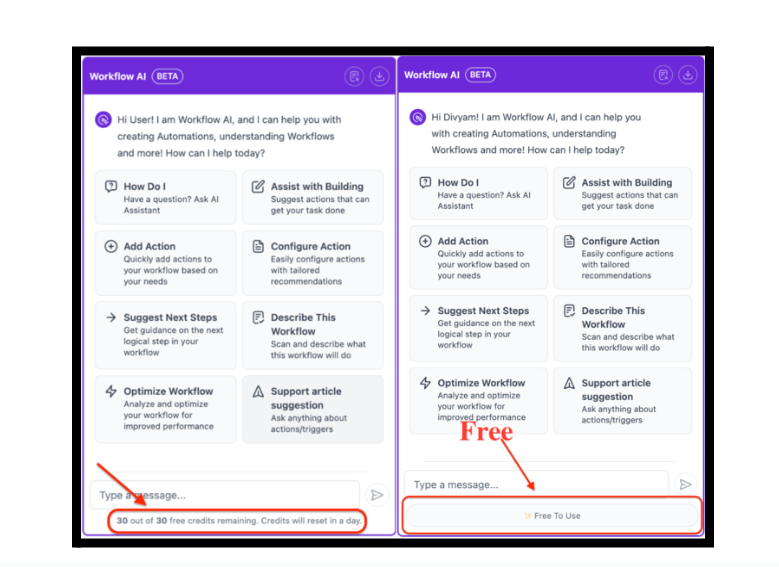
AI Credits Removed – Use AI Without Limits
AI credits are gone. You can now use AI features freely without tracking usage or juggling budgets.
Unlimited AI usage across:
- Build Workflows Using AI (currently in Labs, coming soon)
- AI Chatbot – ask questions freely
- Custom Code AI – generate code without limits
- Email AI – craft perfect emails anytime
- SMS AI – write messages without restrictions
Fair Usage Protection
To keep AI fast for everyone, a fair usage policy is in place. If you hit the daily limit, it resets automatically after 24 hours.
Note: These AI features are no longer part of AI Employee and are now free to use.
LC Phone System
Helping You Set Up Healthy Incoming Call Timeout
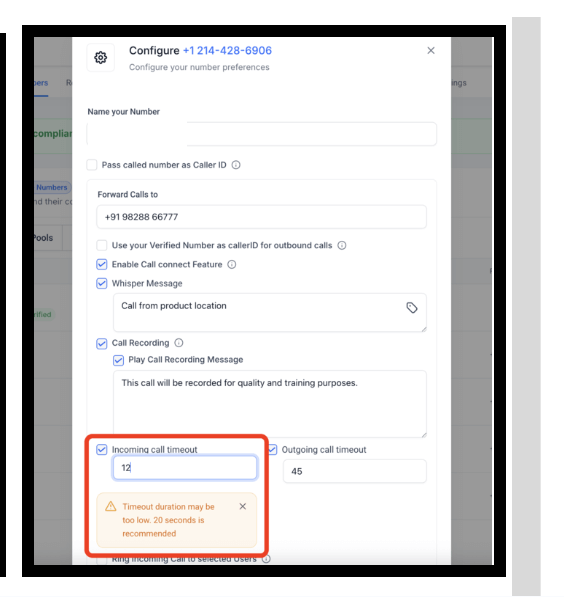
We’ve added guardrails to help you configure a healthy incoming call timeout. Set it too short and calls can end before voicemail; too long and they may route to a carrier voicemail.
If you choose a timeout outside the 15–20 seconds range, we’ll display guidance to steer you to a healthier duration.
Helping A2P-Registered Sub-Accounts Increase Call Answer Rates
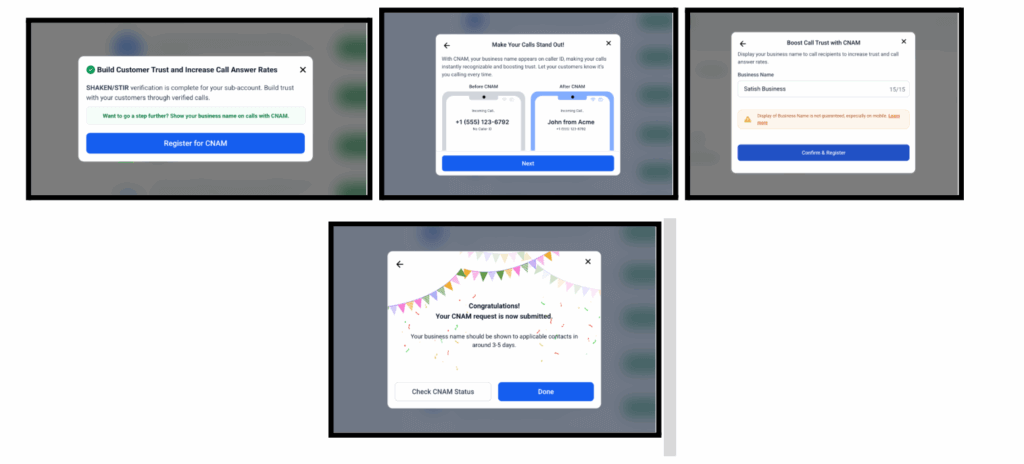
ccounts registered for A2P now get automatic SHAKEN/STIR registration on all phone numbers, plus CNAM support.
- Automatic SHAKEN/STIR for all numbers on A2P-registered sub-accounts
- CNAM: set a caller display name in just a few clicks
- Coverage for older applications: legacy A2P apps are being registered automatically (already in place for submissions after April 23, 2025)
Setting the Right Expectations for CNAM
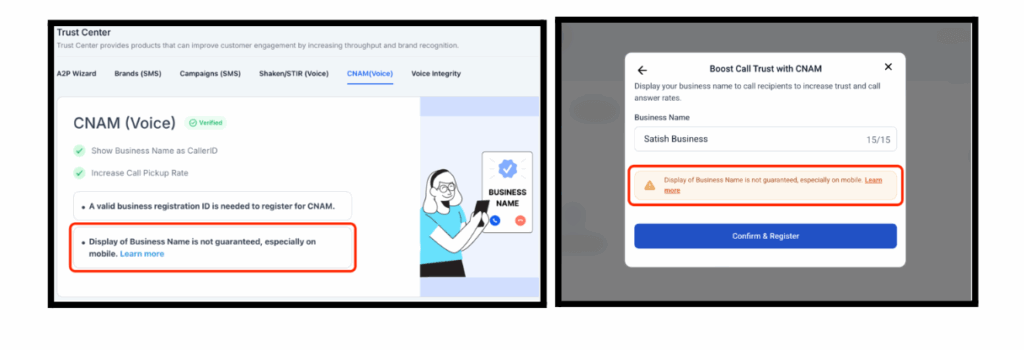
CNAM improves trust, but carrier/device rules vary. CNAM does not guarantee your name displays on every device—especially mobile. This clarification helps set accurate expectations and reduces support tickets.
Conversations
Guided Form Setup (Form-Based Bot) Upgrades
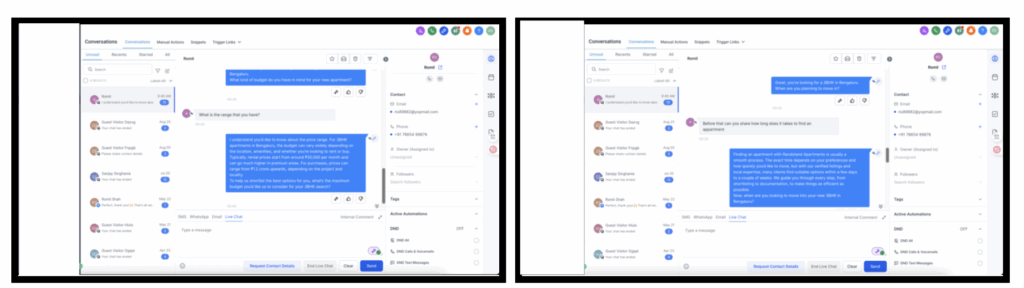
Form-based bots are now more natural, resilient, and context-aware—less robotic, more human.
- Dynamic Question Styling – subtle tone variations to avoid repetition
- Distraction Handling – gently redirects off-topic replies back into flow
- Context-Aware Phrasing – prompts adapt based on prior exchanges
- Friendly But Focused – empathetic and persuasive, without derailing the form
Calendars
View Appointments in Your Preferred Timezone
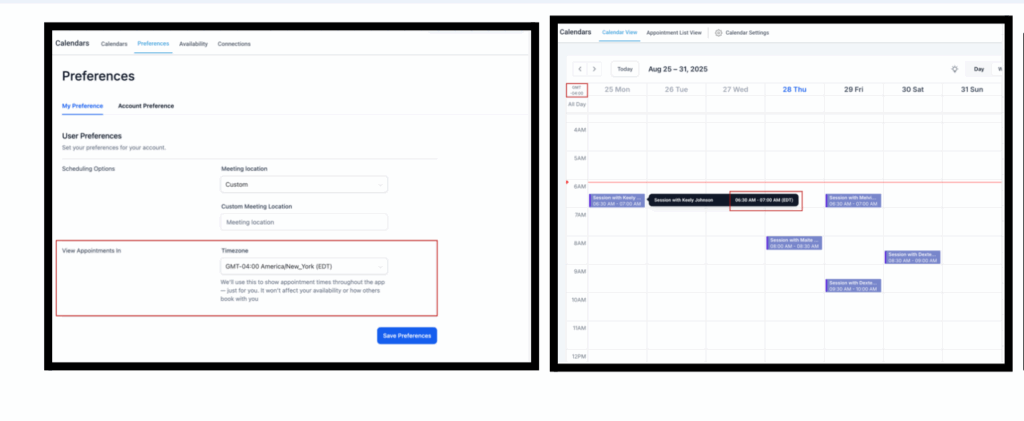
Choose any timezone to view appointments across Calendar View, Appointment List, Contacts, and Conversations—without affecting booking or availability logic.
Key Details
- Setting is user-specific (display only)
- Availability and scheduling remain unchanged
- You’re no longer limited to “User” or “Business” timezone—pick any
View Appointments In Setting
Previously, a Labs flag controlled the display:
- Flag ON → User Timezone
- Flag OFF → Business Timezone
Now, that flag is replaced by a setting. For backward compatibility:
- If the flag was ON, you’re set to User Timezone
- If the flag was OFF, you’re set to the Business Timezone configured in your account
How to Use:
Go to Calendar Settings → Preferences → View Appointments In → Select Timezone → Save Preferences
Payment Integrations – Checkout
Checkout Payment Elements Multilingual Support
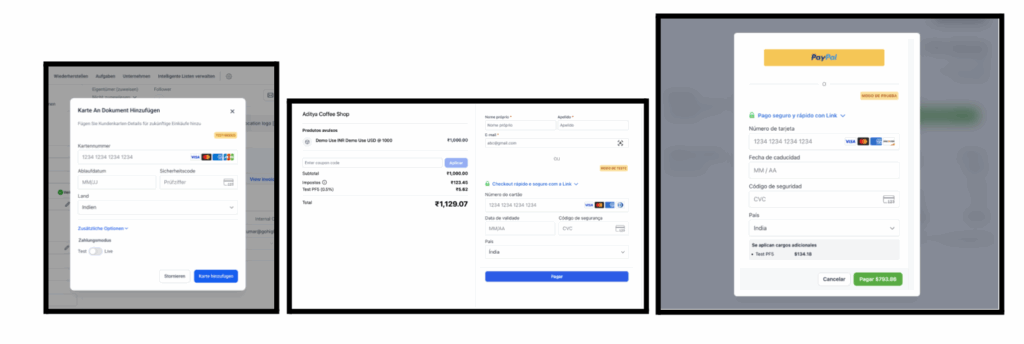
Checkout now supports multiple languages so customers can pay in their native language.
What’s New
- Supported languages: English, Danish, German, Spanish, Finnish, French, Italian, Dutch, Norwegian, Portuguese, Swedish
- Automatically adapts to the Platform Language set in Business Profile
- Available across: Invoices, Payment Links, Subscription Schedules, Manage Cards, Forms, Courses & Memberships
Conversations
Conversation Composer Enhancements
Stay in flow: the composer remembers your last selected channel and auto-saves internal comment drafts.
What’s New
- Channel Persistence – your last selected channel persists after collapse/reopen
- Internal Comment Drafts (Auto-Save) – drafts survive channel switches, collapses, and navigation
Listings
GBP & Facebook Connection for Uberall Entities
If you use Uberall Listings, you can now connect Google Business Profile (GBP) and Facebook directly for a smoother setup and consistent publishing.
What’s New
- Connect GBP and Facebook from Uberall Listings
- Connected accounts appear in Listings Overview for consistent publishing
WhatsApp & Text Message Contact Options (GBP Optimization)
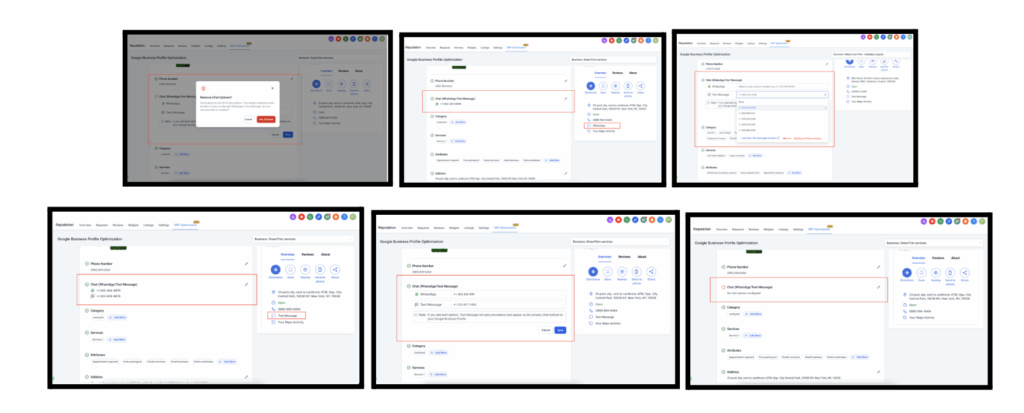
The GBP Optimization tool (Reputation tab) now supports WhatsApp and SMS contact options.
What’s New
- Enter WhatsApp and/or SMS numbers right below the Phone Number field
- Publishing pushes values live to GBP (per Google’s supported attributes)
- If both are entered, Text Message (SMS) takes priority
How to Access
Go to Reputation → GBP Optimization, then add WhatsApp/SMS under the new fields.
Ecommerce
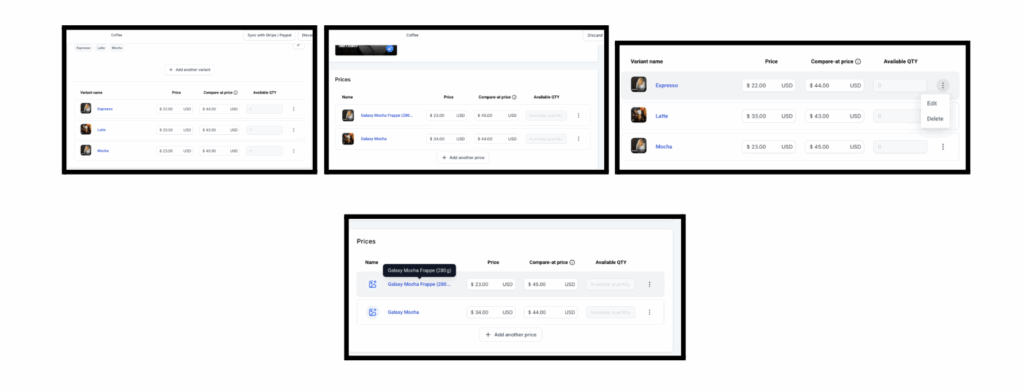
Variant Page Visibility for Product Weights & Shipping
We’ve made it more obvious where to configure product weights/dimensions and digital files so shipping rates and fulfillment stay accurate.
What’s New
- Hover Highlight on variant tiles to indicate click-through to details
- Quick Edit/Delete action buttons on each price/variant
Custom Product Details Pages
Create Custom Product Detail Pages (PDPs) for richer storytelling and higher conversions.
How to Use
Open the Site/Store Builder Click Add New Page → enable Custom Product Detail Page toggle Assign products to the new page from the modal (search available) Design the Custom Product Detail Page as desired Re-assign products via Settings by selecting the element Save and publish to activate the custom PDP
Additional Notes
- Single PDP Association – one product → one custom PDP
- Navigation from lists/featured sections routes to the correct PDP
- Link Behavior – deep links go to the custom PDP if configured
- Fallback – deleting a custom PDP reverts products to the default PDP
Courses
Adhoc Items and Fixes
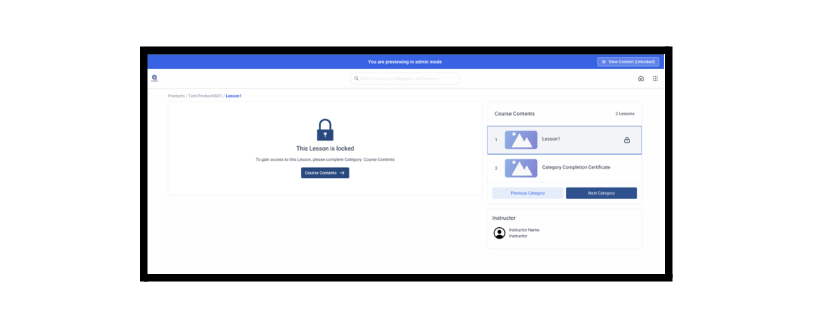
Stability and reliability improvements to Kajabi Imports, Drip Settings, and Admin Mode.
What’s New
- Kajabi Imports: deeper scraping (follows “Show More”), recursive extraction for hidden lessons, optimized payloads
- Drip Settings: backend validation blocks invalid values (e.g., 0)
- Admin Mode (Neo Classic Theme): toggle in preview to switch locked vs. unlocked views; navigation fixes
Forms, Surveys & Quizzes
Internationalization (i18n) Enhancements
Full i18n across the builders so UI text, payment footers, empty states, labels, and tooltips match your selected language.
Element-Level Label Alignment
Control label position per field (Left, Right, Top, or Form Default) for precise layouts.
Key Highlights
- Per-element alignment
- Works across Forms, Surveys, Quizzes
- Mobile-first: labels always on top on mobile
How It Works
In Single Column layouts, select a field → choose Left, Top, Right, or Form Default. Existing forms keep global alignment unless changed.
WhatsApp
WhatsApp List Messages
Interactive list messages let customers tap to choose from up to 10 options—great for guided flows.
What’s New
- List Messages with headers/body/footers
- Workflow Branching per selection
- Template Integration for reuse
Pricing
- Billed as business-initiated conversations under WhatsApp’s pricing
- Customer taps don’t incur extra charges
- 24-hour conversation window remains unchanged
Benefits
- Cleaner, guided choices
- Fewer free-text errors
- Simpler chatbot design with branching
Limitations
- One list message per WhatsApp message
- Up to 10 rows across sections
- Not all list messages are supported in broadcasts
How to Use
Go to CRM → WhatsApp → Templates → Create Template → AI Template
Describe your use case and let AI draft a tailored template. Validator checks compliance and assigns a category. Edit if needed, then submit for Meta approval.
Brand Boards
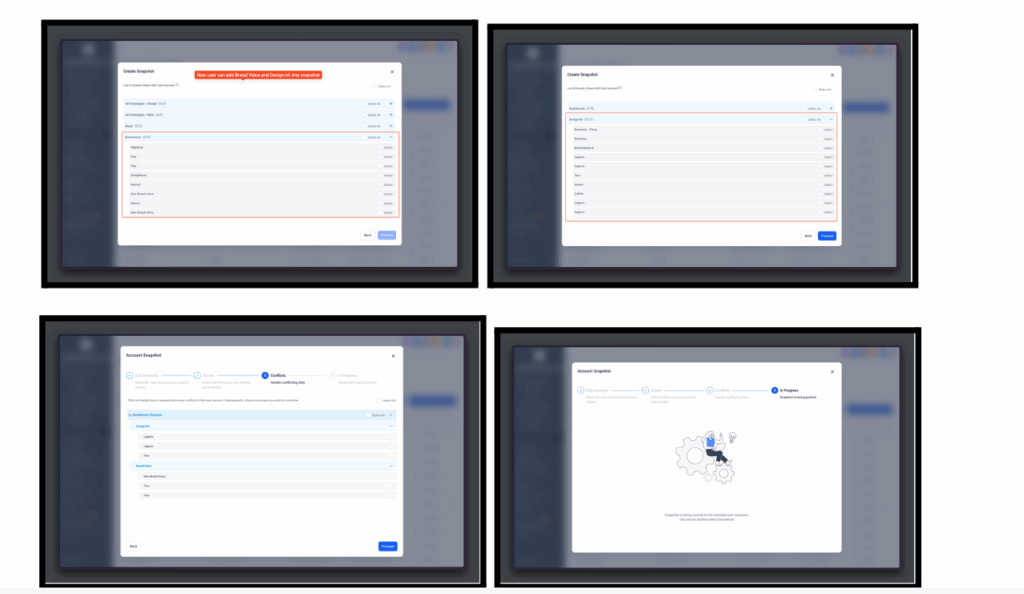
Brand Boards Snapshot Support
Include Brand Boards (Design Kit + Brand Voice) in Snapshots to reuse branding across sub-accounts.
Benefits
- Faster onboarding
- Consistent branding
- Fewer manual setup errors
Documents & Contracts
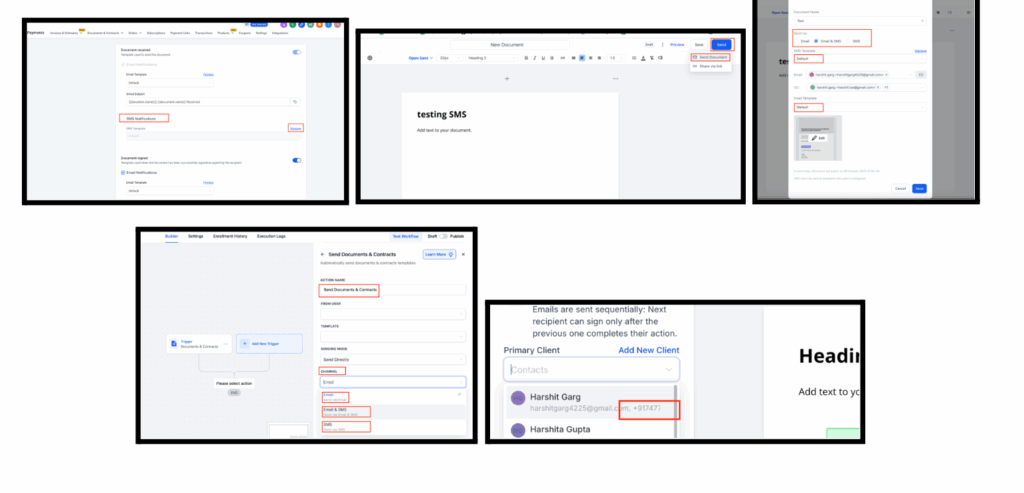
Send Documents via SMS
Deliver documents by SMS (or SMS + email) with global defaults, custom templates, and workflow control.
How to Use
Set Global Defaults
Go to Documents & Contracts → Settings → Customer Notifications
Under Document Received and Document Signed, select your default delivery method (SMS only, Email + SMS)
Save your settings
Create SMS Templates with Snippets
Go to Marketing → Snippets
Create a new SMS snippet, write concise content, and save it
Templates can then be used for individual sends or defaults
Send Documents Individually
Open the document → Click Send
Select delivery channel (Email, SMS, or both)
If SMS is chosen, pick your preferred SMS template and send
Send via Workflows
Go to Automation → Workflows
Add a Send Document action and choose channel (Email, SMS, or both)
Defaults and templates are automatically applied
Conversations AI
Dashboard for All Conversation AI Agents
View analytics for all Conversation AI agents in a single dashboard with filters for date range, channel, and agent.
How to Use
Open AI Agents → Conversations AI to access the consolidated metrics dashboard
Use filters to refine your view by:
To control access to the dashboard:
- Go to Agency Settings → Team → Edit User → Roles & Permissions → AI Agents
- Enable or disable the View Conversation AI Dashboard permission
- When enabled, the dashboard appears on both the Conversation AI home page and agent pages
Additional Notes
- Permission-Gated: only users with permission see it
- Filter by agent/channel/date to compare trends
- No config changes to existing agents
WhatsApp Business
Team WhatsApp Updates
Partner-Led Business Verification is now integrated directly inside FG Funnels. Verify WhatsApp Business in-app with document uploads and real-time status.
What Changed
- In-app verification flow from WhatsApp Settings
- Submit documents, track Pending/Approved/Rejected statuses
- Clear rejection reasons and easy resubmission
Benefits
- Faster onboarding (up to ~40% quicker)
- Higher messaging limits (250 → 1,000+ daily conversations)
- Register up to 20 phone numbers after verification
- Fewer support tickets from failed/abandoned flows
Customer Impact
- Removes friction from Meta’s manual process
- Boosts activation and reduces churn
AI-Powered WhatsApp Template Generation
Generate compliant, on-brand WhatsApp templates with AI—complete with FG Funnels variables and inline validation.
What Changed
- AI Template entry point under Create Template
- AI suggests category (Utility/Marketing/Authentication), length/format checks, and variables
- Editable before submission; validator improves approval odds
Benefits
- Faster creation (hours instead of days)
- Higher approval rates and fewer delivery failures
- Personalization at scale
Retention & CX Impact
- More accounts create templates in the first 7 days
- Higher early usage; fewer rate-limit errors
How to Use
Go to CRM → WhatsApp → Templates → Create Template → AI Template
Describe your use case and let AI draft a tailored template
Validator checks compliance and assigns a category
Edit if needed, then submit for Meta approval
WordPress
Setup Guide for WordPress Hosting
A new in-app Setup Guide appears after subscribing to WordPress hosting to walk you through the essentials—complete with CTAs, tooltips, progress, and the option to skip non-essential steps.
Quick Steps in the Setup Guide
- Create Site – Choose the type of site to create
- Import Existing Site (Optional) – Use the importer to migrate an existing WordPress site
- Log in to WP Admin Dashboard – Sync WordPress Admin with the FG Funnels platform
- Customize Domain and SSL – Add a custom domain or confirm subdomain settings, then enable SSL
- Enable Activity Logs – Turn on automated logs to monitor activity and improve security
- Manage Users and Permissions – Add new users and assign roles (Editor, Admin, etc.)
- Explore Site Analytics and Reports – Access analytics for traffic and performance monitoring
How to Access
- New subscriptions (no site yet): Sites → WordPress Dashboard → Setup Guide
- Existing sites: Sites → WordPress Dashboard → Go to Site → Setup Guide
New Features in Labs
Funnels & Websites, Webinars, Ecommerce – Enhanced Drag & Drop in Page Builder
Available in Labs: a smoother drag-and-drop experience for faster layout edits.
What’s New
- Drag from anywhere on an element (not just the handle)
- Rearrange columns within the same row