Welcome to your weekly roundup of FG Funnels updates through the week of March 3rd, 2026.
This week’s release is packed with speed upgrades in Workflows, big improvements across Voice + Call Transcription, and several brand-new features like Canva inside Media Storage.
If you have any questions about these updates, email us at [email protected] or reach out through live chat inside the app—we’re always happy to help.
Calendars
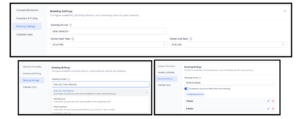
Improved Calendar Settings Experience
Calendar Settings has been redesigned to make setup clearer, faster, and easier to navigate.
What’s new:
- Clearer, structured sections (Basic details, Staff & location, Availability, Booking rules, Advanced settings)
- Contextual helper text to explain what each setting does
- Wider layout for better readability and less scrolling
How to Access:
Navigate to: Calendars → Calendar Settings → Meetings → Edit Calendar. You’ll now see the updated structure and improved layout.

Smarter Booking Periods for Rentals (Listing-Level Time Selection)
Rentals booking logic is now explicit at the listing level, so time selection and pricing behavior are clearer and more predictable.
What’s new:
- Three clear Booking Period modes: Date & Time Selector, Date Selector, Fixed Durations
- Time selection can be enabled/disabled per listing (no hidden global settings)
- Default rental start/end times are visible when using Date Selector
- Smart compatibility rules prevent unsupported pricing/period combinations
Why this matters:
This reduces accidental multi-day charges, makes rental start/end times predictable, and helps vacation rentals and flexible pricing models work the way you expect.
Blogs
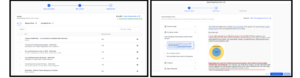
Blog Importer Improvements
The Blog Importer experience has been revamped to make migration smoother and more reliable.
What’s new:
- Clearer Scan → Review → Map → Import flow
- Better feedback during scanning
- Improved content mapping and navigation
- Manual metadata mapping (authors, categories, tags) during import
- Mapped posts import as Published; unmapped posts import as Draft
How to Use:
- Go to Sites → Blogs
- Click Create New Blog Post → Import
- Enter homepage URL and scan
- Review detected posts
- Map metadata (author, category, tags) if needed
- Import mapped and/or unmapped posts
- Posts will automatically be assigned the correct status (Published or Draft).
Workflows
AI Builder is Now 52% Faster
AI Builder workflow generation is significantly faster—without sacrificing quality.
What’s new:
- Average generation time reduced from ~59.7s → ~27.7s
- Applies across all prompts (not just templates)

Version History Improvements Across Builders
Version History now supports viewing and restoring versions created in either Standard or Advanced Builder, and automatically opens the correct builder for the selected version.
How to use it:
- Open a workflow and go to Version History.
- Select the version you want to view or restore.
- Click Restore – we’ll switch to the correct builder automatically.

Advanced Builder: Auto-Connecting Steps
You can now drag and drop triggers/actions onto the Advanced Builder canvas and the steps auto-connect—whether you drop them at the end of a branch or between nodes.

Trigger Descriptions in Workflow Builder
Triggers now include built-in, human-readable descriptions so it’s easier to choose the right trigger without guessing.

Company Variables Now Available in Workflows
You can now reference company fields (company name, phone, email, website, address, and more) in contact-based workflows using the variable picker and If/Else branches.


Connect Call (IVR) Action: Call Whisper
Connect Call (IVR) now supports a Call Whisper message so the recipient hears a private “heads-up” before the caller connects.

Assign User: Assign to IVR Responders
IVR Connect Call now exposes new variables (Answered By User ID, Answered By Device, Answered By Phone Number). You can pass Answered By User ID into Assign User to automatically assign the contact to the user who picked up the call.

Phone Systems – Voice
Call Transcription is Multi-Lingual and More Accurate
Call transcriptions now support 9 additional languages:
- Spanish, French, German, Hindi, Russian, Portuguese, Japanese, Italian, Dutch
Language is detected automatically, and multiple languages can be supported in the same call.

Voice AI
Outbound Calling Global Expansion
Outbound calling limits and boundaries have expanded significantly:
- Daily limit per location: 100 → 1,000 calls/day
- Call rate: 1/min → 10/min per location
- 2-week limit per phone number: 4 → 14 calls
- Call hours: 10 AM–6 PM → 8 AM–8 PM (contact timezone)
- Country restriction: US-only → Same-country domestic calling
What stays the same:
- Each phone number can be called only once per day (overflow is scheduled)
- Calls respect opt-in, DND, and domestic number requirements
- Location must have outbound calling enabled with KYC completed
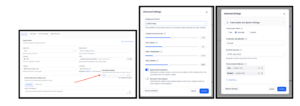
Voice AI Advanced Settings
New advanced controls for Voice AI agent behavior:
- End call after silence
- Response speed
- Delay before greeting
- Transcription mode (Fast/Accurate/Custom)
- Vocabulary specialization (General/Medical)
- Boosted keywords + pronunciation dictionary
- Ambient sound volume + speech normalization
- Dynamic voice speed + noise cancellation options
Conversation AI
AI Response Style Settings
Conversation AI now supports response style settings so you can control how short or detailed bot replies are.
Options:
- Concise (~30 words)
- Balanced (~80 words)
- Detailed (~200 words)
This helps match response depth to your use case (quick replies vs. FAQs and support).
Media Storage
Canva Integration
You can now connect Canva directly inside Media Storage.
You can:
- Browse Canva designs
- Edit designs in Canva (installer has full edit access)
- Download designs
- Import designs into Media Storage
Important notes:
- Canva is connected per location (one Canva account per location)
- Other users can browse/download/import, but cannot edit Canva designs directly
- Proxy users (Login As) do not have access
- Released via Labs (available until March 25, 2026)
Custom Objects
Bulk Import Custom Objects
You can now bulk import Custom Object records with create/update/dedupe controls, plus a dedicated Bulk Actions page with pause/resume.
Highlights:
- Import primary + custom fields (including Owner & Followers)
- Create, Update, or Create + Update
- Dedupe by unique field (with strict conflict handling)
- Bulk Actions page: Pause, Resume, Cancel, and detailed stats

Companies
Bulk Import Companies
You can now bulk import Companies via CSV using a guided flow (behind Labs).
What’s included:
- 4-step import flow: Start → Upload → Map → Verify
- Create or Create & Update
- Duplicate detection (Company ID)
- Dedicated Bulk Actions page + downloadable import report
To enable:
Labs → Company and Custom Object Import

Desktop App
LeadConnector Desktop App (macOS + Windows)
The LeadConnector Desktop App is now available for macOS and Windows, providing a dedicated, optimized experience outside the browser.
Highlights:
- Faster load times and smoother navigation
- Dedicated workspace (fewer browser distractions)
- Native system notifications
- Improved stability vs. browser extensions/crashes
Products
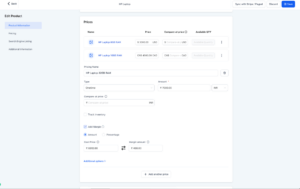
Track Cost Price & Margins
You can now track Cost Price and Margin at the product price and variant level inside Products.
Highlights:
- Amount and Percentage margin modes
- Auto-calculation and synced fields
- Transactions CSV includes new Line Item Cost Price column
Where to find it:
Payments → Products → Create/Edit Product → Pricing → “Add Margin”
Workflows
AI Powered Field Tooltips
Workflow fields now have smarter tooltips with an “Explain Field” CTA that opens the AI assistant for a detailed explanation.
Currently in experiment:
Live on two fields in Advanced Settings within Manual SMS and Manual Call actions.
That’s a wrap for this week’s FG Funnels updates!