Welcome to your weekly roundup of FG Funnels updates through the week of February 26th, 2026.
This week’s release brings deeper reporting clarity, smarter automation controls, stronger compliance protection, expanded Snapshot capabilities (including WordPress!), and powerful new AI integrations inside Workflows and Agent Studio.
If you have any questions about these updates, reach out through live chat inside the app or email [email protected] — we’re always happy to help.
Dashboard & Reporting
Workflow Step Name Now Visible in Email Widget
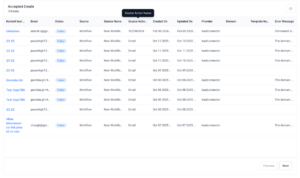
You can now see the workflow step name (displayed as Source Action Name) directly inside the Email Widget table column.
What’s new:
- Workflow step name displayed in the Email Widget table
- Clear visibility into which workflow step triggered or is associated with an email
- Easier correlation between email activity and workflow execution
Why this matters:
Dashboards are now more actionable. Instead of cross-referencing IDs, you can instantly understand which workflow step generated an email — making debugging and reporting much faster.
Documents & Contracts
Staff Selection in Templates
You can now assign signature fields to any staff member directly inside document templates.
Previously, Admins could only assign signatures to:
- Contact
- Sender
- Themselves
Now, the full staff list is available.
How to Use:
- Go to Templates and create or edit a template
- Add a Signature or any other fillable field
- In the right-side Properties panel, click on “To be signed by”
- Select the required team member from the staff list
- Save the template
This makes document workflows more scalable for agencies serving multiple businesses.

Calendars
Multi-Date Selection for Date-Specific Hours
You can now select multiple dates at once when configuring date-specific availability for Meetings and Rentals.
What’s new:
- Select multiple dates from the date picker
- Set start and end times once
- Apply hours across all selected dates in bulk
- Consecutive dates automatically group together
Example:
If you select Jan 2, 3, 4, 5, 8, and 9:
- Jan 2–5 appears as one grouped entry
- Jan 8–9 appears as another grouped entry

Rich Text Editor for Service Descriptions (Services v2)
Service descriptions now support full rich text formatting.
You can now:
- Use bold, italics, underline, strikethrough
- Add bulleted or numbered lists
- Insert hyperlinks
- Customize text and background colors
- Add headings and alignment
How to Use It:
- Go to Calendars Settings → Services
- Edit or create a service
- Navigate to the Description section
- Use the rich text toolbar to format content
- Click Save
This improves clarity and helps align service descriptions with your brand.

Funnels & Websites
Audit Logs for Deleted Builder Assets
Deleted builder assets now generate audit logs.
Covered assets include:
- Section Templates
- Global Sections
- Universal Sections
- Element Templates
- Universal Element Templates
To view logs:
- Go to Settings → Audit Logs
- Search by user or filter by action
This ensures full traceability whenever key assets are removed.

Workflows & Automations
Advanced Tag Filtering Now Fully Rolled Out
Advanced tag operators are now live across:
- Opportunity Created
- Opportunity Changed
- Opportunity Status Changed
- Pipeline Stage Changed
- Invoice
Operators include:
- Equals to / Not equals to (AND logic)
- Any of / None of (OR logic)
- Multi-select support
- Multiple tag filter instances within a single trigger
This unlocks highly precise automation conditions.

Custom Objects
Sorting by Custom Fields
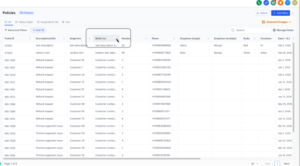
You can now sort Custom Object list views using custom fields (not just Created/Updated).
How to Use:
- Custom Objects → List View → Sort dropdown
- Or click directly on a custom field column header
Unsupported field types:
- Dropdown (Multiple)
- Checkbox
- Textbox List
This makes large datasets far easier to manage.
LC Phone
Updated Toll-Free Verification (TFV)
We’ve aligned the Toll-Free Verification flow with updated carrier requirements.
New required fields include:
- Business DBA name
- Legal Entity Type
- Business Registration Authority/Number/Country (when applicable)
- Campaign Verify (CV) Auth Token (required for Political Election Campaigns)
Effective Feb 17, 2026:
Political Election Campaign use cases must include a valid Campaign Verify Auth Token.
This reduces rejection risk and improves compliance transparency.

Voice AI
Live Transcripts for Agent Trial Web Calls
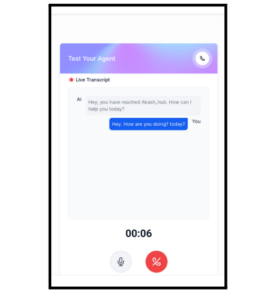
You can now see real-time transcripts during Agent Trial web calls.
This provides:
- Immediate visibility into agent responses
- Better testing accuracy
- A more stable and refined interface
Agent Studio
Invoke Agent Action Inside Workflows
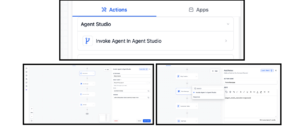
You can now call Agent Studio agents directly inside Workflows.
New action:
- Invoke Agent Studio Agent
This allows agents to:
- Generate insights
- Enrich contacts
- Create tasks
- Summarize conversations
- Drive branching logic
- Send AI-generated outputs via Email/SMS/WhatsApp
Agents can now work alongside workflows at any step of automation.
**How it works **
- Add a new workflow action
- Select Invoke Agent Studio Agent
- Choose an agent from the dropdown
- Provide inputs (optional)
- Use the message field if needed
- Execute — and use the agent output anywhere downstream
Folder Management
Agent Studio now supports:
- Folder creation and organization
- Bulk move/delete
- Server-side pagination
- Sorting and grouping options
Status labels updated to:
Expanded Variable Sources
Agent Studio now supports structured variables from:
- Account
- Custom Values
- Right Now
- Form Data
- Contact
This makes agents reusable and context-aware at scale.
Chat Widget
All-in-One Chat Support in Customer Replied Trigger
You can now trigger workflows based on replies from All-in-One Chat widgets.
What’s new:
- All In One Chat added to Reply Channel filter
- Chat Type filtering (Chat Widget or Live Chat)
- Dynamic third-level filtering for specific widget configurations
This makes chat-based automation cleaner and more precise.

Companies
Company Export
You can now export selected or all company records in one click.
How to Use:
- Go to Contacts → Companies
- Select records and click Export
- Or use the 3-dot menu to Export All
- Download the generated CSV
Includes real-time progress tracking.

WordPress / Snapshots
WordPress Support in Snapshots
Snapshots now support bundling full WordPress sites.
Included in Snapshot:
- Pages
- Themes
- Plugins
- Settings
When deployed, the WordPress site restores automatically with other assets.