Welcome to your weekly roundup of FG Funnels updates through the week of March 19th, 2026.
This week’s release brings major upgrades across Agent Studio, Ecommerce, and Ask AI, along with smarter workflow controls, stronger compliance checks, and new ways to work faster across the platform.
If you have any questions about these updates, email us at [email protected] or reach out through live chat inside the app—we’re always happy to help.
Agent Studio
Build, Modify & Test Agents via Chat in Agent Studio
A native AI assistant is now built directly into Agent Studio, allowing users to create, update, and test agents through natural conversation.
What’s new:
- Conversational agent generation and modification
- In-place graph updates
- Automated smoke testing
- AI-generated full test suites after validation
- Graph preview before changes are applied
- Session persistence for the last 3 interactions per version
- Real-time streaming of reasoning and output
This makes Agent Studio significantly faster and easier to use, especially for iterative builds.
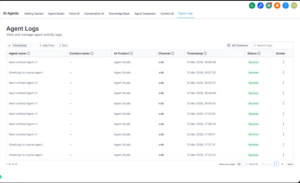
Agent Logs: The New Standard for AI Tracing & Transparency
Agent Logs introduces a new centralized logging and tracing layer for AI activity.
You can now move from:
- A high-level activity view
- To conversation context and timeline
- To granular step-by-step execution details
This includes:
- Input/output payloads
- Latency tracking per step
- Tool execution visibility
- Easier debugging for complex AI workflows
Agent Logs is now live for Agent Studio and will expand to other AI products next.
Voice AI
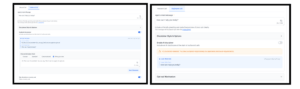
Outbound AI Disclaimer Controls
Voice AI now gives you more control over outbound disclaimers.
You can now:
- Disable the AI disclaimer entirely
- Write your own disclaimer and verify it for compliance
- Configure the disclaimer to play only once per contact instead of on every call
This gives you more flexibility while still supporting transparent AI communication.
Edit with AI for Voice AI
You can now refine any section of a Voice AI prompt with AI assistance.
This feature lets you:
- Select only the section you want to improve
- Give an instruction like “make this clearer” or “improve tool triggering”
- Review exactly what changed before accepting
- Use voice input for edit instructions on Chrome browsers
This makes prompt improvement much faster and more intuitive.
LC Phone Systems
Improved Compliance Checks for Pre-Built A2P Campaigns
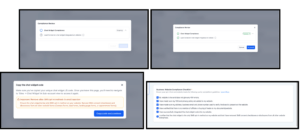
The pre-built A2P campaign flow now includes stronger compliance checks to help reduce carrier rejections.
What’s new:
- AI validation confirms the LeadConnector Chat Widget is installed on the submitted business website
- New compliance reminders appear when copying widget code
- Updated checklist requires confirming the widget is the only SMS opt-in method on the site
- Required confirmation checkboxes appear before final submission
This helps customers configure campaigns correctly from the start and lowers rejection risk.
Dialer: Auto-Minimize, Pin & Drag
The dialer now minimizes automatically when you click outside it, so it is easier to view contact or pipeline info without manually closing the dialer.
You can also:
- Pin it open so it stays in place
- Drag it anywhere on screen
- Reopen it in the same spot if pinned
Contacts
Advanced Filters 2.0
Advanced filters in Smart Lists have been upgraded for better consistency, clarity, and usability.
What’s new:
- More date operators like today, tomorrow, yesterday, this week, this quarter, and this year
- Better consistency across string, numeric, and date filters
- Improved
contains behavior so it matches anywhere in the value
- Communication filters now use a DND suffix for easier filtering
- Pipeline filters renamed to Opportunity
- Birth Date renamed to Date of Birth
This update also resolves a long-standing issue related to future-date filtering.

Notes Just Got Smarter for Contacts
The Notes section on contact records now supports:
- Color-coded notes
- Note titles
- Pinning notes to the top
- File attachments
- Search across both title and description
This makes contact notes much more useful, searchable, and action-friendly for teams.
How to use
- Navigate to a contact and open the Notes section from the right panel.
- Click Add Note, enter a title and description.
- Select a color label, pin if needed, and attach files.
- Save the note to keep it organized within the contact timeline.
Ecommerce Stores
Zoom In on Product Images
Store owners can now choose how product images behave on the Product Details Page.
Available zoom options:
- No Zoom
- Click & Hover Zoom
- Open Lightbox Zoom
The Lightbox experience also supports fullscreen viewing, zoom controls, image navigation, and thumbnail browsing.
How it works
- Open your Store and edit the Product Details Page.
- Select the Product Details element.
- In the Layout Settings, locate the Image Zoom option.
- Choose your preferred zoom behavior: No Zoom, Click & Hover, or Open Lightbox.
- Save and publish your changes.
Product Details Page Customization (Desktop Media Size & Layout)
There are now more desktop customization options for the Product Details Page, including:
- Media position on the left or right
- Media width options: Small, Medium, Large
- Cleaner directional alignment for product layout
How to Use It
- Open your Store Builder and edit the Product Details Page.
- Select the Product Details element in the builder.
- In the Settings panel, locate the Desktop media options.
- Choose the desired Media position (Left or Right).
- Select the Media width — Small, Medium, or Large.
- Save and publish the page to apply the changes.


Shipping Rate Sorting at Checkout
Shipping rates at checkout are now sorted by price automatically, with the cheapest option pre-selected by default.
This also prioritizes free shipping if available and recalculates dynamically if the cart or address changes.

Variant–Image Sync on Product Details Page
When a customer selects a product variant, the product image now updates automatically to the image assigned to that variant.
This works with:
- Stack Carousel
- Stack Gallery
If a variant has no image assigned, the existing image remains in place.

Variant Selector Display Options on Product Page
Variant selectors on the Product Details Page now support two styles:
This also brings a more consistent selector experience across variants, quantity selectors, upsells, and multi-price selectors.

Additional Product Media Layout Options
Product image display on the Product Details Page now includes three layout options:
- Gallery
- Carousel
- Two Column (desktop only)
On mobile, Carousel is automatically used for the best viewing experience.


Workflows
AI Builder’s Newest Skills: Full Workflow Settings Control & Naming
AI Builder and AI Assistant can now manage workflow naming and workflow settings through natural language prompts.
You can now ask AI to:
- Name or rename a workflow
- Enable or disable re-entry, stop on response, and multiple opportunities
- Set business hours and time windows
- Change time zone
- Update sender details
- Turn Mark Conversations as Read on or off
This makes AI Builder much closer to handling the full workflow setup process end to end.

Merge Contact Action in Workflows
There is now a dedicated Merge Contact action inside Workflows.
This action can:
- Detect duplicates by email, phone, or both
- Preserve the older contact record
- Merge the newer record into it automatically
- Log every merge in execution logs with full metadata
This brings contact deduplication into workflows without requiring manual cleanup from the Contacts page.


Email AI
Email AI + Knowledge Base Integration
Email AI can now leverage the Knowledge Base when generating responses.
This means Email AI can:
- Reference existing help articles automatically
- Use updated documentation without manual reconfiguration
- Generate more accurate and contextual responses
Import Email Templates with AI
You can now import email templates from your inbox or another email platform and convert them into editable templates inside FG Funnels.
This helps users:
- Bring over templates from tools like Mailchimp, HubSpot, or ActiveCampaign
- Reuse existing high-performing emails quickly
- Start editing and optimizing imported emails with AI immediately
How to use
- Make sure Email AI is enabled under Labs
- Go to Marketing → Emails → Templates
- Click New
- Select Import
- Copy the dynamic email ID
- Send the template as a test email or forward any email from your inbox
- Choose the editor you want to import it into
- Click Continue and start editing
Ask AI
Ask AI — The Biggest Thing We’ve Shipped Yet
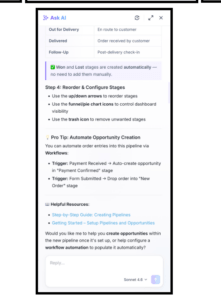
Ask AI is a brand-new full-screen AI workspace inside FG Funnels.
It combines:
- 500+ Marketplace actions
- Content and image generation
- Built-in FG Funnels support knowledge
- Better flow, reasoning, and streaming for complex tasks
This is designed to be a central workspace where users can create, automate, troubleshoot, and get work done without leaving the platform.
Social Planner
Facebook Post Sync Now Available
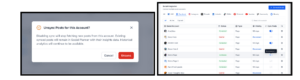
Social Planner can now sync existing Facebook posts directly into Planner and Statistics.
What’s included:
- Sync posts from the last 30 days
- Background syncing and daily refreshes
- Text, images, and videos pulled in automatically
- Clear sync status, errors, and reconnect prompts
This makes Social Planner a more complete source of truth for Facebook publishing and analytics.
Payment Integrations
Bank Transfers (ACH) via NMI for US and Canada
US and Canada-based accounts using NMI can now accept ACH bank transfers.
This gives businesses:
- A lower-cost payment option than cards
- Another payment method for larger-ticket transactions
- Reduced risk of card disputes in some cases
ACH support is currently available for invoices, recurring invoices, and subscriptions.

Opportunities
Collapsible & Resizable Kanban Stages
Kanban stages in Opportunities can now be collapsed, expanded, and resized.
This helps users:
- Reduce clutter in large pipelines
- Focus on high-priority stages
- Customize the workspace without changing it for everyone else

Credentials
Welcome Every Learner with a Badge
Every new course now includes a pre-attached Welcome Badge that is automatically issued when a learner enrolls.
This makes badge usage easier by default and gives learners a stronger welcome experience from day one.


Conversations
Form Submissions on Conversations
Form submissions can now appear directly inside the Conversations thread for the contact who submitted the form.
This helps teams:
- Review form answers without leaving Conversations
- Respond faster with better context
- Reduce switching between modules
To use it, enable the setting when creating the form so submissions display inside Conversations.