

Welcome to your weekly roundup of FG Funnels updates through the week of January 9th, 2026.
This week’s release brings faster dashboards and smarter AI-powered page building, all designed to help you get from idea to live a little more easily.
If you have any questions about these updates, email us at [email protected] or reach out through live chat inside the app—we’re always happy to help.
If you use the Email Widgets on your dashboard, you should notice things feeling a lot snappier. We’ve made behind-the-scenes improvements to how data is pulled and processed, which means faster load times and smoother performance overall.
Here’s what that looks like day to day:
This is especially helpful for businesses and service providers managing a high volume of emails and conversations, where quick visibility really matters.
AI Page Creation just got a big upgrade—and it shows. Pages now generate faster, look more polished, and follow stronger design standards from the start, so you spend less time fixing things after the fact.
With this update, you’ll notice:
Whether you’re creating a sales page, opt-in, or offer page, this makes it easier to get something live quickly—and feel good about how it looks.
Editing AI-generated pages is now much more predictable. Instead of reworking more than you intended, revisions now focus only on what you actually want to change.
You can:
Overall, this makes refining your pages feel simpler and safer—especially when you’re making quick updates to offers, messaging, or visuals.
Uploading and managing media just got more reliable across the board. We’ve improved file format validation and browser compatibility so uploads, previews, and listings behave consistently whether you’re using Chrome, Firefox, or Safari.
What’s improved:
This means fewer “why did this work yesterday?” moments and a smoother experience when uploading assets for pages, campaigns, or content libraries.
If you work with video, this one’s for you. You can now upload video files up to 500MB, making it easier to work with longer or higher-quality videos.
Why this matters:
This update applies to video uploads and helps support use cases like course content, promo videos, and social assets.
You can now train up to 4,000 URLs per knowledge base, up from the previous 2,000.
This is especially helpful if you:
In short, it gives your knowledge base more depth and flexibility.
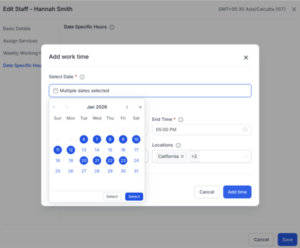
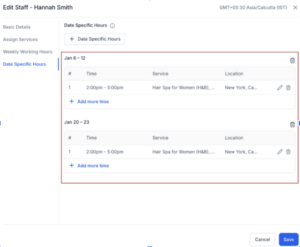
Managing availability just got easier. You can now select multiple dates at once when setting date-specific hours, instead of configuring each day individually.
Here’s how it helps:
This makes setting up holiday hours, special schedules, or short-term changes much faster—and much less repetitive.
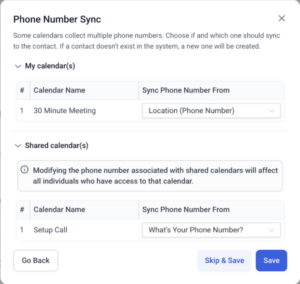
Phone numbers from Calendly appointments are now captured more accurately and reliably.
What’s new:
This reduces manual cleanup and helps ensure contact records stay accurate after appointments are booked.
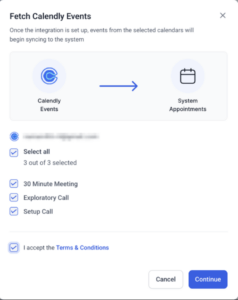
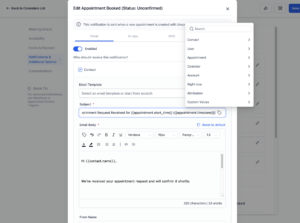
You can now use your own custom values directly inside Calendar-related settings, like appointment titles, locations, and notification templates.
Why this is useful:
It’s a small change that adds a lot more flexibility when customizing the appointment experience.
Agent Studio now makes it easier to keep AI-generated content aligned with your brand. You can apply your Brand Voice and Brand Kit directly inside Agent workflows, so outputs stay consistent automatically.
With this update, your agents can:
This is especially helpful if you manage multiple offers or brands and want AI output to feel intentional—not generic.
You can now forward emails directly from the Conversations inbox.
Why this helps:
More email improvements are on the way, including additional reply options and sender controls.
We’ve upgraded how file uploads work behind the scenes, making large uploads faster and more stable—especially for channels like WhatsApp.
What this means:
This improves the overall experience when sharing media through Conversations.
Drip Mode makes it easier to catch up on older reviews without replying to everything all at once. You can now automatically respond to historical reviews at a controlled pace that feels natural and human.
With Drip Mode, you can:
This helps improve response rates and customer trust—without overwhelming your audience or your team.
That wraps up this week’s FG Funnels updates 🎉 These improvements are all about speed, clarity, and control, and we’re excited to keep building tools that make running your business simpler and more reliable.
FGF Notifications








