

FG Funnels Updates – January 22nd, 2026

January 21, 2026
POSTED IN BLOGS › FG Funnels Release Notes    

Welcome to your weekly roundup of FG Funnels updates through the week of January 22nd, 2026. This week’s release brings major updates across SmartLists, workflow automation, and more to support your growing business. If you have any questions about these updates, email us at [email protected] or reach out through live chat inside the app—we’re always happy to help.
 

Workflows

Autosave for AI Builder Workflows

Workflows created with AI Builder now autosave! As long as autosave is enabled in global settings, every edit you make while using AI Builder is automatically saved in the background.

This helps you build confidently—no more losing your work to browser refreshes or forgotten saves.


“Opportunity Changed” Trigger – Major Upgrade

One of the most requested triggers just got better.

You can now use event-based operators like Has Changed and Has Changed To for standard and custom opportunity fields.

What’s new:

  • Track precise field changes (e.g., Assigned To, Status, Pipeline)
  • Support for custom field types like checkboxes, dates, dropdowns
  • Date fields supported in opportunity triggers for the first time

This helps reduce automation noise and gives you tighter control over what triggers your workflows.


Forms, Surveys & Quizzes

New Submission PDF Layout + Email Attachments

PDF exports of submissions just got a big upgrade:
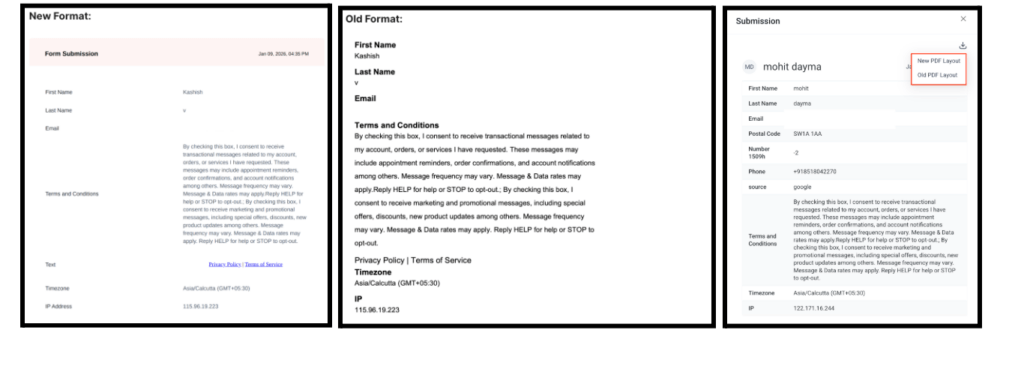
  • Cleaner, more readable layout
  • New dropdown lets you choose between old/new formats
  • PDFs can now be auto-attached to email notifications
  • Quiz-specific options for submission vs. results page PDFs


Persistent Survey/Quiz Responses

Users can now move between slides in multi-step forms without losing entered responses. This improves user experience and reduces drop-off.

How It Works

  • Create any survey or quiz with multiple slides.
  • Navigate to the live form and enter your input for Slide 1.
  • Change to Slide 2 and enter a few inputs.
  • Return to Slide 1; all previously entered values will be preserved.


Listings

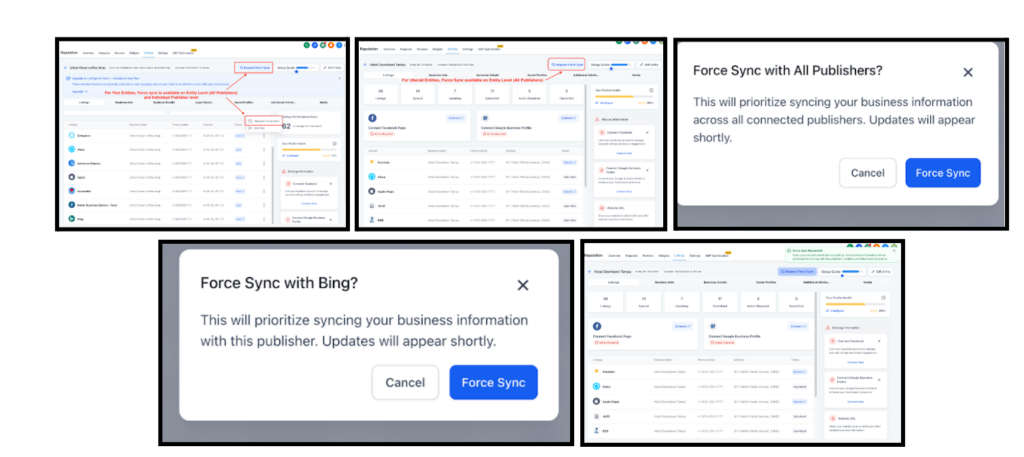
Publisher Listing Force Sync

Listings getting stuck? You can now manually request a Force Sync to prioritize your update across supported publishers.

Available for:

  • Yext: Entity & Publisher level
  • Uberall: Entity level only

This gives you more control when updates are delayed.
 

Social Planner

Edit Category Queue

You can now fully edit existing Category Queues! No more deleting or starting over.

New actions include:

  • Edit queue settings
  • Drag-and-drop post order
  • Shift entire queues to a new date
  • View full calendar of scheduled posts
  • Prioritize where new posts go

You can even add content to a queue directly from the post composer.

How to Use
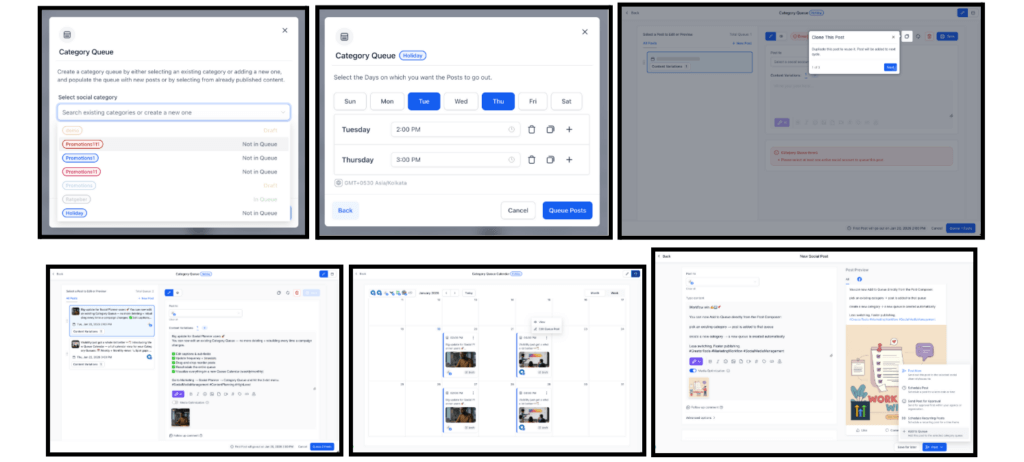
  • Go to Marketing → Social Planner → Category Queue
  • Hover over any queue → Click the 3-dot menu
  • Choose between: Edit Category Queue, View Queue Calendar, Reschedule Queue, Queue Preference
  • Make edits → Click Save
  • Changes update instantly across the Planner


Publish Instagram Stories via Push Notification

Instagram doesn’t allow direct Story publishing from third-party platforms—but now you can schedule Stories in FG Funnels and get a mobile push notification at publish time.

At the scheduled time, you’ll get a notification that opens Instagram with:

  • Media ready to go
  • Caption copied to clipboard
  • Notes visible for the publisher (e.g., “Add New Year sticker!”)

This gives you the best of both worlds—automation + Instagram’s full native editor.


Contacts

New List View + SmartLists (Now Live for Everyone)

SmartLists 2.0 and the new List View are officially out of beta and available to all users!

What’s improved:

  • Unified, cleaner UI
  • Faster load times
  • Powerful AND/OR filters
  • Column sorting and field management
  • Drag-and-drop column reordering
  • Better sharing controls and permissions

This update makes it easier to find, manage, and segment your contacts in a consistent way across the platform.

How to Use

  • Go to Contacts > SmartLists to access the new experience.
  • Create SmartLists using Advanced Filters with AND/OR logic.
  • Customize your view by adding, removing, or rearranging fields via Manage Fields.
  • Share SmartLists with your team from Sharing & Permissions, assigning view or edit access as needed.


LC Domain

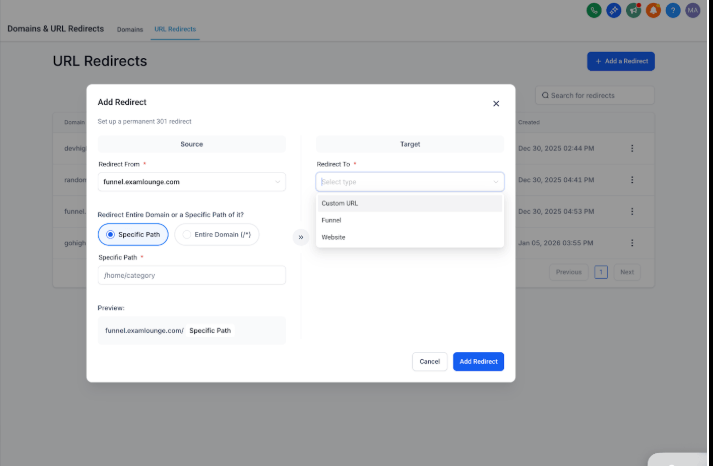
Revamped URL Redirect UI

URL redirects just got easier with a fully redesigned interface. You can now:

  • Redirect entire domains to external URLs
  • Preview redirect behavior before saving
  • Catch invalid formats with real-time error handling

This gives you more power over your domain routing—without needing dev support.
 

Agent Studio

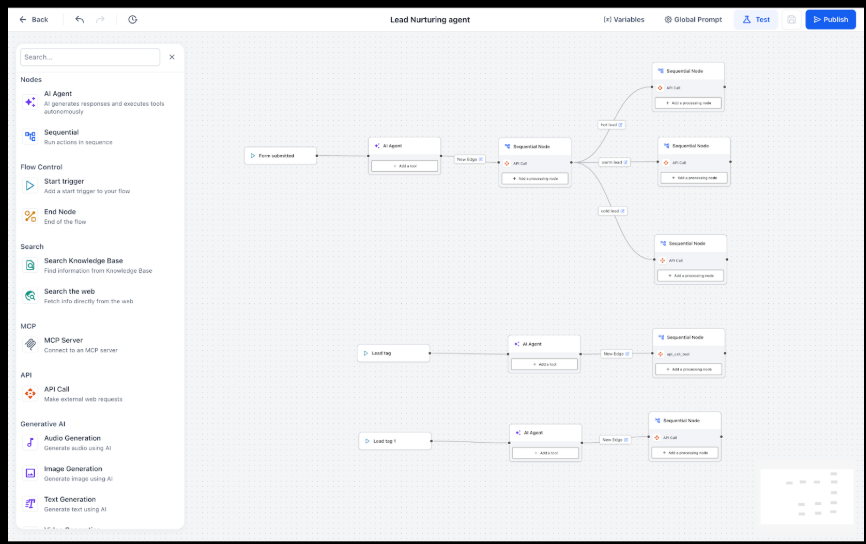
Agent Studio Triggers

Agent Studio is now fully event-driven! You can now trigger AI agent workflows based on:

  • Form submissions
  • Contact tag changes
  • Inbound chat messages

No more custom integrations or manual starts—your agents can now operate autonomously and scale automatically.
 

WhatsApp Business

Rich Media Messaging Now in Conversations UI

The upgraded Conversations UI (Labs) now supports WhatsApp media messages with captions and full file support. You can:

  • Send from Media Storage or Composer
  • Include captions with images, videos, or documents
  • Use full WhatsApp-supported file formats (pdf, mp3, pptx, xlsx, etc.)
  • Preserve media with “Add to Documents”

This dramatically improves engagement, accessibility, and reliability when using WhatsApp.


Voice AI

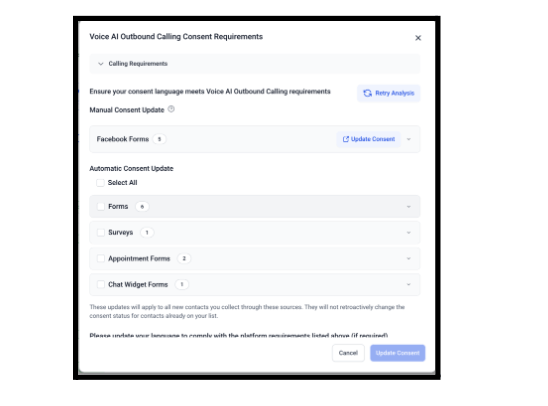
Outbound Calling Consent Across All Assets

The consent audit system now scans all lead capture assets—not just forms—including:

  • Surveys
  • Calendars
  • Chat Widgets
  • Facebook Lead Forms (manual update required)

You can now bulk fix consent text across all assets, ensuring outbound call compliance.
 

Prospecting Tool

Local Marketing Audit – Major Upgrade

Local Marketing Audits now:

  • Let you review/edit business info before first run
  • Allow instant refreshes without rerunning everything
  • Store report history for 12 months with timeline view
  • Support PDF exports in multiple languages
  • Centralize settings for report frequency and layout

Audits are now smarter, more flexible, and easier to share—perfect for tracking progress and improving local visibility.


Integrations

New Integration Page UI

The Integration page has been fully redesigned with a structured card-based layout, improved performance, and more scalable backend architecture.

What’s improved:

  • Faster load times
  • Standardized modals and CTAs
  • Per-account disconnects
  • Role-based access control
  • Better error messages and help docs

This makes connecting (and managing) integrations simpler and more consistent.


External Tracking

External Site Analytics

You can now access a full analytics dashboard for pages and forms hosted outside FG Funnels.

Metrics include:

  • Page views, form views, completions
  • Bounce rates, time on page
  • Audience insights (device, location, browser)
  • Filters by domain, form, or page

Great for optimizing forms or tracking externally embedded FG Funnels content.

 

FGF Notifications

Sign Up For FG Funnels Updates Via Email

Share On:

Newsletter sign up

    Let’s be Friends

    © 2018-2026 Funnel Gorgeous LLC©

    Marketing Magic for Flawless Funnels™





