Welcome to your weekly roundup of FG Funnels updates through the week of February 17th, 2026.
This week is all about making day-to-day work faster and more reliable—cleaner listings management, better ecommerce browsing, smarter workflow debugging, and a big intelligence upgrade for Conversations AI. We’ve also shipped a handful of improvements for Knowledge Base, Courses, Snapshots, and the Email system.
If you have any questions about these updates, email us at [email protected] or reach out through live chat inside the app—we’re always happy to help.
Workflows & Automations
Enhanced Highlight Contact Path
If you use Highlight Contact Path for debugging, you’re going to love this update. It now includes richer visuals so you can see exactly what happened—without guesswork.
New visibility includes:
- Error nodes highlighted directly in the builder
- Skipped nodes (what the contact bypassed)
- Entry & exit status indicators
- In-progress tracking
How to Use
- Open Enrollment History or Execution Logs
- Click the Highlight Contact Path icon
- View the enhanced path with error nodes, skipped steps, and status indicators

Expanded Error Highlight Feature
Error highlighting now covers way more workflow misconfigurations before they go live.
What’s improved:
- Actions coverage expanded from 14 → 48
- Triggers coverage expanded from 26 → 28
- Stronger validators for If/Else and Wait actions (fires when you click Save)
This means fewer execution failures and a lot more confidence when publishing.

AI Builder: Conversational Editing for If-Else & Wait Actions
You can now edit If-Else and Wait actions conversationally in AI Builder—no more jumping into manual configuration just to tweak complex branching logic.
You can:
- Update wait attributes (delays, windows, reply conditions)
- Add/remove timeout branches
- Convert between wait types
- Add/remove If-Else branches while preserving downstream actions
- Modify logic (AND/OR, conditions, segments) without breaking structure
How to Use It
- Enable AI builder via labs if not already done
- Go to Automation ->Workflow and either create a new workflow or use an existing one
- Ask AI builder to add or edit any existing If-Else or Wait action in your workflow
- Continue to tweak your if-else and wait action conversationally if required

Voice Dictation in AI Builder & Assistant
Prefer talking to typing? You can now use voice input to build workflows and ask questions inside AI Builder and AI Assistant.
How to Use
- Go to workflow builder—you will see the AI Builder prompt box
- Click the mic icon
- Speak your workflow idea naturally
- AI Builder transcribes and generates your workflow
- Review, refine, and launch
- This also works with AI Assistant.

Manus: Triggers & Actions in Workflows
You can now connect Manus directly to Workflows with native triggers and actions—so you can create and manage Manus tasks without third-party tools.
What’s included:
- Triggers: New Task Created, Task Stopped (instant)
- Actions: Create Task, Get Task, Update Task, Fetch Tasks, Delete Task, Continue Task with a Prompt
Notes:
- Triggers fire only when a task is created via a workflow action
- Manus actions and triggers are premium workflow steps
- AI usage is billed by Manus separately
Knowledge Base
Metadata Enhancements for Better Analytics
We’ve introduced a centralized kbMetadata system for cleaner, faster analytics across knowledge base content sources.
What’s improved:
- Real-time source tracking across FAQs, URLs, Files, Tables, Rich Text, and Web Searches
- Pre-computed source counts for faster dashboard loading
- New timestamps for usage insights (firstQueryAt, lastQueryAt, lastSourceAddedAt)
- Atomic batch updates for consistency
Crawler Improvements
The Knowledge Base crawler is now smarter and faster:
- Recursive sitemap crawling (nested sitemaps supported)
- Zipped sitemap support (.xml.gz and .gzip)
- Navigation guard to prevent crawler drift
- Latency improvements in EXACT mode (P95 reduced ~27%)
LC Phone
Deskphone-to-Deskphone Calling & Transfer
You can now transfer IVR calls between deskphones—and call teammates with deskphones by dialing their extension.
Courses
Course Theme Customisation
Course themes got a polish pass to make templates clearer, naming more consistent, and customization easier.
What’s new:
- Neo Classic is now the default theme for new courses
- Neo Classic name is consistent in Browse Templates
- Save as Template option with naming modal
- Improved My Templates empty state
- Shimmer loading effect for theme name
- Clearer CTAs and tooltips in the editor
Import from Media Storage
You can now import audio and video from Media Storage directly into course lessons—no re-uploading needed.
How to Use
- Go to Courses > Open a course and navigate to a lesson
- Click to create or edit a lesson
- Click the Import via Media Library button
- Select your desired audio/video file
- Save and publish
Labs Access:
- Available inside Labs: “Courses: Import from Media Storage”
Webinars
Webinars Support in Snapshots
Snapshots now support Webinars as an asset type—so you can export/import complete webinar funnels and related assets in one go.
What’s included:
- Webinars listed as a selectable asset during snapshot creation
- Webinar pages cloned on import
- Webinar sessions created automatically
- Overwrite/skip behavior supported to avoid conflicts
Conversations AI
Conversation Summary, Transcript Generation & Conversation Logs
This is a major intelligence upgrade for Conversations AI. Once enabled, FG Funnels can automatically generate summaries and transcripts for each session, log those sessions centrally, and power follow-up automations.
What’s new:
- Automated session summaries
- Full transcripts (text + optional image context + optional audio transcription)
- Automatic contact note logging for each summary
- Workflow triggers and custom field mapping from summaries
- Email notifications on summary generation
- Conversation Logs dashboard with filters and visibility across contacts
Supported channels:
- Instagram, Facebook, SMS, Chat Widget, Live Chat, WhatsApp
Notes:
- Available under Labs
- Summaries/transcripts generate only after enablement (no retroactive processing)
Agent Studio
Folder Management
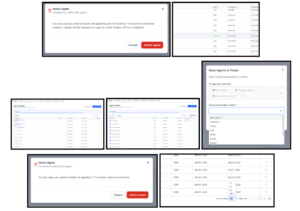
Agent Studio now supports folders and bulk actions to help teams organize agents at scale.
You can now:
- Create, rename, move, and delete folders
- Bulk move agents
- Bulk delete agents or folders
- Search agents by name
- Use server-side pagination for better performance
- Choose rows per page (10/50/100)
- Group by Folders First or Agents First
- Sort by Name or Last Updated
Status labels have also been updated:
- Published (has a live version)
- Draft (no published version)
Custom Values & Expanded Variable Sources
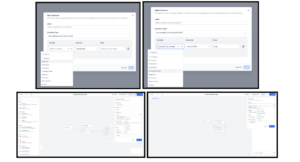
Agents can now pull from five structured variable categories:
- Account
- Custom Values
- Right Now
- Form Data
- Contact
This makes agents more reusable, more context-aware, and much easier to deploy across multiple sub-accounts without hardcoding business-specific details.
Prospecting
Prospecting → Opportunities Integration
Prospecting now connects directly to your CRM pipeline.
What’s new:
- Add prospects directly into a selected Pipeline and Stage during report generation
- Works across manual search, bulk prospecting, and form-based prospect creation
This helps you move from discovery to deal tracking instantly—without manual handoffs.
That wraps up this week’s FG Funnels updates!
These releases are all about clarity, control, and faster execution—whether you’re managing listings, building workflows, training AI, or scaling across accounts.
Let us know what you’d love to see next.