


Welcome to your weekly roundup of FG Funnels updates through the week of April 30th, 2026. This week’s updates bring some seriously powerful tools to your stack. We’re rolling out upgrades to Workflows, E-Commerce Stores, Opportunities, Courses, Social Planner, and more — all designed to save you time and give your clients a better experience.
If you have any questions about these updates, email us at [email protected] or reach out through live chat inside the app — we’re always happy to help.
Voice AI now supports 54 languages — up from 32. The new additions span the Middle East, South Asia, Southeast Asia, Eastern Europe, and Africa, including Hebrew, Thai, Urdu, Persian, Welsh, Afrikaans, and 16 more. If you’ve been waiting to expand into new markets, the door is now wide open.
Alongside the language expansion, there’s a new Voice Model picker right next to the voice selector in the agent builder. Pick a specific model when you need a particular quality or latency tradeoff, or leave it on Auto and FG Funnels will select the best model for the language you chose.
The voice selection modal also now hides providers and voices that don’t support your chosen language — so you never accidentally pick something that won’t work.
Voice AI agents can now hand off a live call to a different Voice AI agent mid-conversation — no phone number needed, no interruption to the caller.
This is great for breaking big, complex agents into smaller specialists. Instead of one mega-prompt trying to handle discovery, pricing, and scheduling all at once, use three focused agents — each with a tight, purpose-built prompt. Every agent in the chain contributes to the post-call summary, data extraction, and workflow triggers automatically.
What’s included:
How to Use:
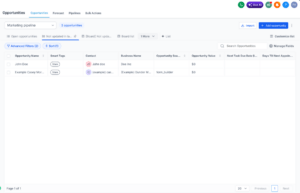
Smart Lists are now available for Opportunities — bringing the same structured, reusable view system that contacts have had into your pipeline workflows.
You can save filters, sorting, and field configurations into named views, choose whether a smart list applies to all pipelines or specific ones, and set a default view per pipeline that applies across your whole sub-account.
Other highlights:
Enable via Labs: Opportunity Smart Lists – Views & Defaults.
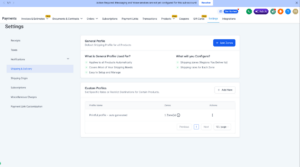
Shipping profiles for Printful are now automatically managed by the system. When you connect Printful and sync your products, the required shipping profile is created and configured for you — no manual setup needed. Live shipping rates will show at checkout automatically.
Note: Removing products from the profile disables shipping rates for those products. If you delete the profile, you’ll need to reinstall the integration to restore it. Manual edits to the Printful shipping profile are not recommended.
You can now add a mandatory Terms & Conditions and Privacy Policy consent checkbox to your store checkout. The checkbox appears before the payment button and must be checked before the customer can complete their purchase — helping you stay compliant with legal requirements.
The text and links are fully customizable, and the checkbox is supported across desktop and mobile.
How to enable it:

Deleting a store now only removes store-specific pages — Products List, Product Details, Cart, Checkout, and Thank You. Your main website pages (Home, About, etc.) stay completely untouched.
This eliminates the risk of accidentally wiping an entire website when you only meant to delete a store. The delete confirmation message has also been updated to make this clear.
Note: Deleting a website from the Websites section still deletes the full site including store pages. The “Delete Store” and “Delete Website” actions are now clearly separated.

You can now view and reply to community post comments directly inside Social Planner. No more switching over to the native community platform just to respond to a discussion. Community engagement is now part of the same unified workflow as your other social comments.
You can mention community members in replies, and any edits made on the native platform will sync back into Social Planner in real time.
Navigate to Marketing > Social Planner > Comment Management > select Community > open the Comments tab.
Note: Attachments, course mentions, and event mentions are not currently supported in community comment replies. Comment editing is not available from Social Planner.

You can now include marketing audit report links automatically in your workflow outreach. Two new custom values are available when using the Generate Marketing Audit Report action:
This means you can build end-to-end flows — from lead capture to audit generation to personalized outreach — without any manual steps in between. Drop the report link and business name directly into your email or SMS and send it automatically.

When you have multiple Google Business Profile pages connected, each review and review response in Conversations now clearly shows which page it belongs to. This brings GBP reviews in line with how Facebook and Instagram already display page names — making it much easier to understand context at a glance in multi-location setups.
The sample message fields in A2P manual campaign registration have been updated to clearly separate promotional and transactional content. Sample Message 1 is now reserved for a promotional/marketing example, and Sample Message 2 is for a transactional/informational example.
Each field now has updated tooltips, filtered example message pools, and placeholder text that matches the required content type — so you’re guided toward the right format from the start.
This directly addresses a recent spike in sample message rejections (error 30893) caused by submitting two messages of the same type. Applies to Low Volume, Mixed, and Sole Proprietor use cases.
Live sessions in Communities just got more reliable. If the host gets disconnected — from a refresh, network drop, or device issue — the meeting stays active and attendees stay connected. The host can rejoin instantly without creating a new session.
Host exit controls have also been redesigned to prevent accidental session endings. Hosts now see two clear options:
And if the original host rejoins after stepping away, they automatically regain host privileges — no manual reassignment needed.
Agent Studio now catches missing required fields before you test your agent — saving you from cryptic error messages mid-conversation. When you open the test panel, Agent Studio scans every node and displays a clear warning if anything is incomplete, telling you exactly which node and which field needs attention.
Each node card on the canvas also shows a small amber warning icon whenever it has unfilled required fields — so you can spot issues at a glance without clicking Test. The icon disappears automatically once you fill in the missing fields and save.
AI Studio received a handful of under-the-hood improvements this week. Localization support has been expanded so the UI can be managed through language keys more consistently — laying the groundwork for broader language support down the road.
On the performance side, API responses are now leaner, database reads have been reduced for common project-loading flows, and a fix has been applied to prevent raw HTML in chat markdown from affecting the UI.
The FG Funnels mobile app now opens noticeably faster. In internal testing on an iPhone 13, cold-start time improved by approximately 39%. You get to your dashboard quicker from the very first tap — no changes to how anything works, just a smoother start every time you open the app.
The improvement is automatic once you update to the latest version (v4.13.1 or later). Available on both iOS and Android.
Changes to notification preferences are now tracked in Audit Logs. Each entry captures what changed, the before and after values, who made the change, and when — giving your team a clear, timestamped record of every modification.
You can filter by the new “Notification Preferences” module inside Audit Logs to search and export these entries independently. Available at the sub-account level only.
FGF Notifications








