


Welcome to your weekly roundup of FG Funnels updates through the week of October 15th, 2026.
From AI Studio gaining built-in analytics, payments, and a full Cloud backend to Events now connecting with Workflows, Tags for Sub-accounts, and Gemini 3.8 Live for Voice AI — this week’s updates bring some seriously powerful tools to your stack. We’re also rolling out upgrades to Conversations Mobile, Meta Pixel, Schema Markup, Social Planner, and more — all designed to save you time and give your clients a better experience.
If you have any questions about these updates, email us at [email protected] or reach out through live chat inside the app — we’re always happy to help.
Shopify stores on the Basic plan can now access and sync protected customer data through the FG Funnels Shopify integration. That means you can turn on the Customer and Order sync toggles and use the related Shopify webhooks to keep everything in step, without upgrading your Shopify plan.
If your store is already connected through OAuth, there’s nothing to reconnect. Just enable the sync toggles and the Customer and Order webhooks, and you’re set. If your store was connected with the legacy integration (via Custom App), you’ll need to reconnect it using OAuth first to unlock protected customer data.
A2P campaign rejection reasons in the “View required fixes” modal have been rewritten. Instead of generic carrier text, you now get guidance that matches how you registered your campaign.
The six most common rejection codes now have separate guidance for Chat Widget (Quick Setup) and Manual (Self-Serve) campaigns. Chat Widget guidance only covers what you actually control, like your website and policy links, so you’re no longer told to fix consent wording or form fields you never filled in. Where carriers expect specific wording, the steps include the exact text, and when a rejection can’t be fixed by resubmitting alone, the guidance tells you what has to change first.

The emails sent to sub-account admins when a new user is created now use the new email design, with a cleaner card layout, clearer typography, and a single action button.
The old “User’s details” text link is now a “Manage user” button that opens the same Team Settings page as before, and the footer is simplified. Everything else stays the same: who gets the email, when it sends, what it says, and your Business name, logo, and domain.
InitiateCheckout now fires when a buyer reaches the checkout page, not when they submit payment. And AddPaymentInfo now sends full order and customer details to Meta. Together, that gives you an accurate picture of checkout drop-off and gives Meta better signals to optimize your campaigns.
The event now fires when a store checkout page loads, when a page with InitiateCheckout added at the page level loads, or on the buyer’s first click, tap, or keystroke in an order form everywhere else. It fires at most once per page visit, browser autofill and auto-focused fields don’t trigger it, and buyers who go straight to Apple Pay and similar express wallets are still counted. AddPaymentInfo now includes order value, currency, product IDs, and hashed customer details when available.
No action is required and your Meta Pixel settings work exactly as before. Just expect your InitiateCheckout counts to go up, since the event now includes buyers who reach checkout and leave without paying, so keep that in mind when comparing reports before and after. Page-level settings can take up to 24 hours to apply on already-published pages, or edit and save the page to apply them right away.
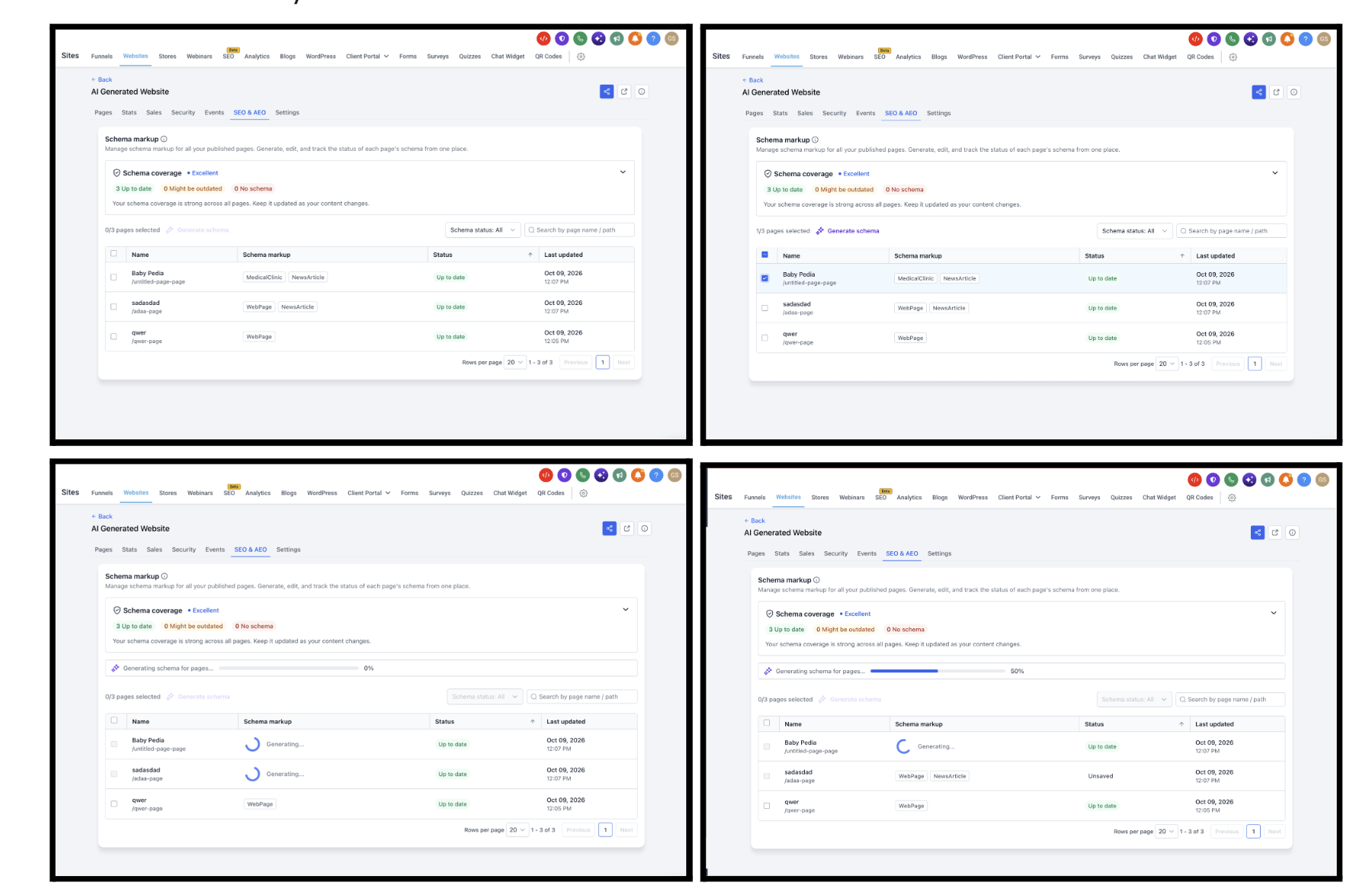
A new SEO & AEO tab on every website and funnel puts schema markup in one dashboard, so you no longer need to open each page in the builder to check or fix it. A Schema coverage card rates your site from Needs work to Excellent, and each page shows its schema types, status (Up to date, Might be outdated, No schema, and more), and when it was last updated.
You can generate schema with AI for one page or many, add or edit it manually, and review everything before it goes live. Generated or edited schema stays Unsaved until you click Save and publish. Pages edited and republished two or more times since their schema was created get flagged as Might be outdated. Running Generate schema on a page that already has schema replaces it entirely, so review before you publish. Existing schema shows up automatically, and editing in the page builder still works exactly as before.
How to use
Go to Sites → Websites/Funnels → select one → SEO & AEO. Check the Schema coverage card, and filter by No schema or Might be outdated. Select pages and click Generate schema, or use + Add schema / click a tag to edit manually.
Why it matters: accurate, current schema helps your pages qualify for Google rich results and helps AI answer engines understand and cite your business, and now you can keep it current in bulk.
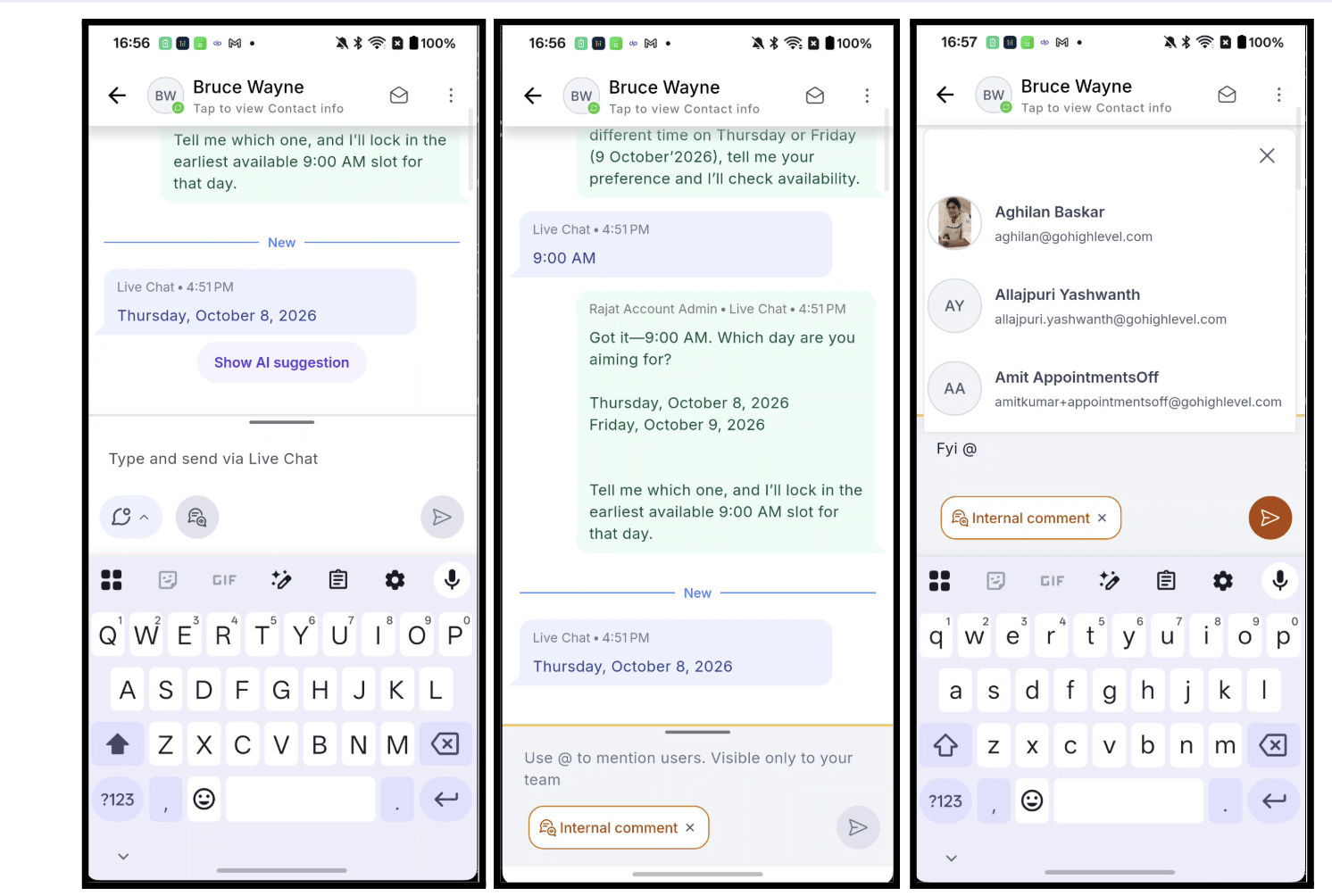
Leaving a private note for your team on mobile just got a lot easier. Internal comments now live right inside the message composer: tap the comment icon next to the mic, @mention a teammate, and post. The note sits in the same thread as your customer messages, and the contact never sees it.
The composer turns amber while you’re writing privately, comments show up as amber bubbles labeled “Internal” with an “Only visible to your team” hint, and as soon as you post, the composer drops back to whatever channel you were using (SMS, Email, WhatsApp, and so on). Tagged teammates get a “New mention” notification every time. You’ll also find one combined send button now: tap to send, or press and hold to schedule.
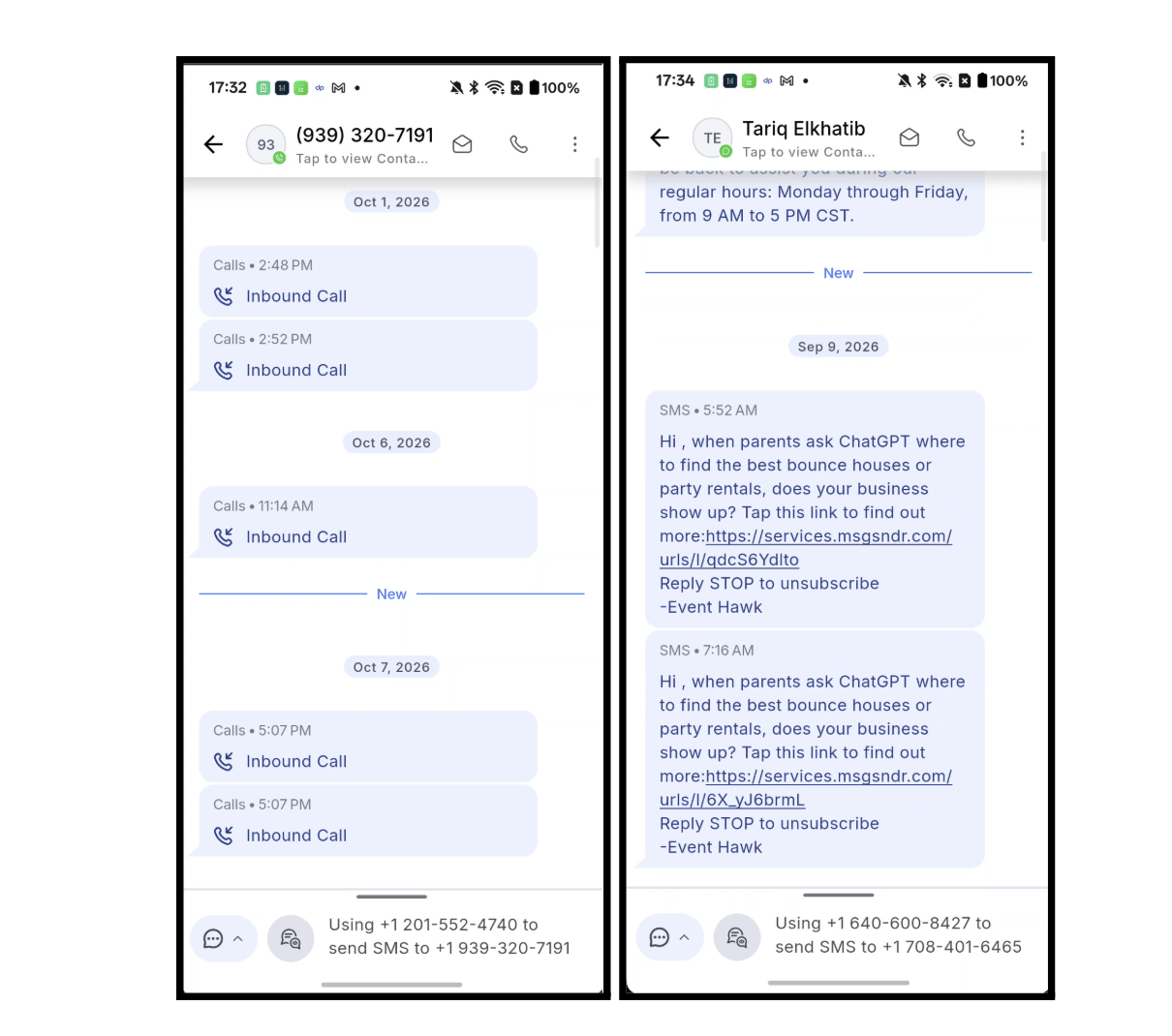
Open a conversation with unread messages and the chat now lands right at the first one, marked with a “New” divider, instead of dropping you at the bottom of the thread. It works even in long threads where the unread messages are far back in the history, and the divider clears itself once you’ve caught up.
The chat list has also been rebuilt under the hood, so scrolling is noticeably smoother, running at your screen’s full refresh rate (up to about 120 FPS on 120 Hz devices), with the biggest gains on long threads.
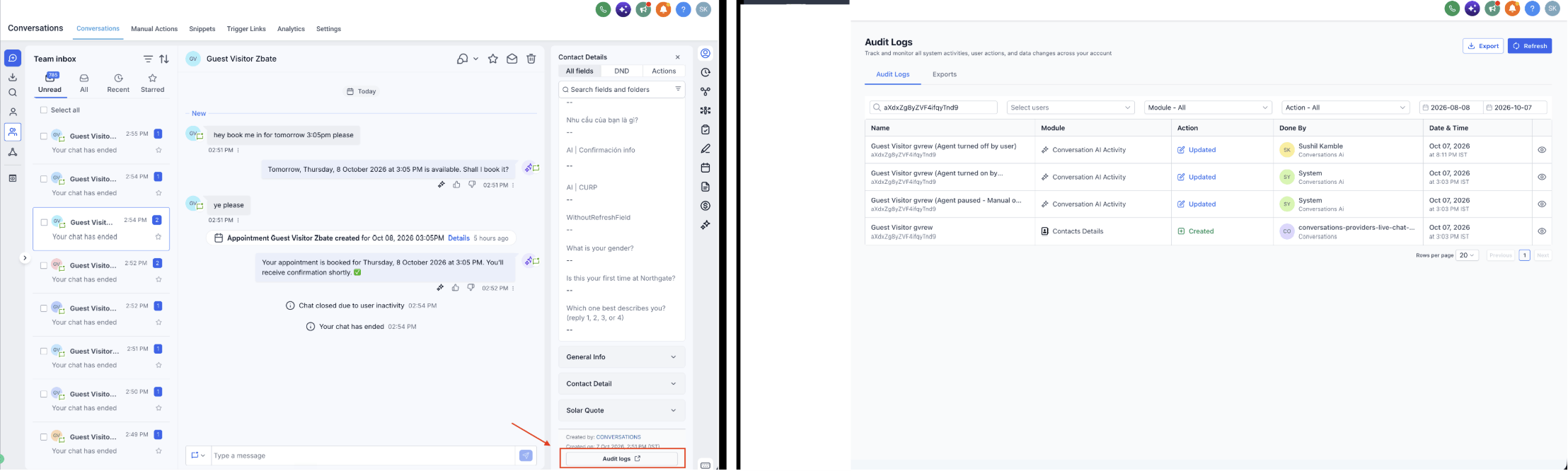
When an AI agent pauses or another agent takes over a conversation, understanding why should be straightforward. Conversation AI now records these changes in Audit Logs, so you can see what happened for a contact, what triggered it, and who made the change.
You can see when an agent was turned on, turned off, paused, or reassigned, including updates to its pause time. Each entry shows what triggered the change (a workflow, appointment booking, human handover, or user update), the date and time, and who was responsible. User changes show the person’s name, while automated activity appears as System.
To see activity across your whole location, go to Settings → Audit Logs and select Conversation AI Activity from the module filter. For a single contact, open their conversation and click Audit logs at the bottom of the Contact Details panel.
Every published AI Studio site now measures itself, with no setup or tracking code needed. Inside your project (More → Analytics → Overview), you’ll see page views, unique visitors, opt-ins, and opt-in rate, with trends compared to the previous period, plus top pages, time on page, traffic sources, devices, browsers, and locations.
Under Form Submissions, every lead your site’s forms collected is in one place, with a link to the contact, and you can filter by form and date or create a workflow right from there. You can also compare all your AI Studio sites alongside your Funnels and Websites in Sites → Analytics → AI Studio, and contacts created from your site keep their visit history, including the pages they viewed, where they came from, and the form they submitted.
Opt-ins from forms you connected before this update keep counting. To link a submission to the pages that visitor viewed first, ask AI Studio to reconnect form tracking, then publish again.

You can now take payments in apps built with AI Studio. Connect the products in your catalog, ask the agent to “add payments,” and your app gets a secure, hosted checkout. It uses FG Funnels’ native payments, so your products, orders, payment providers, and subscriptions are the ones already set up in your account, with nothing extra to configure.
Under More → Payments, you turn payments on, switch between test and live mode, and choose which catalog products your app can sell, priced as one fixed price, a selected set of variations, or the full catalog. The checkout supports PayPal express, coupon codes, and subscriptions (including carts with more than one), picks up your site’s colors, and runs bot protection on every purchase. Card details are entered and processed in the hosted checkout, never in your app’s code.
After a purchase, you can show buyers a one-click upsell offer, which works with saved cards from Stripe, Square, Authorize.net, NMI, Adyen, and Mercado Pago. Upsells can only be charged after the original order is paid, and only once per order.
Payments currently works only with apps built on TanStack Start. To use it in an existing React project, go to Project Settings → Migrate to SSR, which creates an upgraded copy and leaves your original live.

Your AI Studio app can now remember things, know who’s signed in, and store uploaded files, without you wiring up a backend. Open More → Cloud, turn it on from Overview, and in about a minute FG Funnels creates a private backend just for that project, with a database, user accounts, and file storage.
With Cloud on, you get a Database tab (browse and edit tables, run health checks, and restore daily backups), a Users tab (watch signups, create or invite users, and shape sign-in with settings like email confirmation, password rules, and closing registration), and a Storage tab (public and private buckets, uploads, folders, size limits, and access policies). Sign-in supports email and password only for now, with more methods coming in future releases.
Advanced settings let you grow at your own pace. Database size starts at Tiny (free) and scales up to X-Large, or back down, once an hour. A built-in watchdog flags security issues on the Overview page, and Try to fix asks AI Studio to repair them, so fix any critical issues before you publish. If your wallet can’t cover Cloud, it pauses itself with nothing deleted. And if you ever remove Cloud, that project’s database, users, and files are permanently deleted, so export your tables and download your files first.
Cloud works with apps built on TanStack Start. For an existing React project, run Project Settings → Migrate to SSR first, and note that migrating doesn’t turn Cloud on. Your published site stays as is until you publish again.

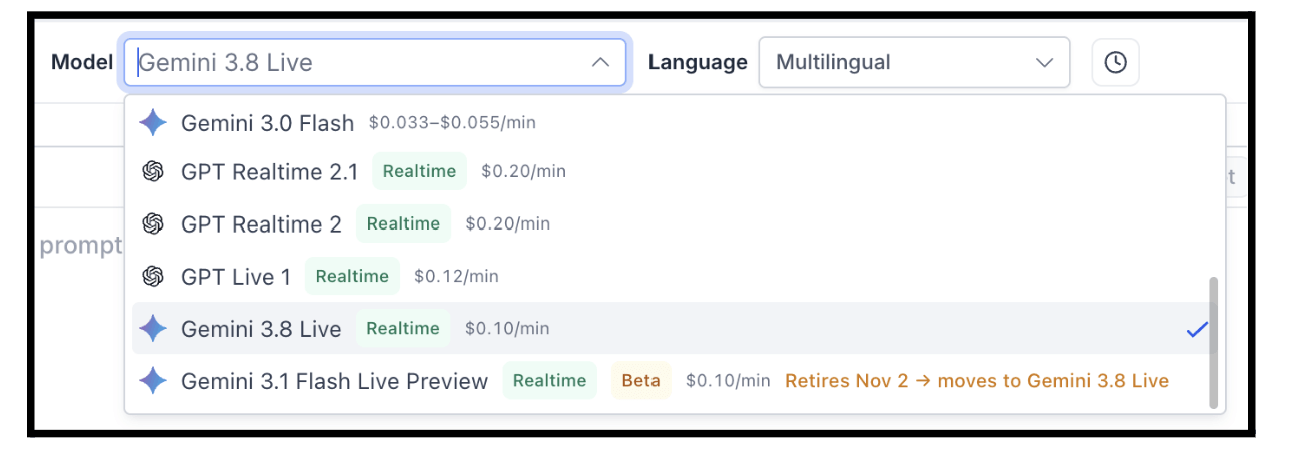
Voice AI Speech-to-Speech agents now support Gemini 3.8 Live, Google’s latest generally available real-time voice model. Expect more natural conversations, stronger reasoning for complex calls, better tool handling for action-driven agents, and low-latency performance, plus a larger context window for longer, more detailed conversations.
You’ll find it right in the LLM Model selector in the Agent Builder. If any of your agents are using Gemini 3.1 Flash Live Preview, they’ll automatically move to Gemini 3.8 Live on November 2, with no action required.
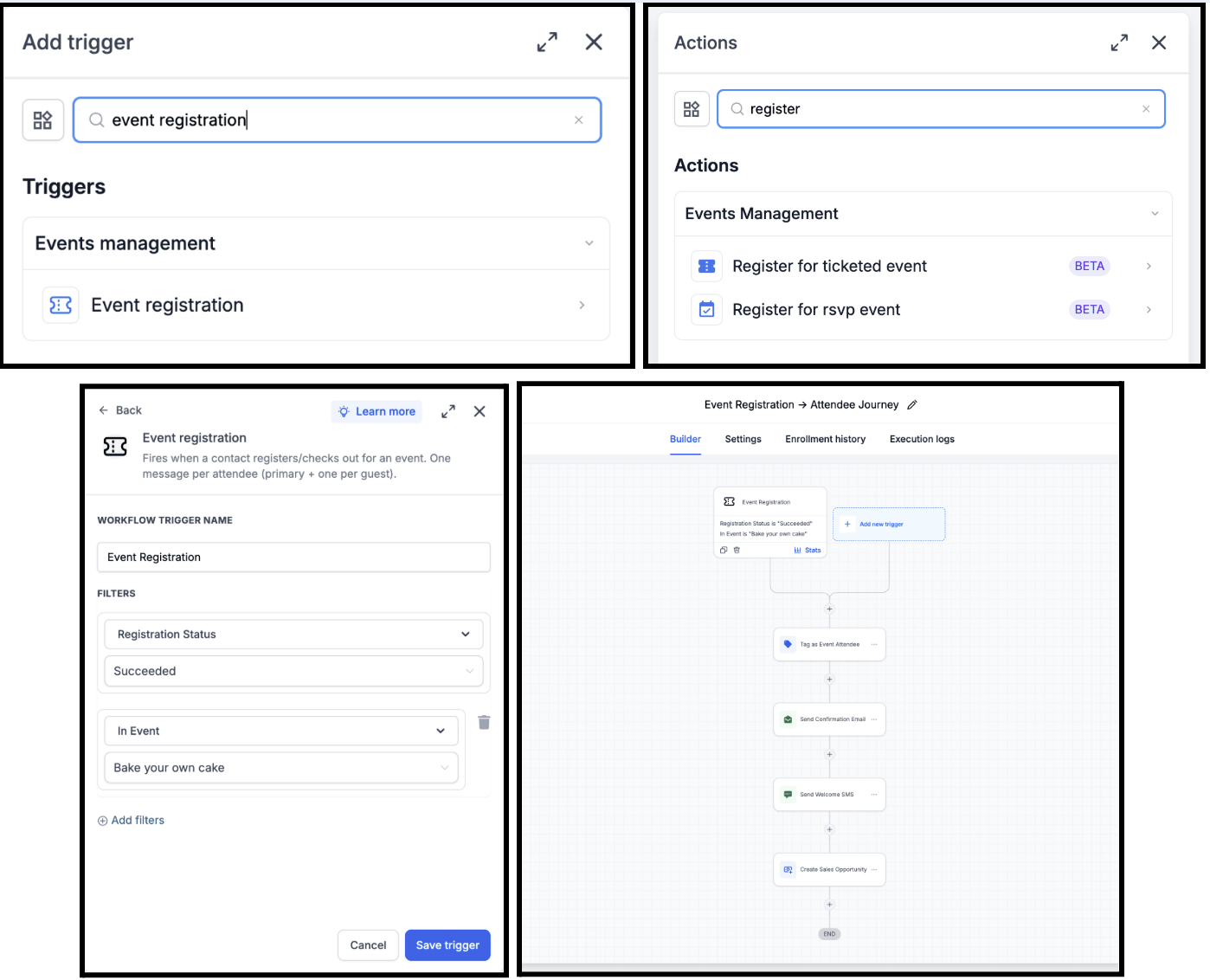
Your whole event journey can now run on autopilot. Events now connect with Workflows, so you can trigger an automation when someone registers for an event, or register contacts into events directly from your existing workflows.
The new Event Registration trigger kicks off automations the moment someone signs up: send instant confirmation emails and SMS, schedule reminders and follow-ups, tag and segment attendees, notify your team, or create sales opportunities. On the flip side, the new Register for Ticketed Event and Register for RSVP Event actions let you turn leads from Facebook Ads, funnels, forms, and landing pages into event registrants automatically.
Some automations you can build: Facebook Lead Ad → Event Registration → Confirmation Email, Form Submission → RSVP Event → Reminder Sequence, Event Registration → Add Tag → Send SMS → Follow-up Campaign, or Event Registration → Create Opportunity → Notify Sales Team.
FGF Notifications