

Welcome to your weekly roundup of FG Funnels updates through the week of May 28th, 2026.
From a completely revamped Wait action in Workflows to a new Flow-Based Builder for Voice AI, studio-quality audio controls in Meetings, and Company fields now available as custom values across the platform — this week’s updates bring some seriously powerful tools to your stack. We’re also rolling out upgrades to Knowledge Base, Calendars, Chat Widget, Social Planner, E-Commerce Stores, and more — all designed to save you time and give your clients a better experience.
If you have any questions about these updates, email us at [email protected] or reach out through live chat inside the app — we’re always happy to help.
The Wait action just got its biggest upgrade ever. The old dropdown is gone. Wait now opens with a clean card selection screen — you pick your intent first, then configure. No more buried options or missed capabilities.
What’s new:


Integration-powered workflow steps now show required fields upfront — even before you’ve connected an account. If no account is connected, a banner and field preview appear together. Clicking Connect opens the setup in a mini tab so you never lose your workflow progress. Once connected, fields unlock and the selected account appears directly in the action or trigger.

The Math Operation action is now supported in company-based and custom object-based workflows. Run calculations on numeric values tied to companies or custom objects and use the result downstream in the same workflow — no workarounds needed.
Audio and video settings are now integrated directly into active meetings. A new Settings icon in the meeting toolbar gives you instant access without leaving the conversation.
Audio controls include: microphone and speaker device selection, a real-time audio meter, built-in mic and speaker testing, noise cancellation toggle, and an Original Sound for Musicians mode for high-fidelity natural audio. (Note: enabling Original Sound automatically disables Noise Cancellation.)
Video controls include: background blur with adjustable intensity, virtual background presets, live preview before applying effects, real-time background switching, camera selection, and mirror video support.
Meeting recordings can now be shared directly into Communities with a few clicks. A new Share as Post option is available on recordings — select a community, and the post composer opens automatically with the recording title and video already attached. You can also switch communities from within the composer without restarting the flow.


FG Funnels now automatically identifies missing, weak, or underperforming areas in your Knowledge Base. By analyzing real customer queries and AI retrieval performance, the system surfaces topics where the AI couldn’t find strong supporting knowledge or produced low-confidence answers — including questions that keep getting asked without adequate coverage.
Gaps identified can be converted into FAQs in one click, closing content holes without switching tools.
Training websites into your Knowledge Base is completely reworked. A new sitemap preview modal shows every URL on the site — you select exactly what you want trained instead of crawling everything blindly. A live quota counter updates with every selection so you always know where you stand. Operation cards now show real-time progress (“Training 18 of 42 pages”) and survive page refreshes. Failed URLs can be manually retried directly from the operation card.
The Knowledge Base Retrieval Test has been redesigned with a full-screen overlay, a chat-style thread for stacking multiple queries in one session, match quality badges (Strong / Partial / Weak) per query, a score bar per chunk, latency and top score displayed per query, and sort and filter options by source type, relevance score, or retrieval order.
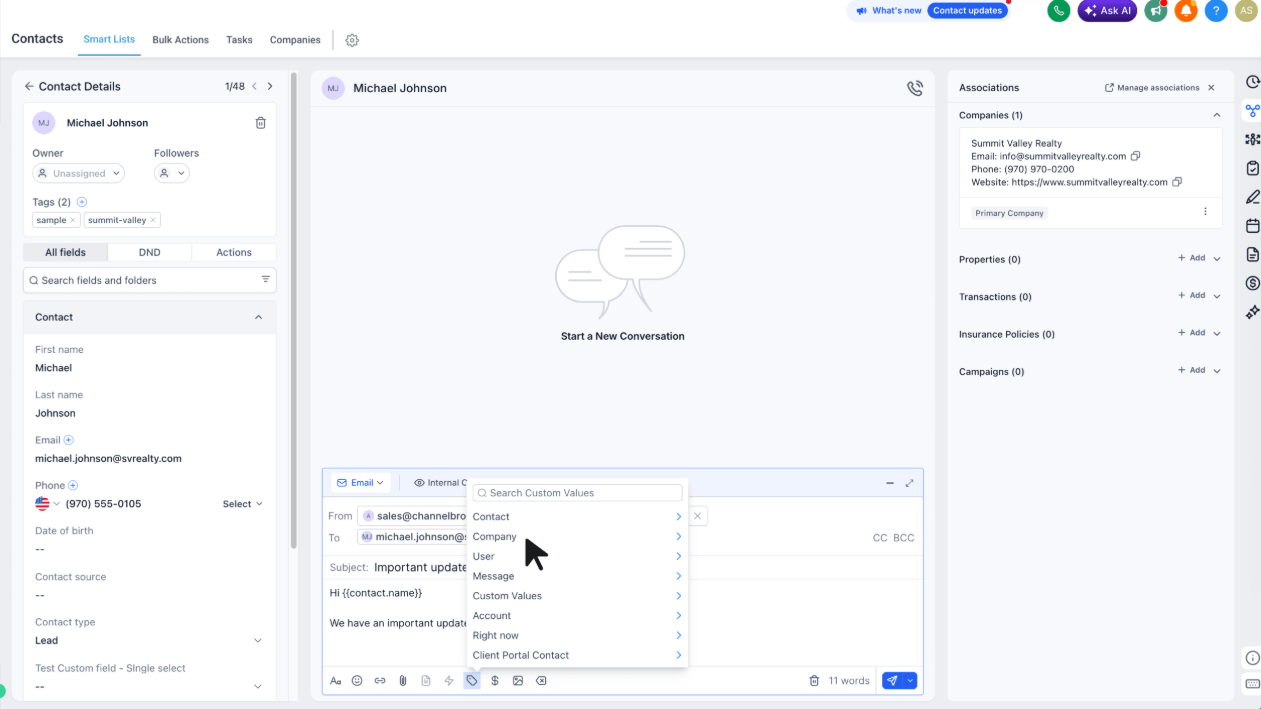
Company fields — both standard and custom — are now available in the Custom Value Picker across Workflows, Email Builder, Email Campaigns, Conversations, Documents & Contracts, Bulk Actions, and Conversation AI.
This is a big one for B2B users. Industry, account tier, region, contract terms — all of that data stored on the Company object can now be used to personalize messages, automations, contracts, and AI replies anywhere you communicate.
Open any supported tool → click the Custom Value Picker → select the Company group → pick your field.
Visitors can now send and receive voice notes and audio attachments directly from the Live Chat Widget. The widget includes a full inline audio player with play/pause, waveform, seek controls, mute/unmute, playback speed options, and audio preview before sending.
If Conversation AI is enabled, it can process and reply to voice notes automatically. Sub-account users can control the visibility of the attachment and mic icons from the Chat Widget settings.
Navigate to Sites → Chat Widget → Chat Window → Additional Options.
A new toggle lets you delay the chat widget from loading until a visitor actually interacts with the page — improving initial page load performance, especially on mobile. If no interaction happens, the widget loads automatically after about 8 seconds as a fallback.
Find it in Sites → Chat Widget Builder → Chat Window tab → Additional Options.

Conditional visibility rules can now be applied to entire layouts — not just individual elements. This means you can hide or show whole sections without configuring every element inside them one by one.
Two new operators have also been added: IS EMPTY and IS PRESENT — making it easy to handle missing field values gracefully. For example, show a “Download Invoice” button only when an attachment IS PRESENT, or hide a personalized greeting when first_name IS EMPTY. All custom fields, including attachment fields, are now supported in the dropdown.

Calendly reschedules are now treated as true appointment reschedules inside FG Funnels. Existing appointments are updated instead of recreated, correctly marked as Rescheduled, and reschedule-based workflow conditions now work consistently for Calendly appointments — just like native FGF reschedules.

You can now customize result content for each individual category in personality-style quizzes — including text, images, videos, CTA text, and links. This works for both highest-scoring and lowest-scoring category results. The first category can act as a default template for the rest to reduce setup time.

Button elements in Forms, Surveys, and Quiz builders now support gradient backgrounds — choose between solid color and gradient styling with linear, radial, or angular gradient types, adjustable angle, and multiple color stops.

You can now set a custom modal height (in pixels) for Popup, Polite Slide-in, and Sticky Sidebar form embeds — so modals no longer overflow or feel oversized on host pages. The field defaults to 500px and is hidden automatically for Inline layouts. Existing embeds are unaffected.

Alt text is now automatically generated for product images, collection cover images, store branding, and store elements using existing metadata — product name, collection name, variant name, store name, and more. No manual input required. This improves both SEO and accessibility across your storefront.
Connecting your Shopify store is now a one-click OAuth flow. No API tokens, no custom app creation in Shopify, no developer configuration. The full integration — including historic and real-time sync of customers, orders, transactions, products, and collections — is available through the simplified connection.
Existing Shopify integrations are not affected. If you’ve already connected via the custom app method, your integration continues to work as-is.
Settings → Integrations → Shopify → Connect.

Any changes to a contact’s communication preferences — whether initiated by the contact or by a user — are now logged directly in the Conversations view. No more hunting across multiple surfaces to understand why a contact’s preferences changed.
You can now upload your IRS CP575 form during A2P Brand Registration and FG Funnels will automatically pre-fill your Legal Business Name, EIN, and Registered Business Address. This removes the guesswork that causes mismatches — a leading reason for first-time registration rejections. Drag and drop or click to upload (PDF, up to 5MB), review the pre-filled details, and continue.
Contact merge by name now works for Facebook Lead Form submissions, not just Messenger conversations. The setting has been split into two dedicated options in Business Profile settings so you can control merge behavior for Messenger-based contacts and Lead Ads submissions independently.
Sub-account View → Settings → Business Profile → General.

Countdown Timer active and expiry link fields now support Custom Values and Trigger Links. Instead of updating every timer manually when a destination URL changes, set a Custom Value or Trigger Link once and all timers using it update automatically.
Marketing → Countdown Timers → create or edit a timer → click the tag icon next to the Active or Expired link field.
FGF Notifications








