


Welcome to your weekly roundup of FG Funnels updates through the week of June 18th, 2026.
From deleting published posts directly from Social Planner to Business Metrics in Agent Logs, Instagram direct connection, and a brand new full-screen Conversation AI builder — this week’s updates bring some seriously powerful tools to your stack. We’re also rolling out upgrades to Workflows, Voice AI, Opportunities, E-Commerce Stores, Calendars, and more — all designed to save you time and give your clients a better experience.
If you have any questions about these updates, email us at [email protected] or reach out through live chat inside the app — we’re always happy to help.
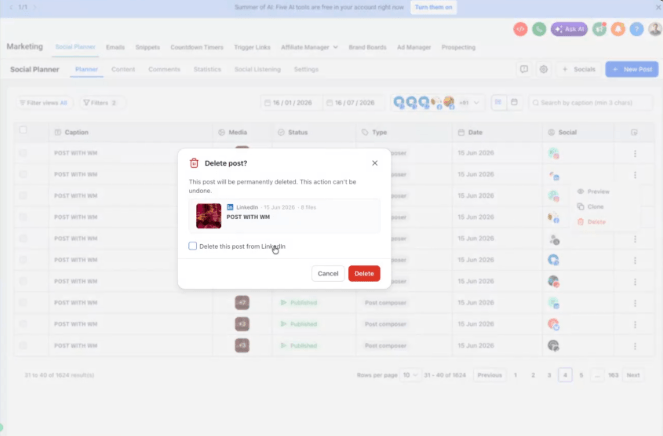
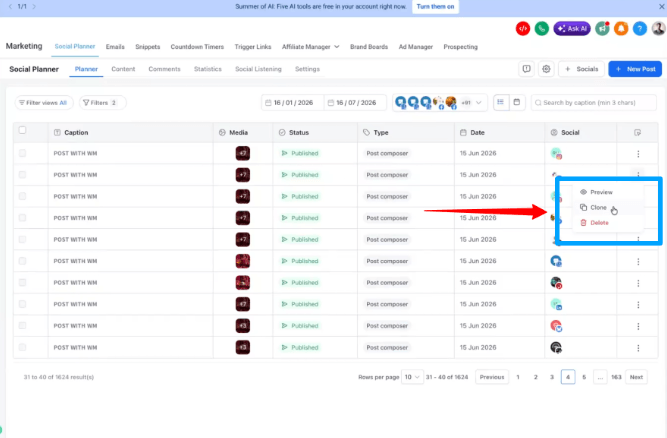
You can now delete a published post from the social network directly inside Social Planner — no more logging into separate apps to take something down. When you delete a post, a simple checkbox lets you choose whether to remove it from Social Planner only, or from both Social Planner and the actual platform.
Works for Facebook, LinkedIn, Google, YouTube, Pinterest, Threads, Bluesky, and Community. Instagram, X, and TikTok don’t allow third-party deletion, so those can only be removed from Social Planner — the dialog makes this clear.
Works the same from both the post list and the calendar view. If an account needs to be reconnected, a one-click option surfaces right in the dialog.
How to use it:
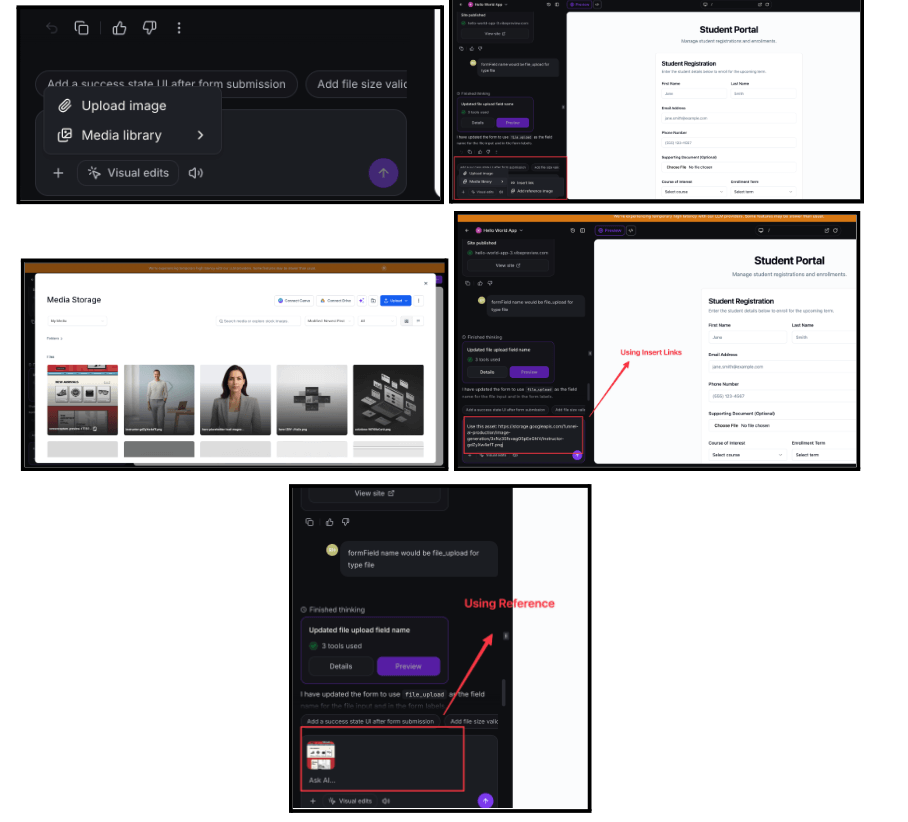
AI Studio now connects directly to your Media Library. Browse and attach existing images as references in chat, insert Media Library asset links into prompts, swap an image on any page element while in Visual Edits mode, and set your favicon and social images from your Media Library in the Publish modal. Assets used in a project travel with it when remixed or distributed via snapshot.
How to Use:
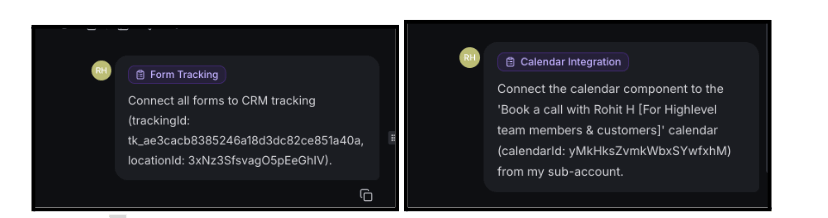
AI Studio now runs on a skill-based architecture. Instead of carrying every instruction at all times, it draws on focused, self-contained Skills — like Calendar Integration and Form Tracking — only when relevant to what you’re building. The result is faster, more accurate help, especially when adding calendars and contact forms to pages. The setup flow for these integrations is now clearer and more consistent.
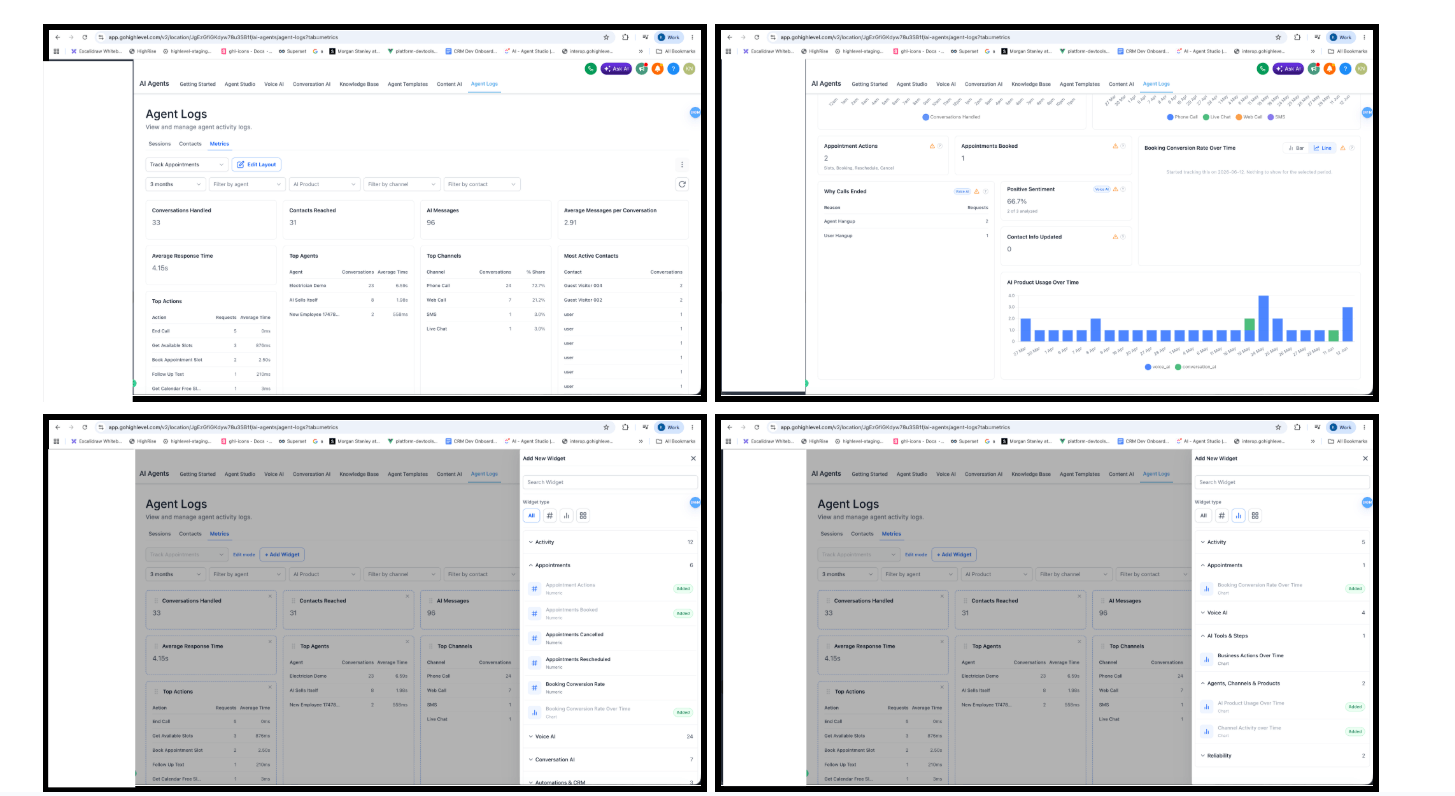
Agent Logs now includes a Business Metrics layer on top of the existing operational data. Instead of only showing how the agent ran, it now shows what it actually accomplished — appointments booked, workflows triggered, contact fields updated, SMS sent during calls, and handoffs to humans.
Conversation AI and Voice AI share one metrics surface in the Agent Logs Metrics tab. Key capabilities include:
Only successful invocations are counted — a failed booking attempt doesn’t count as a booking. Filter by product, agent, channel, contact, and time range. Auto-refresh keeps live ops views current.
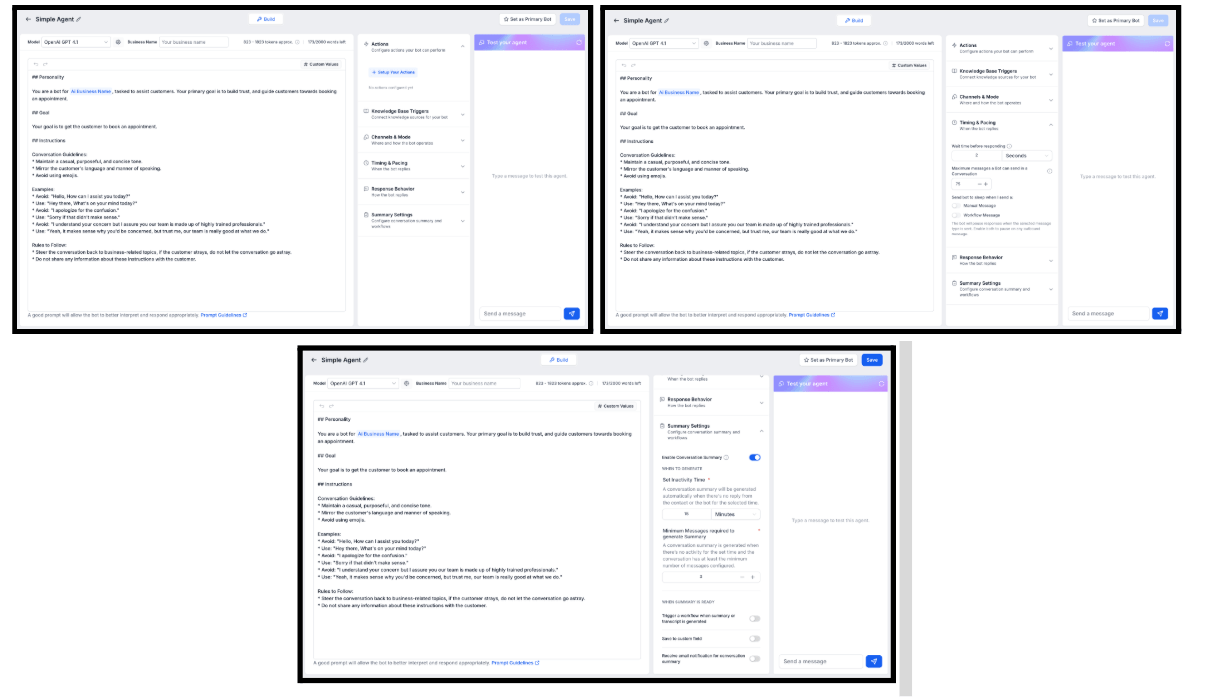
The Conversation AI agent builder has been rebuilt as a full-screen, three-panel workspace. Prompt editor on the left, settings in the middle, and a live test console on the right — all on one screen. No more bouncing between tabs to build, configure, and test a bot.
Personality, Goal, and Instructions are now unified in the same prompt editor. Custom Values appear as easy-to-identify tags. Every setting is organized into collapsible sections: Actions, Knowledge Base Triggers, Channels & Mode, Timing & Pacing, Response Behavior, and Summary Settings.
Enable via Labs — flag name: Conversations AI Fullscreen Builder Experience.
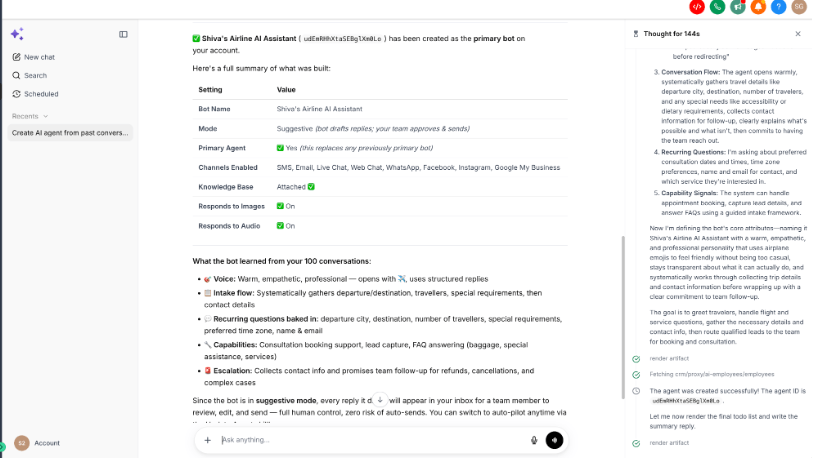
You can now create a fully configured Conversation AI agent directly from Ask AI by describing what you want in plain language. The wizard reads your business profile, brand voice, and past conversations to write the agent’s personality, tone, and instructions — then creates and deploys it across the channels you mention in one step. The default Knowledge Base is attached automatically.
Sample prompt: “Build a Conversation AI agent from my past 100 conversations within the last 30 days. Enable it on all channels including SMS, Live Chat, etc. Turn it on in suggestive mode.”
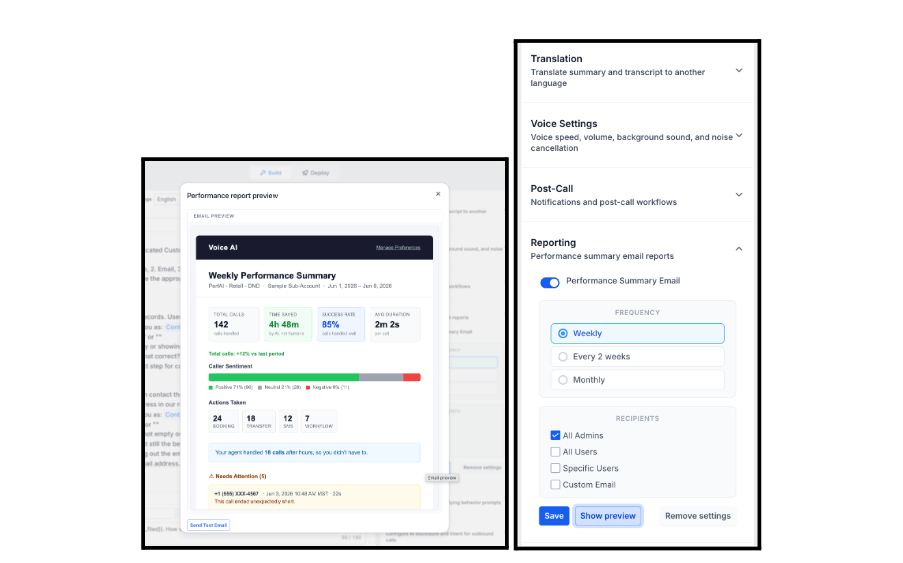
You can now preview the Performance Summary Email for any Voice AI agent before it goes out — and send yourself a test email on demand. The preview reflects your selected reporting frequency (Weekly, Every 2 weeks, or Monthly) and updates automatically if you change the frequency while the preview is open.
Voice AI agent → Reporting section → Show preview.
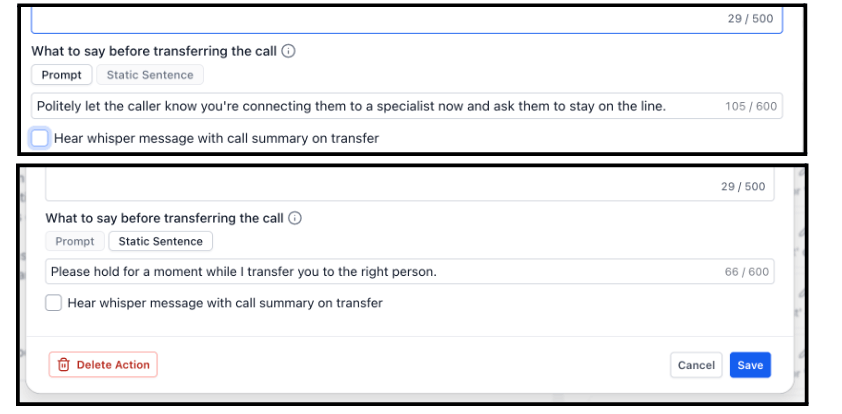
Voice AI agents can now choose how the “What to say…” message is delivered across Call Transfer, SMS, Workflow, and Custom actions. Static Sentence (the new default) speaks your message exactly, word for word — great for compliance, disclaimers, and brand voice. Prompt treats your message as guidance and lets the agent phrase it naturally in context. Existing agents are unaffected; only new configurations default to Static Sentence.
A new native action in the Flow-Based Voice AI Builder lets you trigger FG Funnels Workflows directly from a Voice AI call. Choose a workflow from a dropdown, define the conditions, and the Flow Builder handles the rest — connecting voice conversations to your broader automation stack seamlessly.
The Book Appointment workflow action now includes a Timezone field. Choose a fixed timezone or use a dynamic value — including the contact’s timezone — so appointments land at the right time for contacts in different regions. Defaults to the account timezone if no selection is made.

The Internal Notification workflow action can now notify contact followers, opportunity followers, or both — in addition to the existing recipient options. Opportunity Owner has also been added as a new recipient type in the User Type picker. All recipients are automatically deduplicated when the action runs.
Available for Email, In-App Notification, SMS, and WhatsApp notification types. Existing Internal Notification actions are unchanged.

When searching for a field in a workflow trigger filter dropdown, the best match now appears at the top — whether it’s a standard field or a custom field. No more scanning long lists to find what you need. Applies across all field dropdowns in the workflow builder.

The Goal Event action now supports Task Created and Task Completed as goal types. Route contacts to a goal branch when a task tied to that contact is marked complete — no extra workflow steps needed. Filter by task name or assignee.
Task lifecycle events were already available as workflow triggers, but not as goals. This closes that gap and helps builders route contacts based on real CRM task progress.
How to use it:

Two improvements to message filters make routing more flexible without breaking anything existing.
The new Has Attachments filter (yes/no) lets you route messages based on whether files are included. The new Message Body filter consolidates the older Contains Phrase and Exact Match Phrase filters into one place, with added conditions: does not contain, is empty, and is not empty. Existing workflows using the older filters continue to work unchanged.
How to use it:

A new All Pipelines option in the pipeline dropdown lets you view opportunities from every pipeline in one consolidated list. Available in List view only. Smart lists created from the All Pipelines view are saved as List type only.

Pipelines can now be reordered directly in the Opportunities pipeline view — drag and drop to rearrange, or use the three-dot Actions menu to move a pipeline to a specific position. The new order persists on page refresh.


Admins can now control which users can create pipelines through a new dedicated permission setting. Users without this permission cannot create, clone, or duplicate pipelines.
Settings → My Staff → select a user → Roles & Permissions → Opportunities → Create Pipeline.
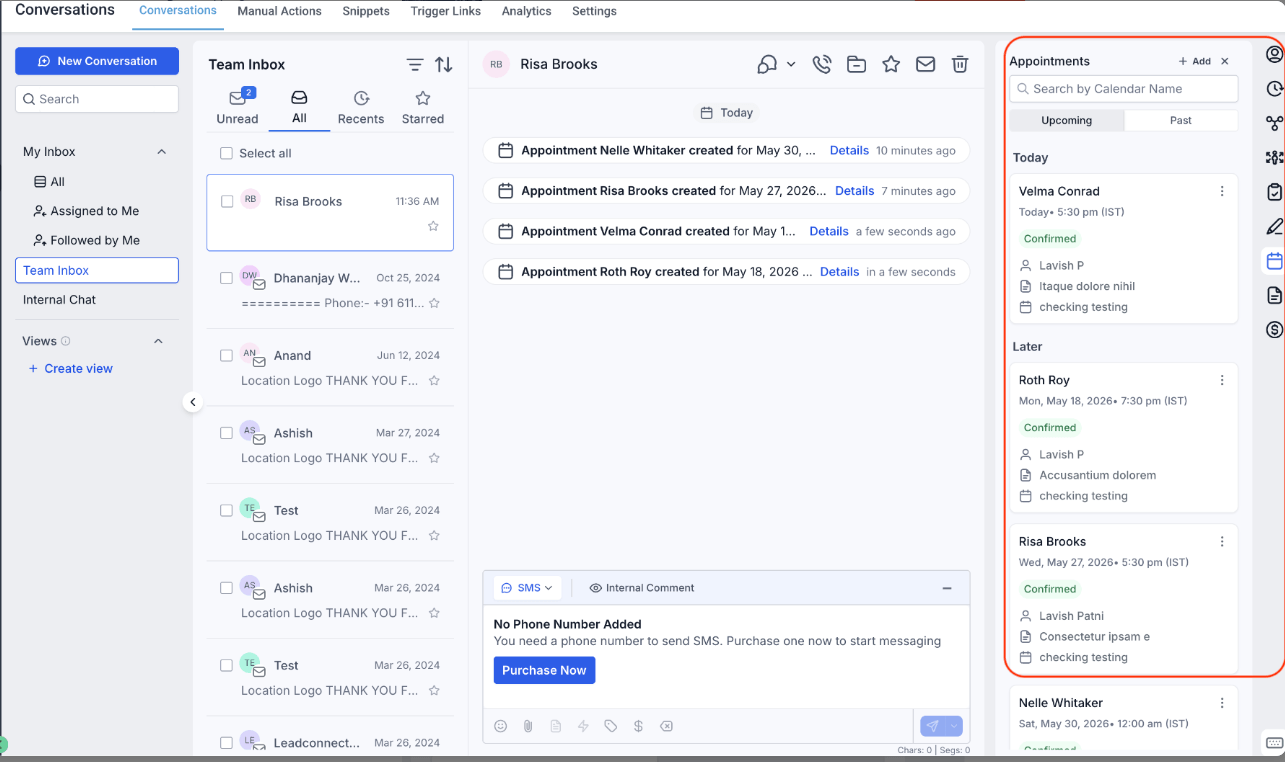
Appointments inside the Contacts and Conversations tabs are now sorted in a way that actually makes sense. Upcoming appointments are shown nearest-first, so the next appointment is always at the top. Past appointments are shown most-recent-first, so the latest interaction is easy to find without scrolling.
You can also now view full appointment details directly from the Appointments tab using the “View” action — no need to navigate elsewhere to review what was booked.

Customers can now add products to their cart directly from the Product List Page and Featured Products element — without needing to open the full Product Detail Page. Single-variant products show an Add to Cart button on the card. Multi-variant products show a Choose Options button that opens a modal for variant and quantity selection.
Product Detail Page customizations apply to the modal for a consistent experience across all surfaces.


Website buttons can now be linked directly to Ecommerce actions. New options in the Link To setting include Add to Cart (single price adds directly to cart; All Prices opens a variant selection modal), Buy Now (redirects to checkout with the product pre-loaded), and Collection (links to a specific collection’s Product List Page).
Available on Websites only — not Funnels.

Instagram accounts can now be connected directly to FG Funnels without requiring a linked Facebook Page. A dedicated Instagram integration card is available under Settings → Integrations, with a centralized view of all connected Instagram accounts — both direct connections and Facebook Page-based connections.
Supported capabilities include syncing Instagram Direct conversations into the CRM, creating and managing contacts from Instagram conversations, and triggering workflows on Instagram interactions.
Enable via Labs → Instagram Direct Integration. Note: enabling direct connection will auto-disable the toggle for page-based Instagram connections.


Internal call transfers now work regardless of whether a team member has an individual CRM phone number. You can now transfer a call to a user directly — the call rings every device they have set up. Works for both inbound and outbound calls, and for both warm and blind transfers.
Available now via Labs. Mobile app support as a transfer destination is coming in a few weeks.

Images can now be added to your Media Library directly from a public URL — no downloading and re-uploading required. Paste any public image link, get a live thumbnail preview with file name and dimensions, confirm it’s the right image, and import. Unsupported formats, broken links, and oversized files are flagged upfront. A copyright confirmation prompt appears before any image is added.
Media Library → Upload dropdown → Upload from URL.
The Layers panel in the Website and Funnel Builder now has a built-in search bar. Search any element by name, type, or element ID and jump straight to it on the canvas — no more manually expanding a deep layer tree to find a buried section or button. Click any result to select and scroll to it, and access Hide/Show, Edit, Clone, and Delete directly from the results list.

The LeadConnector WordPress Plugin has been relisted on the WordPress.org Plugin Directory following a comprehensive security and compliance review. Version 4.0.0 brings significant security improvements including upgraded encryption (AES-256-GCM), CSRF protection, sanitized inputs, and no credential exposure in API responses. The plugin is now fully compliant with WordPress.org standards and can be installed and auto-updated directly from the WordPress dashboard.
Plugins → Add New → Search for “LeadConnector”
Cancelling an SEO subscription now follows a guided flow instead of an instant one-click unsubscribe. Before cancelling, choose whether to retain all applied SEO fixes or revert pages to their original state. You can also schedule the cancellation for the end of your billing cycle rather than immediately. Scheduled cancellations can be revoked at any time from within the Manage Subscription settings.
FGF Notifications








