


Welcome to your weekly roundup of FG Funnels updates through the week of July 16th, 2026.
From a redesigned Prospect AI experience to full editing for paid service bookings, flexible deposit and full payment options at checkout, and a wave of new workflow triggers and actions — this week’s updates bring some seriously powerful tools to your stack. We’re also rolling out upgrades to Conversation AI, Calendars, Communities, Jira and Todoist integrations, and more — all designed to save you time and give your clients a better experience.
If you have any questions about these updates, email us at [email protected] or reach out through live chat inside the app — we’re always happy to help.
One of the most requested Services enhancements is finally here. You can now fully edit both paid and unpaid service appointments without canceling and recreating the booking. Add or remove services, change the assigned staff member, update add-ons, apply or remove coupons — all from within the existing booking.
Every edit automatically recalculates the booking total and updates the payment status to reflect whether additional payment is required, the booking is fully paid, or a refund is due. If a refund is due, you can process it directly from the appointment modal without leaving the booking. The existing order is updated rather than replaced, keeping your order history clean and all payment records in sync.
How to use it:
Note: If a refund is in progress, editing is temporarily disabled until the refund completes. You can still reschedule the appointment during this time. Mobile app support is scheduled to roll out the week of July 20th.

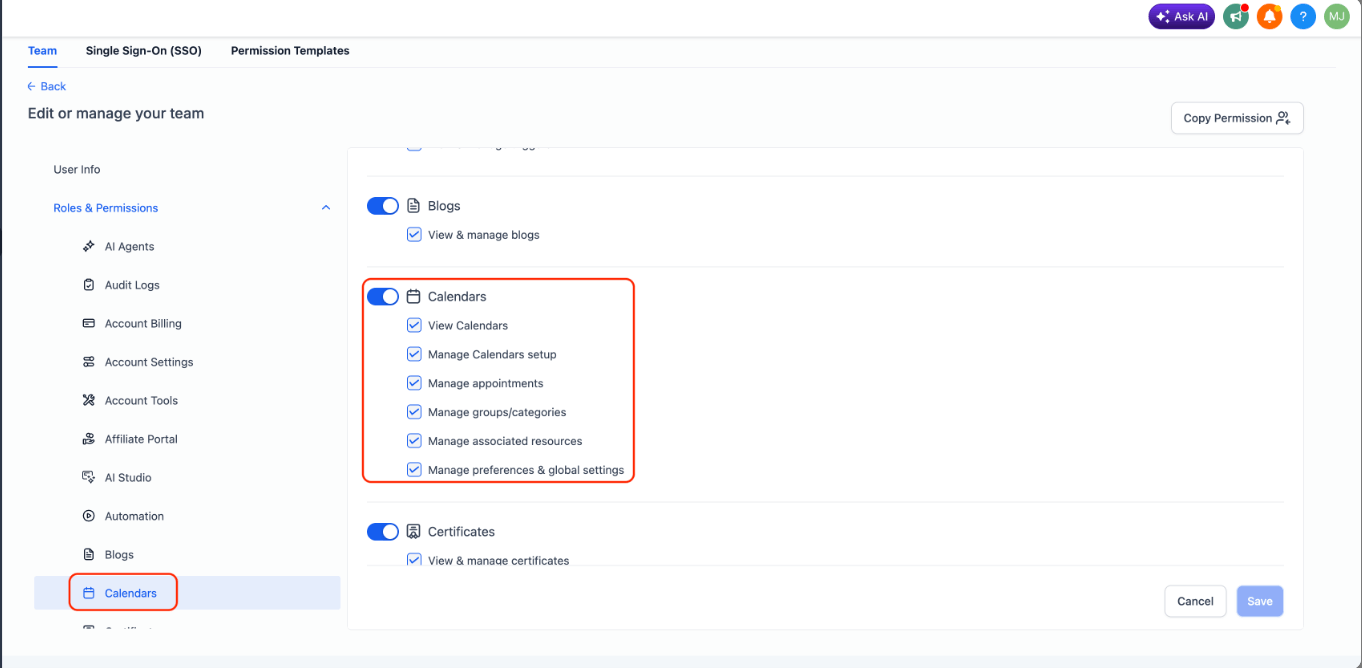
Roles & Permissions for Calendars have been expanded to cover Services and Rentals — not just Meetings. You can now configure exactly what each team member can view and manage across all three scheduling modules from one consistent permission model.
Two new permissions have been added alongside the existing ones:
Mix and match these permissions to build role-specific access for every team member.
How to set it up:
Configure the required permissions and click Save.
The Services payment experience just got more flexible. Customers can now choose how they’d like to pay at checkout — deposit or full amount — instead of being locked into deposit-only. When the setting is enabled, customers booking a service with a deposit configured will see both options side by side.
This also improves support for Buy Now, Pay Later providers. Customers who want to finance their purchase can now choose to pay the full service amount, allowing BNPL to cover the complete booking rather than just the deposit.
Deposit calculations have also been made smarter. Percentage-based deposits are now calculated on the final payable amount after discounts are applied — so if a coupon is added, removed, or changed during checkout, the deposit recalculates in real time. Add-ons and applicable taxes are also factored into the deposit calculation. Flat deposit amounts are unchanged.
How to enable it:
Note: This setting is only available when Online Payments are enabled and the service has a deposit configured.

Jira is now natively integrated into FG Funnels Workflows. Automations can react when issues are created or updated in Jira, and any workflow can manage Jira issues without leaving the builder.
The integration includes 2 triggers and 11 actions:
Triggers (Jira → Workflows): New issue, Updated issue — both polling in near real time.
Actions (Workflows → Jira): Find users, Find projects, Find issues, Create issue, Update issue, Add comment to issue, Add watcher to issue, Add attachment to issue, Add work log to issue, Link issue, and Move issue to sprint.
A Cloud Site selector on every trigger and action lets a single connected Atlassian account target the correct Jira site — useful if you have access to more than one.
Common use cases include notifying customers automatically when an issue is resolved in Jira, and cross-linking related issues when a new one is created that matches an existing external reference like a support ticket or feature request ID.
How to connect:


Todoist is now natively integrated into FG Funnels Workflows. Task activity in Todoist can now fire automations, and any workflow can create and manage Todoist tasks and projects without leaving the builder.
The integration includes 3 triggers and 12 actions:
Triggers (Todoist → Workflows): New incomplete task, New completed task, New project — all polling every 5 minutes.
Actions (Workflows → Todoist): Create task, update task, mark task complete, add task comment, add project comment, create project, move task to section, find tasks, find projects, find user, get collaborators, and invite user.
Common use cases include routing form submissions into Todoist as tasks with the right project, labels, and priority; updating CRM contacts automatically when a task is marked complete; and creating team tasks with due dates, labels, and context notes triggered by any workflow event.
How to connect:
Alternatively, connect via Settings → Integrations → Todoist.
Note: All Todoist triggers and actions are premium workflow components and consume premium action credits. Todoist plan usage is billed directly by Todoist.


The Workflow AI Builder now follows targeted edit instructions with significantly more precision. Name the specific actions or triggers you want changed and it updates exactly those — leaving everything else untouched. You can also apply the same change across many actions in a single instruction, turning what used to be a manual action-by-action grind into a one-pass edit.
What’s new:
How to use it:


Automated workflows can now automatically stop or redirect when a team member steps in. The Goal action now supports User Replied as a goal event — the moment a user sends a reply through a supported conversation channel, the contact jumps directly to the Goal step, bypassing any remaining automated actions.
This is great for preventing contacts from receiving unnecessary messages after human engagement has already started. A lead mid-way through a nurture sequence gets a direct reply from a rep? The remaining emails stop automatically. A support workflow sending reminders? The moment an agent replies, the reminders stop.
How to use it:
Note: The Goal is triggered only when a user — not a contact — sends the reply.

The Wait action now supports User Replied as a wait condition — keeping a contact paused until a team member responds to the conversation before the workflow continues. Combined with the existing timeout option, you can now build SLA workflows that automatically escalate when no user reply arrives within your target response time.
The workflow pauses until a user replies or the timeout is reached — whichever comes first. If a reply is detected, the workflow continues immediately. If the timeout expires first, route the contact through escalation steps like notifications, reassignments, or task creation.
How to use it:
A support team can wait up to 30 minutes for an agent reply — if the SLA is missed, a supervisor is alerted and the conversation is reassigned. A sales team can wait 15 minutes for a rep to respond to a new lead — if no reply comes, an urgent task is created and the sales manager is notified.
Note: If no timeout is configured, the workflow waits indefinitely until a user reply is received.

Workflows can now start when a team member replies to a conversation — not just when a contact does. The User Replied trigger fires the moment a user sends a reply through a supported conversation channel, making it easy to automate internal processes based on agent activity.
Use it to update opportunity stages when a rep responds to a new lead, add tags when a support agent replies, create follow-up tasks, send internal notifications, or log team engagement — all triggered automatically without any manual steps.
How to use it:
Note: This trigger activates only when a user (team member) sends a reply — not when a contact responds.

Channel Management changes how AI bots are assigned to your conversation channels. Instead of relying on a single “Primary Bot,” any bot can now be assigned directly to specific channels and respond independently — giving you far more control over how conversations are routed.
What’s new:
Your existing Primary Bot is automatically migrated to the channels it already supports — it keeps responding exactly as before. No need to recreate your bots.
For Facebook and Instagram with multiple connected accounts, each Page or account is treated as a separate channel identifier. After migration, your existing bot responds across all connected accounts by default. To route them separately, assign a specific bot to each account.
How to enable it:
Important: When this feature is enabled, any agent assigned via the “Update Conversation AI Bot and Status” workflow action will respond on all channels. The previous Supported Channels configuration is deprecated.
Prospect AI has been completely redesigned to give you better visibility into what your AI sales agents are doing, what they’ve found, and what’s happening behind the scenes.
Redesigned agent cards — each card now shows total prospects discovered, last successful run, next scheduled run, agent description, and a quick link to view all prospects found. No more opening each agent just to check its status.
New agent home — clicking an agent no longer drops you straight into edit mode. Instead you land on the agent’s own workspace with two views:
Agent Activity Center — Prospect AI now explains what your agent has been doing. See when it last ran, when it runs next, how many prospects were found, and which business categories were discovered. If no prospects are found, you now get actionable recommendations — increase search radius, relax conversion score filters, lower GBP rating requirements, or adjust your monthly limit allocation — instead of wondering why nothing happened.
Dashboard metrics & search — the Prospect AI dashboard now shows total agents, active agents, total prospects discovered, and monthly lead usage across all agents at a glance. A new search bar makes it easy to find and manage specific agents as your AI team grows.
Native CRM pipeline integration — when configuring an agent, choose which pipeline and stage new prospects should enter. Every newly discovered prospect is automatically added to your CRM pipeline — ready for review, automation, and outreach — with no manual movement required.


FGF Notifications