Welcome to your weekly roundup of updates through the week of November 28th, 2025. This week’s updates are all about sharper control in E‑commerce, smarter AI follow-up behavior, and new tools in Reputation, Media, and Payments. If you have any questions regarding these updates, feel free to reach out via email [email protected] or in live chat inside of the app.
E‑commerce Store
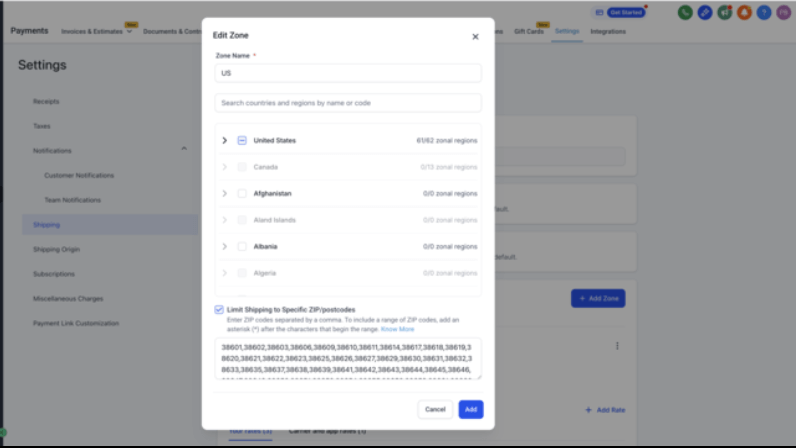
Zipcode Filter Selection for Shipping Zones
Store owners can now limit shipping zones by specific ZIP/postcodes for tighter delivery control.
Key Highlights
- New checkbox: Limit Shipping to Specific ZIP/Postcodes on zones.
- Support for:
- Single codes (e.g.,
100210)
- Comma-separated codes
- Wildcards (
46* to include all ZIPs starting with 46)
- Real-time validation prevents invalid or duplicate entries.
- Checkout logic matches orders to zones based on entered ZIPs or wildcard patterns.
- Shipping Zones overview now lists included ZIPs and wildcards under each zone.
How to Use It
- Navigate to Payments → Settings → Shipping & Delivery → General / Custom Profile → Shipping Zones.
- Create or edit a zone and enable Limit Shipping to Specific ZIP/Postcodes.
- Enter ZIPs, multiple entries, or wildcards as needed.
- Save changes — your zone is now active only for matching postcodes.
Important notes: wildcards can only appear at the end; invalid or empty ZIP lists block saves; if a customer’s ZIP doesn’t match any zone, that zone is not applied.
Selection Micro-Interaction for Featured Product & Collection Elements
Selecting and managing Featured Products and Collections in the builder is now more visual and intuitive.
What’s New
- Double-click on canvas items to select or configure them directly.
- For unmapped elements, the selection drawer opens automatically.
- For mapped elements, the relevant product/collection is highlighted.
- Two-way sync between canvas selection and sidebar drawer.
This update reduces back-and-forth between canvas and panels, helping you configure store elements faster.
Processing Fee on E‑commerce Store Checkout
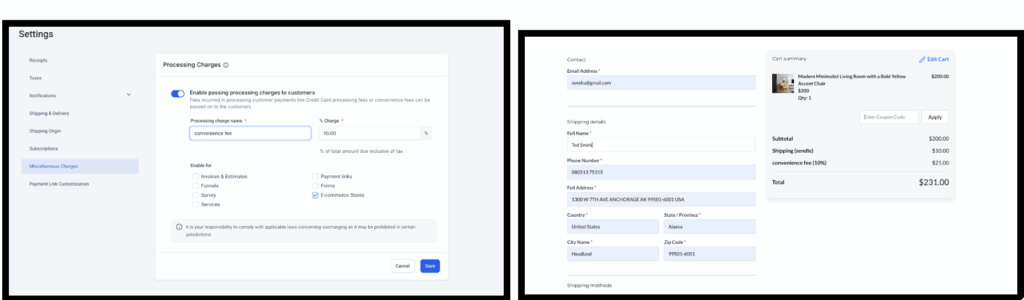
You can now apply a processing fee directly at checkout to cover payment or convenience costs.
What’s New
- New Processing Fee option for E‑commerce checkout flows.
- Fee is calculated on the full transaction (Subtotal − discounts + taxes + shipping).
- Shown as a separate line item during checkout and on order summaries.
- Rounded to two decimals for consistency.
How to Use It
- Go to Payments → Settings → Miscellaneous Charges → Processing Charges.
- Enable Processing Fee and set the percentage and label name.
- Ensure Ecommerce Stores is selected as an applicable channel.
- Save the configuration — the fee will now automatically apply to store checkouts.
- Upsells do not currently support processing fees, and disabling the feature does not alter existing, non-editable orders.
Funnel AI
Faster, Smarter Funnel and Website AI Updates
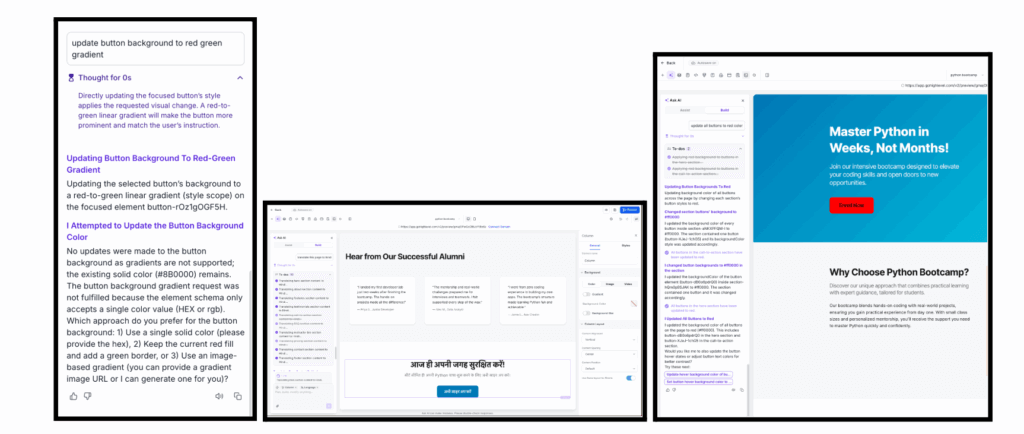
Funnel AI updates are now significantly faster (1.5–2×), more reliable, and more transparent, while reducing token usage and cost by up to 10×.
What’s Improved
- Faster, incremental updates: See changes roll in live instead of waiting for a full pass.
- 1.5–2× faster and up to 10× cheaper: Optimized model usage with lower token consumption.
- Template-guided value generation: Less chance of broken or unsupported outputs.
- Smarter handling of unsupported features: If you request something that isn’t supported, Funnel AI now tells you clearly and suggests valid alternatives.
- Better progress feedback: More accurate progress updates and suggestions, fewer false “update complete” messages.
This makes AI-powered edits feel more real-time, predictable, and cost-effective.
Email Builder
Bulk Action Campaign Enhancements
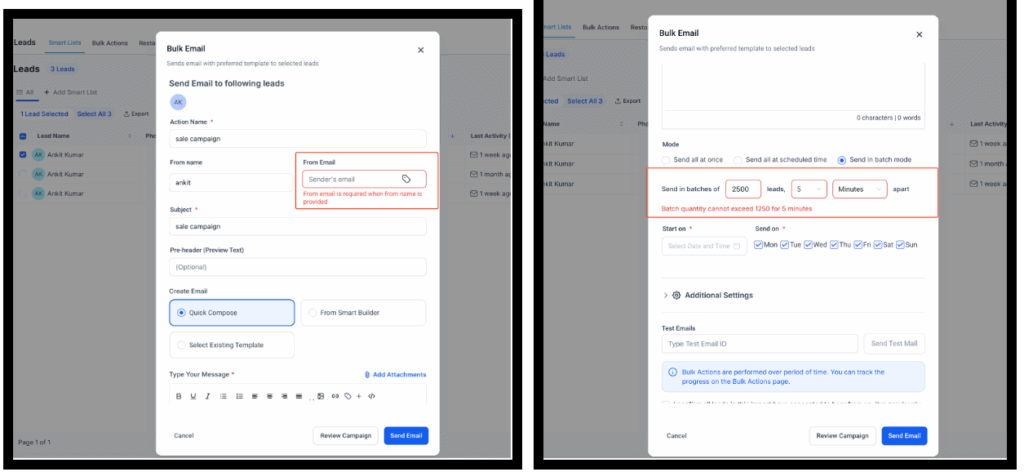
Bulk Action email campaigns have been tuned for smoother setup and more reliable reporting.
What’s New
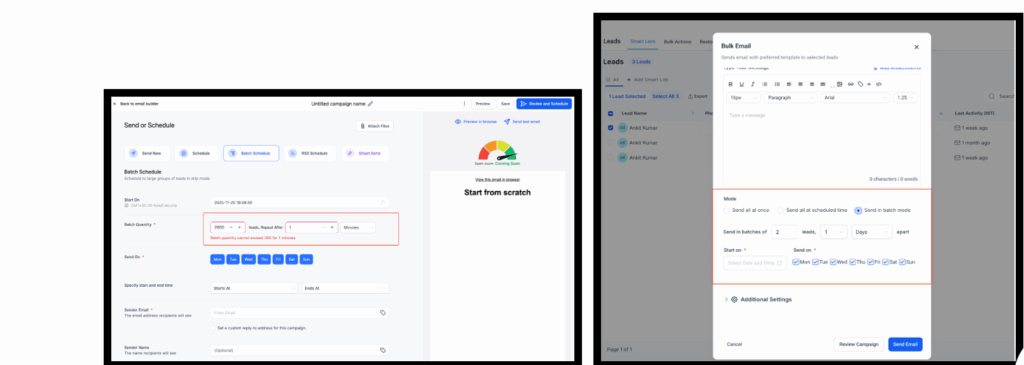
- Simplified Drip Mode UI for easier scheduling.
- Improved From field validation (checks both email address and From Name).
- Attachments and images from snippet templates are now reliably included in sends.
- All Bulk Action campaign metrics now appear under Bulk Action Campaigns in the Email Marketing Stats dashboard.
- Better error handling when Drip schedule limits are exceeded.
Where to Check
- Create a Bulk Action Email from the Contacts page by selecting contacts and clicking Emails.
- View stats under Marketing → Emails → Dashboard.
Invoices
Editable “Payment Schedule” Notifications
You can now fully customize, enable, or disable the Payment Schedule Received notification for invoices with installment payments.
How to Use
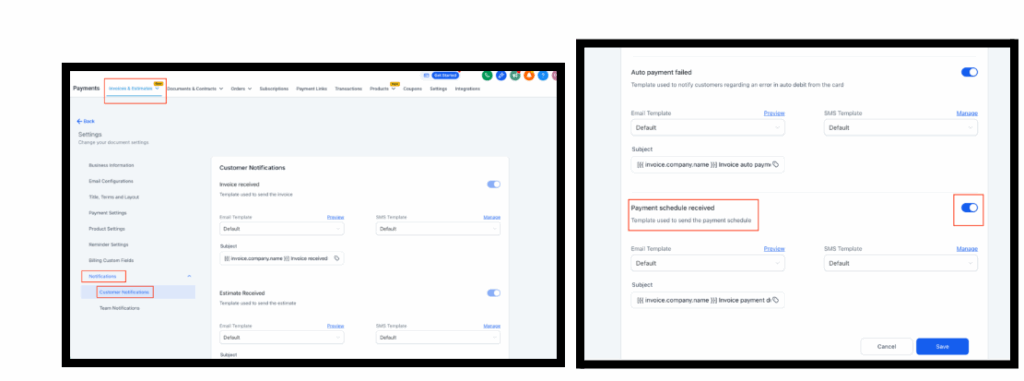
- Navigate to Payments → Invoices & Estimates → Settings → Notifications → Customer Notifications.
- Locate Payment Schedule Received and toggle it on/off as needed.
- Click Manage beside the Email or SMS template to edit or customize the message.
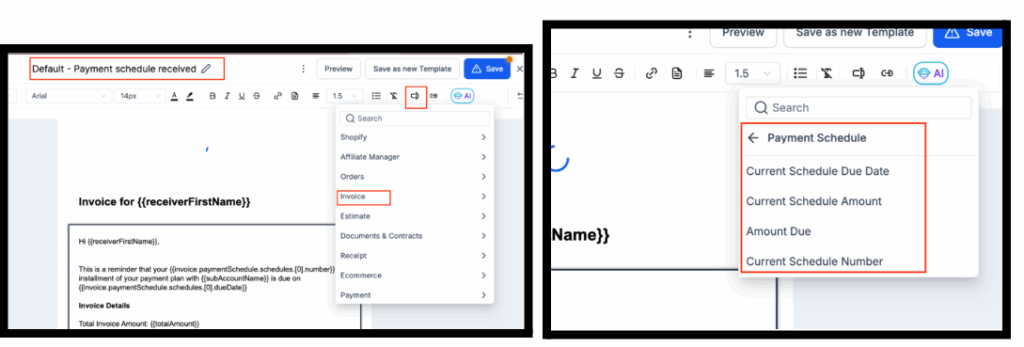
- Use custom fields related to payment schedules (fields render empty if no schedule is present).
- Save your template.
This lets you brand and control schedule emails instead of relying on a fixed system message.
Conversations AI
Auto Follow-Up Revamp
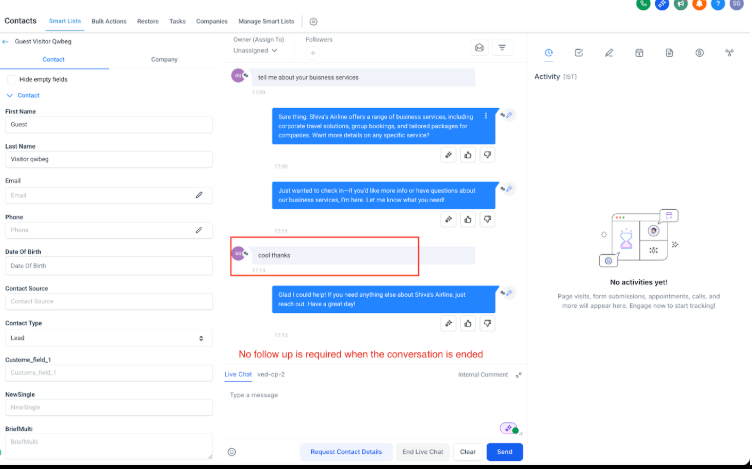
Auto Follow-Up logic is now more human and context-aware so your AI doesn’t follow up when it shouldn’t.
Smarter “When Not to Follow Up” Logic
Follow-ups are now suppressed when:
- Contacts are disqualified (e.g., not in service area, budget mismatch).
- Contacts express disinterest or opt out (“not interested,” “stop texting me”).
- Responses are negative, angry, or abusive.
- The conversation ends with soft closure (“Thanks for the chat,” “Let me know if you need anything else”).
Better Handling for Contact-Requested Follow-Ups
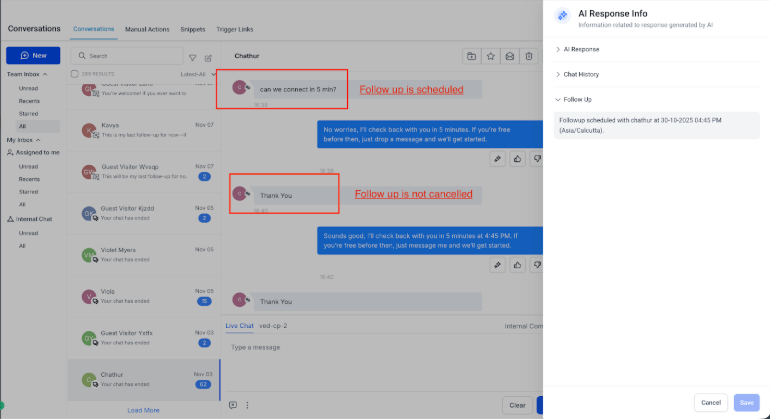
When contacts explicitly request follow-ups (e.g., “Talk to me at 5 PM,” “Follow up tomorrow”):
- The AI stores and respects the scheduled follow-up.
- Simple acknowledgments (“Thanks,” “Great, appreciate it”) keep the follow-up active.
Better Handling When Contacts Are Busy
For messages like “I’m busy, call me later,” the AI:
- Stores and respects the requested follow-up time.
- Keeps follow-ups active if the user acknowledges positively.
This makes follow-ups feel more natural and respectful, focusing only where they add value.
Prospecting Tool
Website Detection Improvements in Marketing Audit Reports
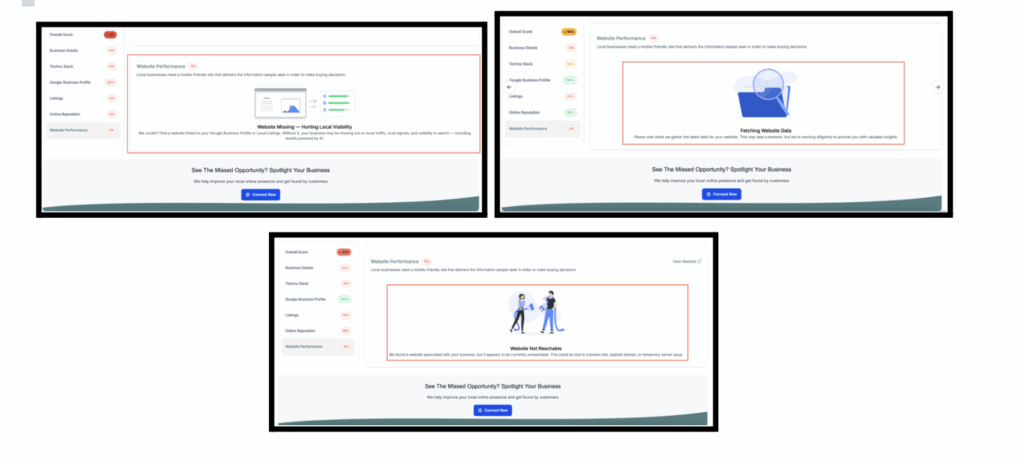
Website detection in Marketing Audit Reports is now more accurate and nuanced, with new states that clarify what’s really happening.
What’s New
- Multiple fallbacks (GBP, local listings) to detect websites more reliably.
- Three detection states instead of a simple yes/no:
- No Website Found – no site listed; clear upsell opportunity.
- Website Found but Not Reachable – site exists but is down or broken.
- Waiting for Data – detection still in progress; kept out of customer-facing reports.
This provides more transparency, reduces confusion, and gives agencies clearer talking points and upsell opportunities.
WordPress
Enhancements to Funnel Embedding & Page Rendering (v3.0.16)
WordPress funnel embedding is now more “native” and performant.
What’s New
- Use your existing WordPress header and footer when embedding funnels via Native HTML Embed.
- Faster funnel rendering using the WordPress template engine instead of raw payload rendering.
- UI enhancements in the plugin’s auth wall, sign-in, and welcome experience.
These changes make embedded funnels feel fully integrated with your site’s design and load more quickly.
Media Center
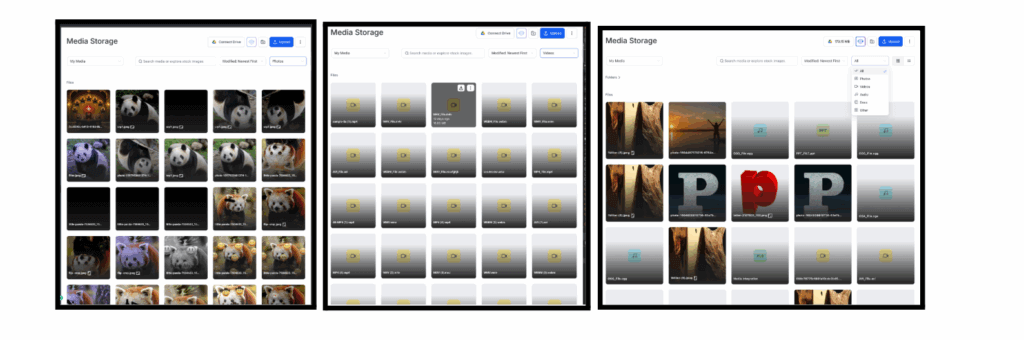
File Type Filter for Faster Discovery
A new File Type filter makes it much easier to find the right files across My Media, Google Drive, and other sources.
What’s New
- Filter by: All, Photos, Videos, Audio, Docs, PDFs, Other.
- Smart context awareness disables filters where they don’t apply (e.g., stock libraries).
- Searches persist when switching between sources and filters.
The result is faster media selection, less clutter, and a more focused file browser.
Reputation Management
Video Testimonials in Labs
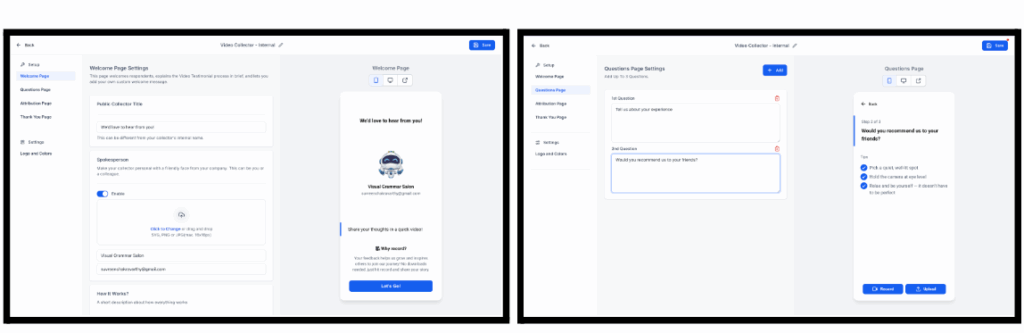
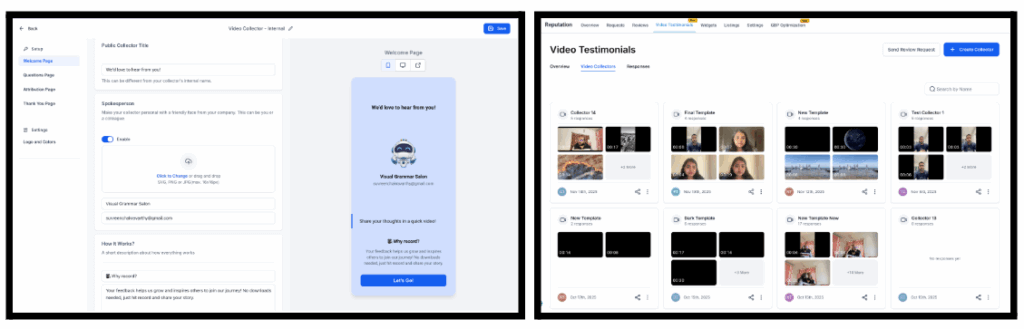
You can now collect, manage, and showcase video testimonials as part of Reputation Management.
Key Capabilities
- Create Video Collectors with multi-step flows (Welcome, Questionnaire, Attribution, Thank You).
- Collect customer attribution details (name, email, phone).
- Brand collectors with your colors, logo, and text.
- Send video review requests via Email, SMS, or WhatsApp.
- Receive, review, and download responses in a dedicated Responses tab.
- Display selected video testimonials in the Review Widget using layouts like List, Carousel, Grid, Slider, or Column.
How It Works
- Enable Video Testimonials under Settings → Labs.
- Go to Reputation → Video Testimonials.
- Create a Video Collector and customize its steps.
- Share the collector links directly or via Send Review Request.
- Manage video responses and configure them in your Review Widget.
Payments
Gift Cards – Creation, Selling, Sending, and Redemption (Labs)
You can now run a full gift card system directly inside FG Funnels, from product creation to redemption.
Key Capabilities
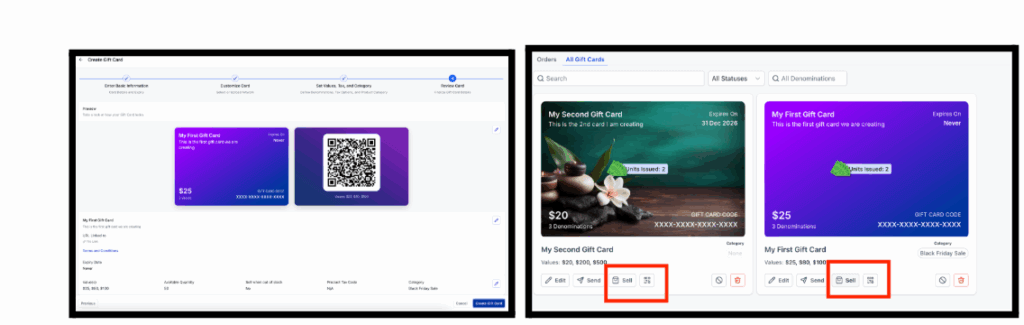
- Create gift card products (name, terms, expiry, artwork, denominations, categories, tax setup).
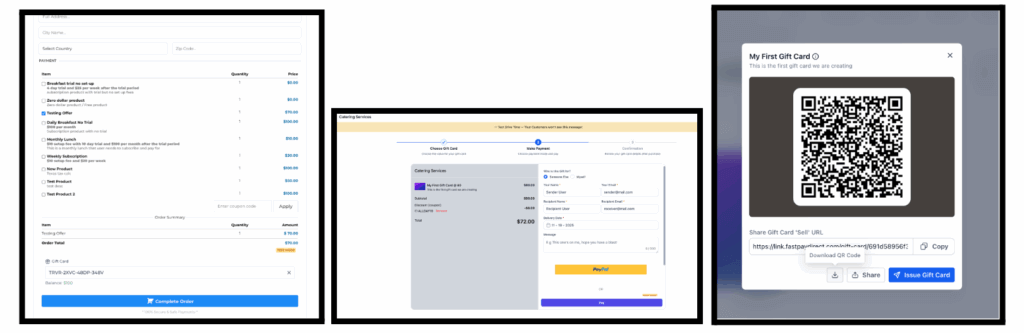
- Sell via dedicated checkout links, embeds, QR codes, or by adding gift cards as products in existing checkouts (funnels, forms, payment links, invoices, stores, calendar payments where supported).
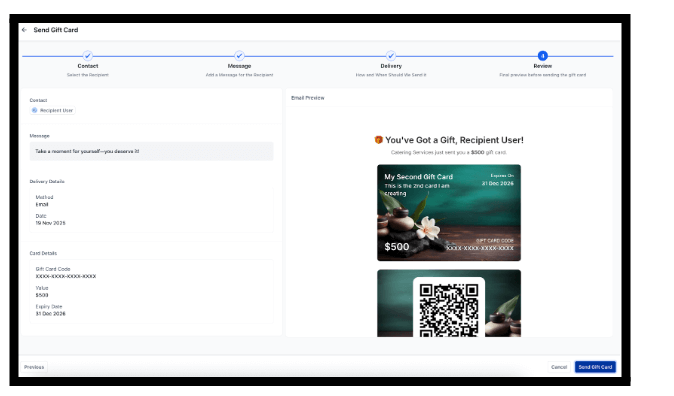
- Send gift cards directly (no payment) for rewards, refunds, or goodwill.
- Track all cards under Gift Card Orders with balance, status, and recipient details.
- Redeem across supported checkouts and providers, including partial payments.
Where to Find It
- Payments → Gift Cards → Gift Card Products – create, edit, archive, deactivate, sell, send.
- Payments → Gift Cards → Gift Card Orders – track all issued cards and view details.
- Use checkout links, embeds, QR codes, or add as products in existing checkouts.
GBP Optimisation Tool
GBP Post Scheduler
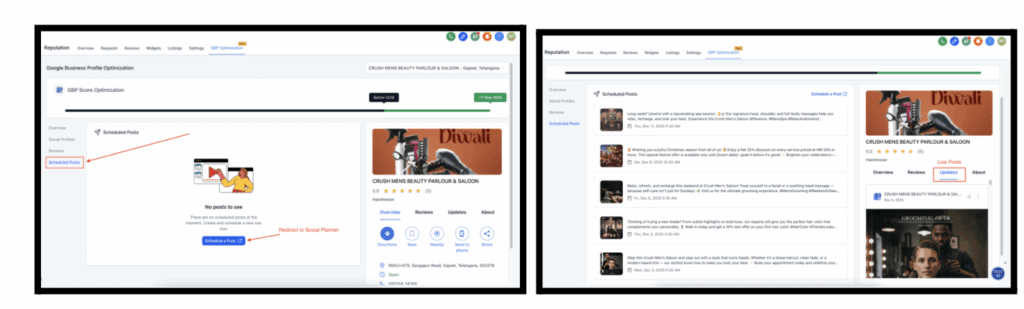
The GBP Optimisation Tool now includes a full post scheduler powered by the Social Planner.
How to Use the GBP Post Scheduler
Step 1: Access the GBP Post Scheduler
Go to Reputation → GBP Optimisation.
Navigate to Scheduled Posts and click Schedule a Post.
Step 2: Connect Your Google Business Profiles
Ensure your GBP accounts are connected to your Social Planner tool.
Select the business social profile(s) you want to post to (one or multiple).
Step 3: Create or Generate a Post
Click Create New Post.
Choose the post type — Update, Offer, or Event.
Either write your own content or use AI Assist to generate post text and an image.
Step 4: Schedule or Post Immediately
Choose your publish date and time.
Click Schedule or Post Now.
Step 5: Track & Manage Your Posts
Review scheduled posts in the GBP Optimisation dashboard.
Once published, posts appear under the Preview → Updates tab.
Edit, reschedule, or delete upcoming posts as needed.
This lets you run regular, AI-assisted GBP content without leaving FG Funnels.
Calendars – Mobile
Mobile App – Services (v2) Appointments
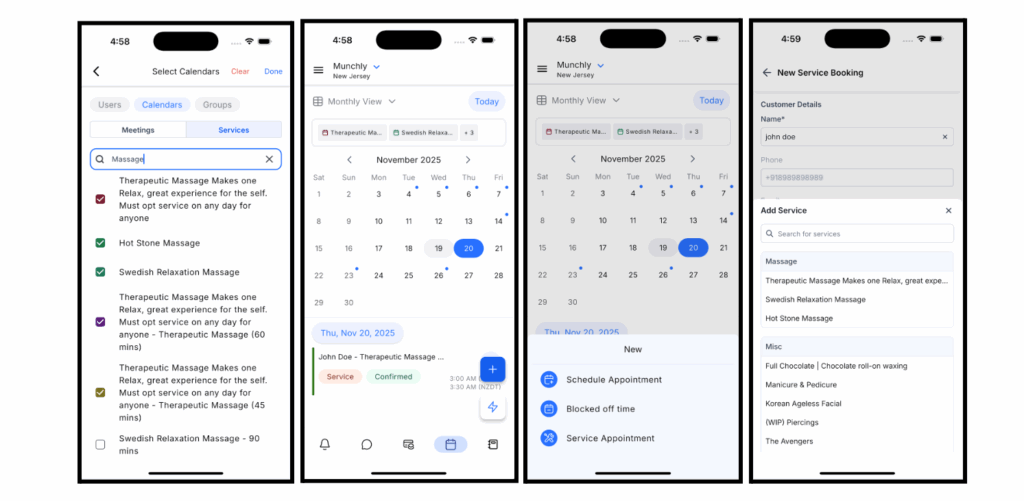
Services (v2) is now available on mobile, offering a full end-to-end booking flow from your phone.
What’s New
- Multi-location booking based on location availability.
- Variations and pricing options per service.
- Add-ons with quantity support.
- Coupons for discounts.
- Staff-specific pricing and date-specific hours.
- Multi-service checkout and multi-service calendar filtering (Month, Week, List views).
How It Works
- Go to the Calendars module and select New Service Appointment from the plus (+) button.
- Select an available location.
- Add multiple services into the booking flow.
- Choose variants for each service.
- Add add-ons and quantities as needed.
- Review staff assignment and pricing.
- Apply coupon codes if available.
- Select a time slot or custom time based on availability.
- Tap Schedule Appointment.
Workflows
Advanced Builder: Bulk Node Control, Selective Formatting, and Quick Sticky Notes
Working inside large workflows is now much faster in the Advanced Builder.
What’s New
- Bulk enable/disable for selected nodes to quickly turn branches on or off.
- Format only the selected area to clean up spacing and connections in a specific region of the canvas.
- Right-click to add a sticky note to a selection for quick labeling and organization.
These tools reduce repetitive edits and make big workflows easier to read and maintain.