


Welcome to your weekly roundup of FG Funnels updates through the week of April 7th, 2026.
This week’s release is packed with powerful upgrades across AI Studio, Calendars, Workflows, Voice AI, Ecommerce, and more. You’ll also see improvements to mobile app management, chat widgets, and new tools to help you automate faster and serve your clients better.
If you have any questions about these updates, email us at [email protected] or reach out through live chat inside the app — we’re always happy to help.
A handful of behind-the-scenes improvements make AI Studio smoother and more reliable. The annoying “stale run” error message that used to pop up during long prompts? Fixed. The preview no longer flickers back and forth between live and static during edits — it stays live so you always see what’s actually happening.
Project URL slugs now follow stricter rules to keep links short and clean, and long single-word messages no longer break the chat UI.
Browsing projects inside a folder now shows a breadcrumb trail (like “All Projects > My Folder”) so you always know where you are and can navigate back easily.

Customers can now choose to pay in installments when booking appointments through FG Funnels Calendars, Services, and Rentals. Klarna and Affirm are available as payment options at checkout, and the available options display dynamically based on the customer’s location and eligibility.
To enable it, go to Payments → Settings → Integrations → Manage Stripe and turn on Klarna and Affirm for Calendars.

A handful of smart improvements make the booking flow cleaner for both businesses and customers.
On the business side, the country code for phone numbers is now auto-selected based on your business location, the logged-in user is automatically selected as staff when creating a booking, and you’ll see clear alerts if a service is no longer available.
On the customer side, unnecessary filters (like category or location dropdowns) are automatically hidden when there’s only one option — keeping the booking page clean and simple. The deposit/payment amount is also displayed more clearly on mobile.
You can also now set a global appointment title format from Services → Global Settings → Service Settings, keeping your calendar, notifications, and integrations consistent.
Workflow triggers for Customer Booked Appointment and Appointment Status now let you choose who gets enrolled: the primary contact only, the contact and their guests, or guests only. This makes it much easier to send reminders and follow-ups to everyone attending a multi-person appointment.
Existing trigger setups won’t be affected — the default behavior stays as “Contact only.”

You can now choose exactly which timezone your appointments display in on mobile — your personal timezone, your business timezone, or any custom timezone in the world. The preference syncs to your account, so it follows you across devices.
This is a display-only setting and has zero impact on your availability or how clients book with you.
How to Get Started:
You can now fully manage Service v2 appointments right from your phone. No more jumping to a desktop just to fix a booking or handle a last-minute reschedule.
From any Service appointment’s detail view, tap the context menu (⋮) in the top-right corner to access all four actions. Paid appointments are protected from structural changes, but the app clearly explains what’s locked and why. Duplicate is always available as a workaround.
Mobile service businesses — groomers, repair techs, consultants, anyone who travels to clients — can now collect the client’s service address at the time of booking. The address is saved with the appointment, pre-filled on edits and duplicates, and displayed prominently on the appointment view with one-tap copy and Maps navigation.
Setup is done once on web (Calendar Settings → Services v2 → Locations), and the mobile app supports it automatically from there.
Service v2 appointments now show the full address (not just the location name) with a one-tap copy button and smart navigation. Physical addresses open in Maps, and meeting links (Zoom, Google Meet, etc.) launch directly in-app. No more digging through emails to find a join link.
Large workflows just got a lot easier to manage. You can now search for custom values, tags, or text inside a workflow and replace them one at a time or all at once.
Open it with the search icon or Alt+F / Option+F. Results highlight instantly and the canvas jumps to each matching node so you can review it in context. Replace supports custom values and tags, and any changes can be undone.
The Trigger Stats panel in the workflow builder now gives you a clearer snapshot of how contacts are moving through each trigger. You can see attempted enrollments, matched and unmatched contacts, top unmatched reasons, and even search for a specific contact to see why they did or didn’t enroll — all without leaving the builder.

The AI Builder now asks smart questions before it builds. If your prompt is missing key details — like what triggers the workflow, which channel to use, or when something should happen — the Clarifying Agent surfaces up to three targeted questions first.
Questions are presented as multiple choice, and every question is skippable if you’d rather let the AI decide. The result is more accurate workflows on the first attempt, with fewer revisions needed.

A few quality-of-life improvements in the Advanced Builder: stats can now be toggled at the individual trigger/action level, stats mode works in edit mode (not just read-only), and your stats view stays saved when you reload. The builder also auto-adjusts layout to prevent overlap when stats are visible, and there’s a new, cleaner default screen when opening the AI Builder.

The Messaging Analytics section in Phone Settings got a full redesign. Instead of a flat grid of metric cards, you now get a structured dashboard with:
The default view is now 30 days (up from 7), and you can go up to 90 days. Enable it via Labs → Messaging Analytics V2.

Sole Proprietors can now complete A2P registration through the same streamlined Chat Widget flow available to standard accounts. The flow auto-detects Sole Proprietor accounts, pre-selects the campaign use case, and pre-fills consent templates based on your message type selection.

For all new transactional campaigns created through the Chat Widget registration flow, the use case is now automatically set to “Customer Care.” This removes the manual selection that previously caused rejections when the wrong use case was chosen.
The Enhance Prompt feature is now available across all AI nodes in Agent Studio — including all tools connected to the AI Agent node (MCP, Knowledge Base, Web Search, API Call) and all Generative AI nodes (Image, Audio, Text, Video). Use it to refine and optimize your instructions for better, more consistent AI output.
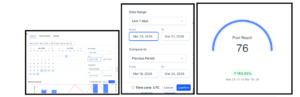
Social Planner analytics are no longer locked to a 7-day view. You can now select any date range using a calendar picker or choose from quick presets (7, 14, or 30 days), and compare your results to the previous equivalent period.
Comparison shows percentage change across Total Posts, Likes, Followers, Impressions, and Comments. Charts also scale intelligently — daily data points for short ranges, aggregated views for longer ones.
How to Use:
Store owners can now deliver digital products via email attachment or external URL, with instant access from the Thank You page — no login required.
Files under 20MB are automatically attached to order confirmation emails. Files over 20MB are delivered via a secure download button. Customers can also access their files immediately after checkout from the Thank You page.
A new toggle in Store Notifications (“Deliver Digital Products Directly After Store Purchase”) controls this behavior. When disabled, fulfillment falls back to the Customer Access Center.


Voice AI agents now have a dedicated full-screen builder with a three-panel layout: your prompt editor, all configuration settings, and a live test console — all side by side. Actions, Knowledge Base, Call Settings, Voice Settings, System Prompts, and 50+ other settings are organized into clean, collapsible sections so you can build and deploy from one place.
The feature is live via Labs — open any Voice AI agent to try it.
A new Card Details field is now available in the Document Builder. Drag and drop it into any document or template to securely collect payment information at the time of signing. The card is saved on file for future charges, subscriptions, or auto-pay workflows — reducing the need for follow-up payment collection after signing.
How to Use:


The border settings panel in Page Builder got a serious upgrade. You can now adjust border width and radius per side individually, and five new border styles have been added: double, groove, ridge, inset, and outset. The updated controls are consistent across all supported elements, and existing pages are unaffected.

The Live Chat Widget can now be embedded inline within your website or funnel content — not just as a floating bubble. Place it below your hero section, next to a form, or near a CTA for a more integrated, conversion-focused experience.
It works across Funnels, Websites, Landing Pages, and custom HTML sites, and is mobile-responsive by default.
How to Use:


Communities got a major visual refresh, now live in GoKollab Beta. Highlights include:
Google Sheets is now a live data source for your Knowledge Base. Connect a sheet and choose between near real-time sync (~15 minute refresh) or manual sync. The integration handles column additions, row changes, and cell updates automatically — keeping your Knowledge Base up to date without any re-uploading.
The feature is live via Labs.
That’s a wrap for this update! There’s something in here for just about every part of your business. As always, dig into the features that make the most sense for your workflows and don’t hesitate to reach out if you have questions.
FGF Notifications








