

Welcome to your weekly roundup of FG Funnels updates through the week of August 20th, 2026.
From Managed Agents (formerly Super Agents) getting Custom Skills and new Facebook Lead Form triggers, to Tablet Mode in the Funnel Builder, QR codes saving to Apple and Google Wallet, appointments in the Client Portal, and a fully revamped HubSpot Importer — this week’s updates bring some seriously powerful tools to your stack. We’re also rolling out upgrades to Courses, Communities, Knowledge Base, Workflows, Reporting, and more — all designed to save you time and give your clients a better experience.
If you have any questions about these updates, email us at [email protected] or reach out through live chat inside the app — we’re always happy to help.
Super Agents has been renamed to Managed Agents — a name that better reflects what these agents actually do: intelligent, configurable agents that businesses can build and manage for ongoing work. This is a rebrand only. Every existing agent, trigger, conversation, and configuration continues to work exactly as before with no action required.
Find them in Agent Studio → Managed Agents.
You can now create reusable Skills and share them across your Managed Agents. Instead of typing the same guidance into every agent, write it once — how you qualify a lead, your follow-up email format, your tone guidelines — and enable it for the agents that should follow it. When a request matches a skill, the agent applies those instructions automatically.
Skills can be created, edited, searched, and toggled on or off per agent at any time. In the agent chat box, type “/” to quickly search and select a skill by name.
Available today for Managed Agents. Support for other AI products is coming.
Managed Agents can now be triggered directly by a Facebook lead form submission or a survey response — no workflow required in between. The submission starts the agent, and every answer the person gave arrives with it so the agent can qualify, reply, or route the lead immediately.
For Facebook: choose a page and optionally specific lead forms. For Surveys: select one or more surveys. Both configuration panels are searchable. The agent’s Activity feed shows every submission that triggered it.
Your Facebook page needs to be connected for lead sync, and a page admin must have accepted Meta’s Lead Ads Terms of Service before submissions will reach your agent.
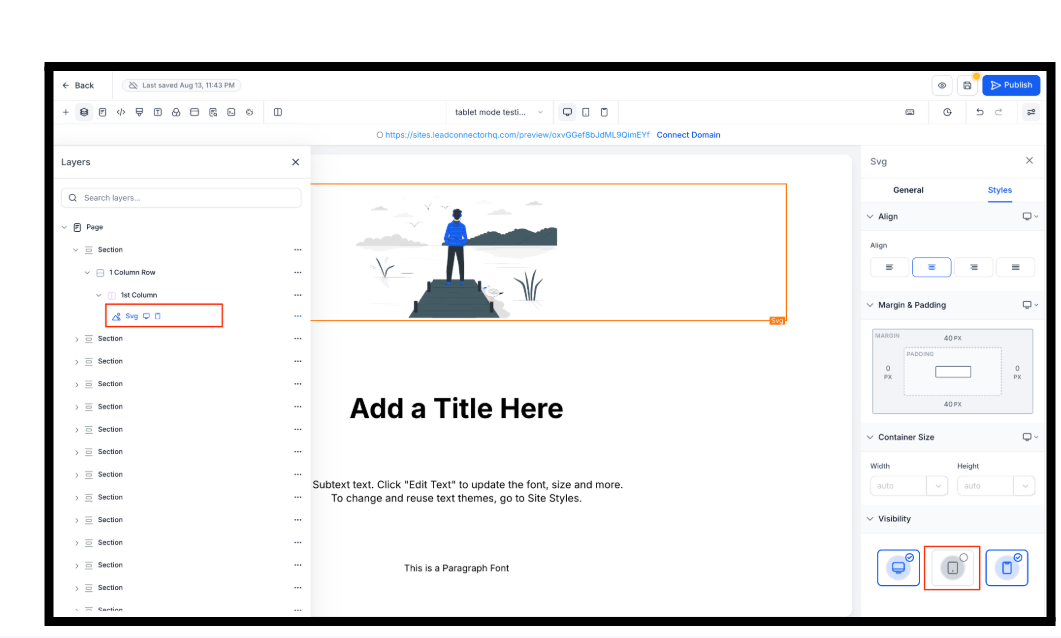
Tablet is now a full device you can design for in the Website and Funnel Builder — alongside desktop and mobile. Style it on its own canvas, with tablet-specific font size, line height, text alignment, padding, margin, spacing, width, height, and show/hide visibility — all stored separately so editing one device never overwrites another.
Tablet styling carries through to preview and your live page. Existing pages keep working exactly as before — anything not explicitly set for tablet uses your desktop design until you change it.
Live pages need to be published again to pick up tablet styling. Note: mobile styles now cover a wider range of phone sizes too — larger phones may look slightly different after the next publish.
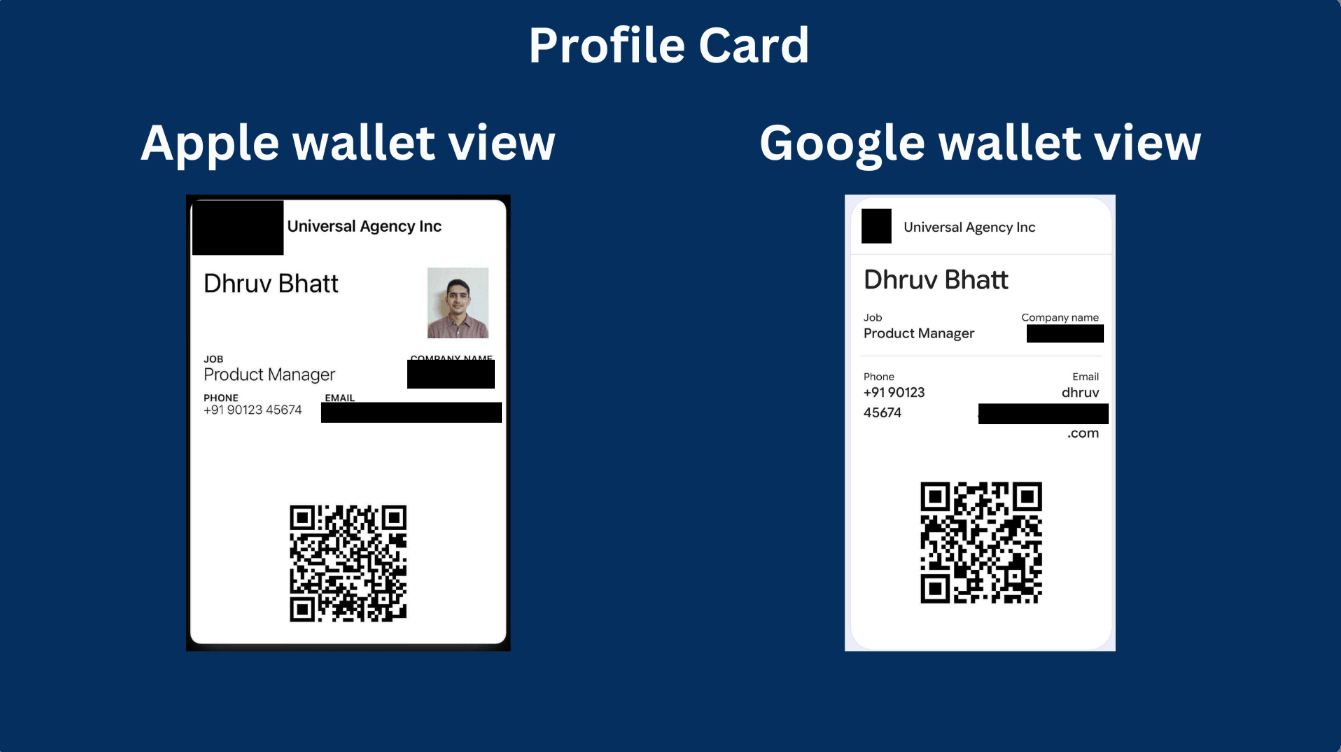
QR codes can now be saved directly to Apple Wallet or Google Wallet. Open your wallet, select the right code, and have a customer scan it instantly — no digging through a photo gallery. Wallet passes include the QR type, associated location, and destination context so you always know which code is which. Works with both existing and newly created QR codes.
QR Code Builder → create or edit a QR code → final step → Add to Wallet → scan the QR code with your phone.
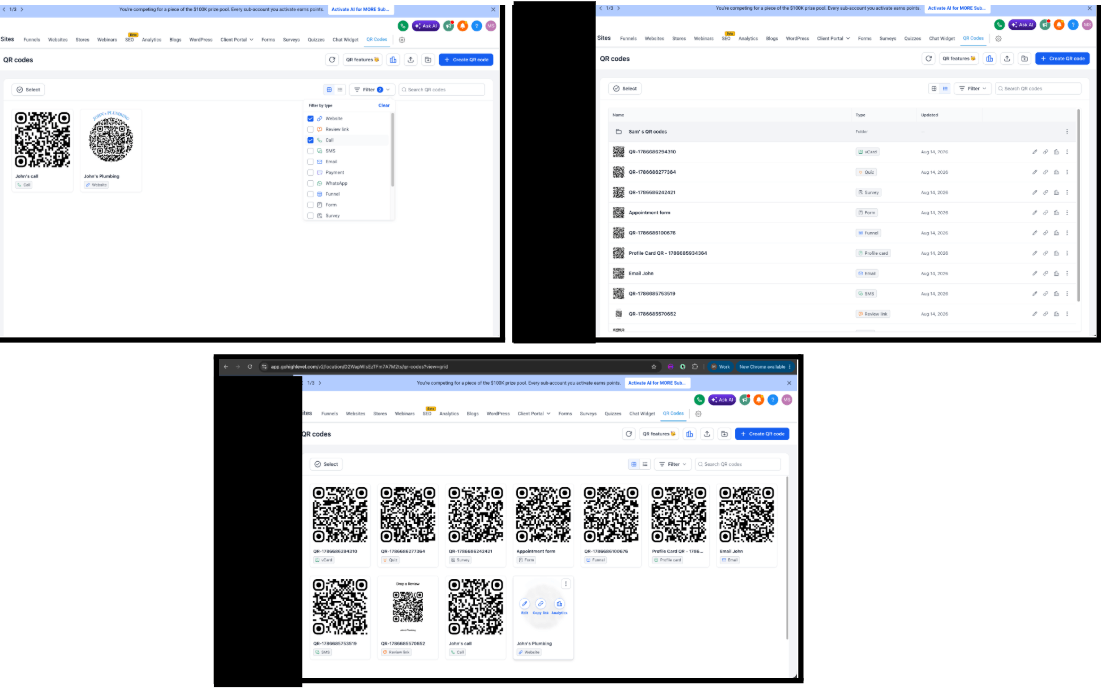
The QR Codes listing page has been significantly upgraded. Search by name, filter by one or more types (Website, Payment, Funnel, Form, and more), toggle between grid and list view, and access Edit, Copy Link, and Analytics directly from each card on hover. QR codes are now scannable directly from the listing — the shadow overlay that blocked them is gone. Bulk actions respect your active search and filters.
Clients can now book, view, and manage appointments directly from the Client Portal. They can see upcoming and past appointments, book new ones with their contact info auto-filled, reschedule or cancel eligible appointments, and book again instantly after a session ends.
You control which calendars are available for client booking and can turn the Appointments feature on or off from App Permissions.
How to enable:
Currently available in the new Client Portal UI only. Branded app support coming soon.

Contacts now receive an in-app notification inside the Client Portal whenever they receive a new invoice or estimate. No more waiting to check email — the alert appears right where they’re already working, with a direct link to the invoice or estimate. No setup required.


When a Client Portal magic link has expired, contacts are no longer met with a dead end. Instead, they’re automatically redirected into the OTP login flow with their email masked on the verification screen — so they can self-recover access without needing a new link from an admin.
The HubSpot Importer is now available to all users. Migrate Contacts, Deals (imported as Opportunities), Companies, Tasks, Emails, Notes, Properties, Pipelines, Stages, and supported Associations from HubSpot in one guided flow — no more fragmented CSV exports.
You can select exactly which objects and properties to import, preview record counts and destination mappings before starting, and run the import in the background while continuing to work. A centralized Import History shows live progress and lets you drill into object-level and record-level results. Download error reports as CSV to fix and re-import any issues.
Contacts → Import → Import from HubSpot.

Course creators can now post announcements with rich content — including images and links — directly inside the course experience. Target announcements to specific courses or all learners, optionally send email notifications to course members, and manage everything from a dedicated Announcements admin area.
Learners see new announcements via an unread banner and a dedicated announcements list — right where they’re already studying.
Courses → Announcements (from the courses list).

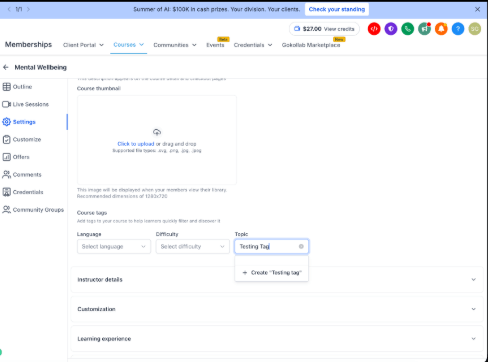
You can now create custom topics for your courses directly from the Topic dropdown in Course Settings. Custom topics are location-scoped and reusable across all courses in the location. Up to 20 custom topics per location. A near-duplicate guard prevents accidentally creating very similar topics.
A new Requested to Join Group workflow trigger fires whenever someone requests to join a community group. Filter by group and by membership question responses — so you can build workflows that automatically approve, route, or review join requests based on what people actually answered. Membership responses can also be used in If/Else conditions and passed into AI prompts to detect spam or low-quality submissions.


Paste a supported link (YouTube, Loom, and others) into a post or comment and a rich preview generates automatically. Supported videos play directly from the feed. Mentioning an event in a post generates an event preview card showing the name, date, time, and status — members can register directly from the post without navigating to the Events page.

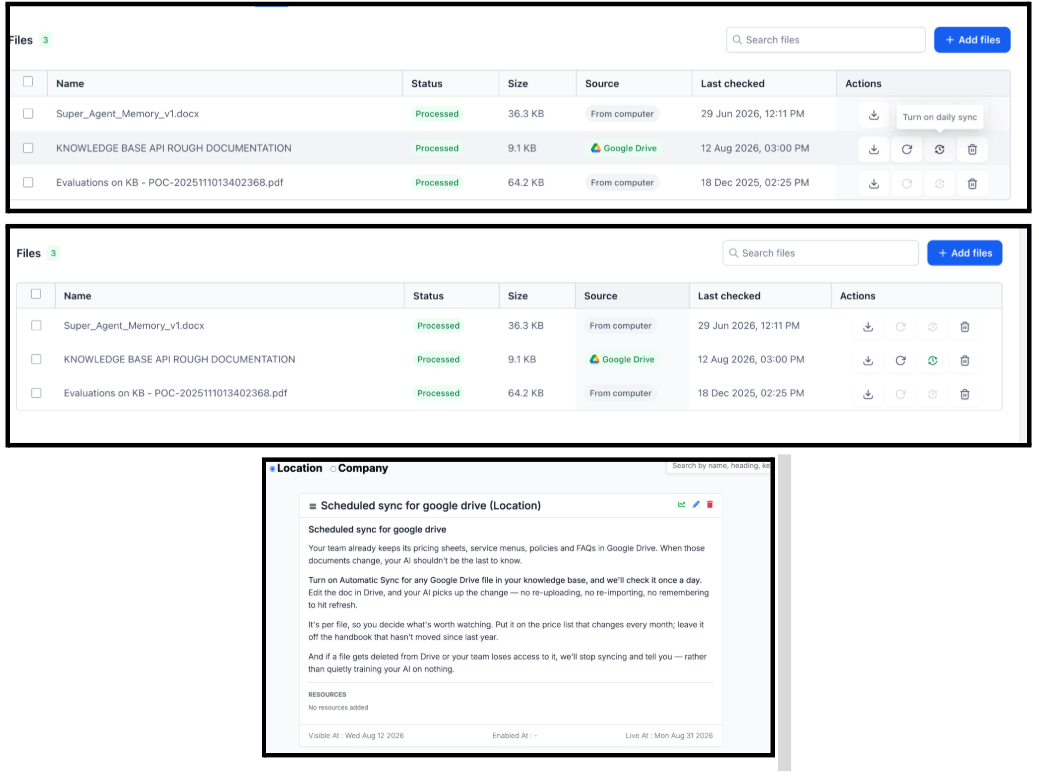
Google Drive–imported Knowledge Base files can now be set to sync automatically every 24 hours. If the source file hasn’t changed, it’s a lightweight metadata check with no re-downloading or re-embedding. If it has changed, the file resyncs automatically. Enable per-file from the Knowledge Base — only the files that need to stay current require the toggle.
Voice AI is now connected to Knowledge Base gap detection. Every question a voice agent couldn’t answer is captured, auto-grouped by topic and subtopic, and surfaced on the Knowledge Gaps page as a ranked to-do list. Fill the gap once and the agent answers it on the next call.
The Workflow AI Assistant now covers WhatsApp performance alongside Email and SMS. Ask about any WhatsApp step in plain language — total sends, delivered, failed, pending, delivery rate, read rate — and get the answer off live data. Ask for any time window and the assistant automatically compares it against the previous period.

The Update Contact Field action now includes an Add option for multi-dropdown and multiple-checkbox fields. Add values to existing selections without replacing them — so you can build on what’s already stored rather than overwriting it. The existing Update (replace) and Clear options remain unchanged.

Custom values inside workflow text fields now appear as visual chips, making it easy to distinguish dynamic content from static text. Type “/” in any supported text field to quickly search for and insert a custom value. Stale or unrecognized values appear in red so you can spot and fix them immediately. This is a visual UI change only — no impact on how values resolve when workflows run.

The custom value picker now recognizes list and array-type values — like order line items or inbound webhook arrays. Instead of inserting raw data, a small inline form lets you choose which field to extract and how to format it: comma-separated, bulleted, numbered, or with a custom separator. Preview before inserting.

Dashboard editors can now insert dynamic custom value tokens into widget conditions and dashboard elements — Embed URLs, Titles, and Text boxes. Tokens resolve automatically per sub-account when the dashboard is viewed. Build one dashboard and it adapts to every location viewing it, with no duplicate setup required.
Available tokens include Location fields (name, email, phone, address, city, state, etc.), User fields (name, email, role), and all Custom Values from your account.
Dashboard → Edit → widget Conditions tab or add an Element → click {} to browse and insert tokens.

Google Merchant Center is now available as a Marketplace app. Connect your E-Commerce Store, and eligible products sync automatically to Google Merchant Center for visibility across Google Shopping. Supported updates to product information, pricing, inventory, images, and variants continue syncing after setup.
Marketplace → install Google Merchant Center → connect Google account → select your Merchant Center account and store.
Google controls product review and approval after products are submitted. The integration syncs products but does not create or manage Google Ads campaigns.

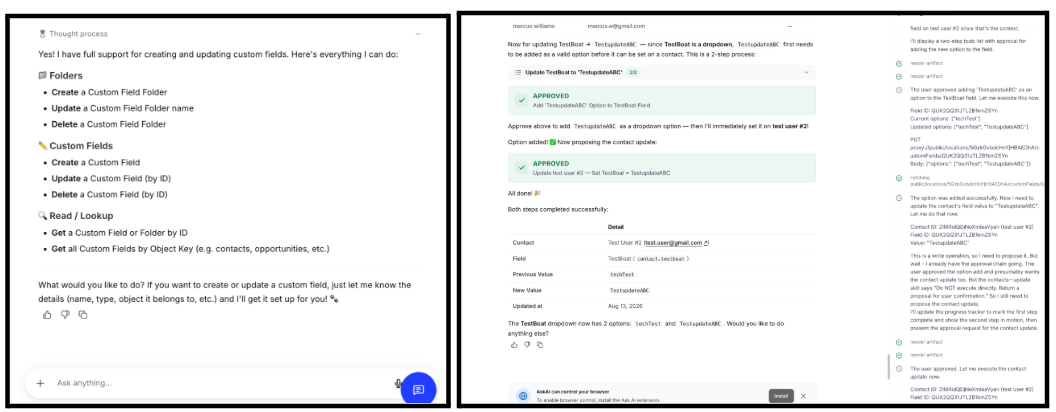
Ask AI can now create, update, and manage custom fields and custom objects using natural language. Refer to fields by name instead of ID (“Update Boat Size to Large”), work with contact and opportunity custom fields, manage custom object fields and folders, and handle common field types including dates, checkboxes, picklists, and text fields.
AI-generated images now render text more accurately and readably. Headlines, CTAs, labels, and other on-image text are clearer, multilingual and accented characters are handled better, and generated images are more faithful to the wording in your prompt. Works across the existing Generate and Edit image flows.
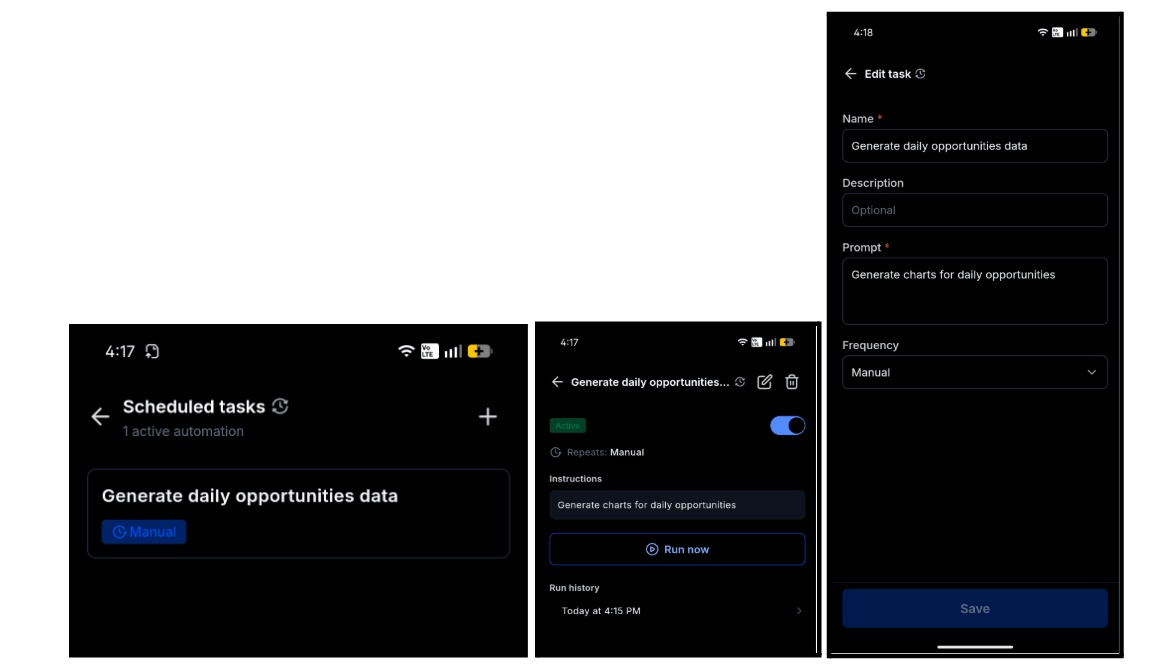
The Ask AI Scheduler is now available on mobile. Save a prompt once, pick a frequency — Manual, Hourly, Daily, Weekdays, or Weekly — and Ask AI runs it on schedule and delivers the finished conversation the next time you open the app. Create, edit, pause, resume, delete, and trigger tasks on demand. Every run is logged in history with status and a direct link to open the full session. Available on app version 4.20.0+.
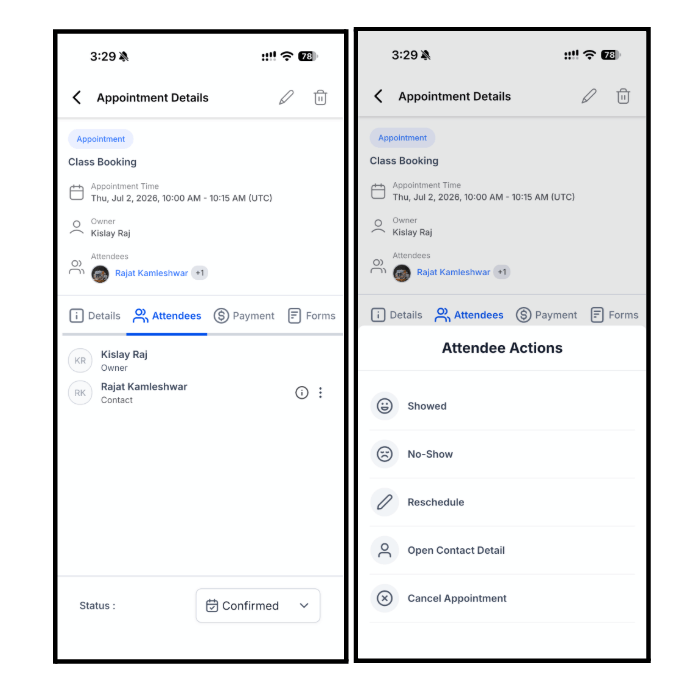
Per-attendee control for Class Bookings is now on mobile. Tap the three-dot menu next to any attendee in the Attendees tab to change their status (Confirmed, Showed, No Show, Cancelled), reschedule them, open their contact record, or cancel their booking — without touching the rest of the class. The calendar now shows each class as one tile with a live seat count (e.g. 2/5 Class Booking). Available on app version 4.20.0+.
Generating AI reply suggestions is now free — up to 4 per review. You’re only charged when you actually send a reply that uses the AI suggestion. Rewrite it substantially in your own words and it counts as a manual reply with no charge. The generate button shows a “(free)” indicator while tries remain, and your latest suggestion stays accessible even after the free tries are used up.
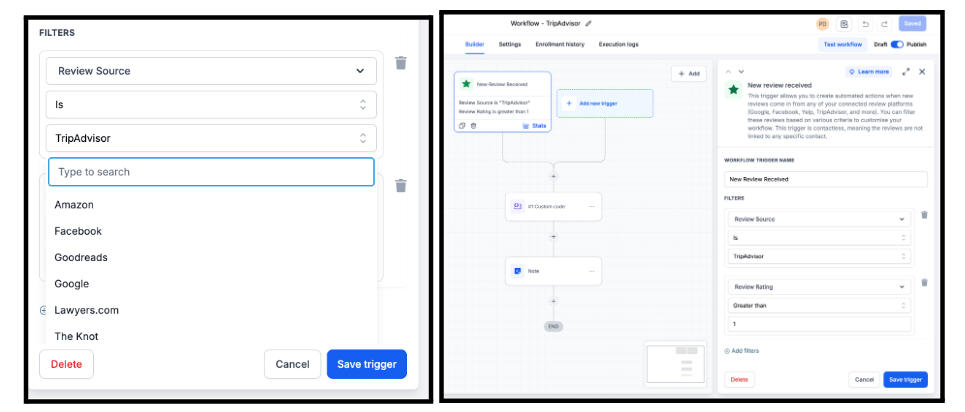
The New Review Received workflow trigger now supports every review platform integrated with your account — not just Google and Facebook. Trustpilot, Yelp, TripAdvisor, and any other connected platform can now trigger workflows automatically. Existing Google and Facebook triggers continue to work unchanged.
Events now supports Meta Pixel tracking. Add your Pixel ID from Event Settings and map attendee actions to Meta events across the full journey — page viewed, RSVP started, RSVP completed, checkout started, ticket selection, form submission, payment details, and ticket order completed. Completed ticket orders include order value, currency, quantity, and ticket identifiers for richer conversion data. Session-based deduplication prevents the same action from being reported multiple times.
Events → Settings → Link & tracking → Meta Pixel. Available for Events Beta users.

Media Storage search is now global. Results return matching files and folders from across your entire library — including nested subfolders — not just the current level. Hover a result to see the exact folder path, and use Open Containing Folder from the three-dot menu to jump straight there.
Clicking a contact’s name from the Opportunities or Appointments page now opens an overlay instead of navigating away. Choose single-column view (left contact panel plus conversations) or two-column view (expanded contact and conversation side by side). A separate icon lets you still go directly to the full contact details page if preferred. The overlay respects your contact page customizations.
Enable in Labs.
Tags can now be organized into categories and assigned colors. Group related tags into categories, move tags between categories (individually or in bulk), and assign custom colors from a predefined palette or color picker. Tags without a color default to gray. Existing tags appear in gray under “No Category” automatically — no reconfiguration needed.
Enable in Labs.
FGF Notifications